# Provider configuration
AI Gateway is part of [AI Governance](/beta-docs/@main/ai-coder/ai-governance/), which is included with a Premium license.
Providers are deployment-scoped and managed from the dashboard or the [AI Providers API](/beta-docs/@main/reference/api/aiproviders/).
See [Setup](/beta-docs/@main/ai-coder/ai-gateway/setup/#configure-providers) for the steps to add, edit, and disable a provider.
This page covers the provider types AI Gateway supports, the setup considerations for each, how a provider's lifecycle affects request handling, and how to monitor providers.
## Database management of providers [#database-management-of-providers]
Manage provider records through the dashboard at `https:///ai/settings/providers` or [AI Providers API](/beta-docs/@main/reference/api/aiproviders/).
Provider setup through environment variables, CLI flags, and YAML is no longer supported.
Leftover provider environment variables are ignored and no longer seed the database.
A removed provider CLI flag or YAML key prevents Coder from starting, with an `unknown flag` or `unknown option` error.
Files generated by `coder server --write-config` in older versions include these YAML keys by default, even if you never configured an AI provider.
Remove any of the following options from your deployment configuration, including empty or default-valued YAML entries.
The table shows AI Gateway names.
For AI Bridge aliases, replace `CODER_AI_GATEWAY_` with `CODER_AIBRIDGE_`, `--ai-gateway-` with `--aibridge-`, and the YAML group `ai_gateway` with `aibridge`.
| Option | Environment variable | CLI flag | YAML key under `ai_gateway` |
| ------------------------- | -------------------------------------------- | ---------------------------------------- | --------------------------- |
| Indexed providers | `CODER_AI_GATEWAY_PROVIDER__*` | None | None |
| OpenAI base URL | `CODER_AI_GATEWAY_OPENAI_BASE_URL` | `--ai-gateway-openai-base-url` | `openai_base_url` |
| OpenAI API key | `CODER_AI_GATEWAY_OPENAI_KEY` | `--ai-gateway-openai-key` | None |
| Anthropic base URL | `CODER_AI_GATEWAY_ANTHROPIC_BASE_URL` | `--ai-gateway-anthropic-base-url` | `anthropic_base_url` |
| Anthropic API key | `CODER_AI_GATEWAY_ANTHROPIC_KEY` | `--ai-gateway-anthropic-key` | None |
| Bedrock base URL | `CODER_AI_GATEWAY_BEDROCK_BASE_URL` | `--ai-gateway-bedrock-base-url` | `bedrock_base_url` |
| Bedrock region | `CODER_AI_GATEWAY_BEDROCK_REGION` | `--ai-gateway-bedrock-region` | `bedrock_region` |
| Bedrock access key | `CODER_AI_GATEWAY_BEDROCK_ACCESS_KEY` | `--ai-gateway-bedrock-access-key` | None |
| Bedrock secret access key | `CODER_AI_GATEWAY_BEDROCK_ACCESS_KEY_SECRET` | `--ai-gateway-bedrock-access-key-secret` | None |
| Bedrock model | `CODER_AI_GATEWAY_BEDROCK_MODEL` | `--ai-gateway-bedrock-model` | `bedrock_model` |
| Bedrock small fast model | `CODER_AI_GATEWAY_BEDROCK_SMALL_FAST_MODEL` | `--ai-gateway-bedrock-small-fastmodel` | `bedrock_small_fast_model` |
Credential options had no YAML equivalent, and indexed provider options were environment-only.
Providers already stored in the database remain available without these options.
Both the embedded gateway and a [standalone gateway](/beta-docs/@main/ai-coder/ai-gateway/standalone/) fetch provider configuration from Coder.
## Provider types [#provider-types]
AI Gateway speaks two upstream API formats: the **OpenAI** format (Chat Completions and Responses) and the **Anthropic** format (Messages).
Every provider type maps to one of these.
| Type | API format | Setup notes |
| --------------- | ---------- | ----------------------------------------------------------------- |
| `openai` | OpenAI | Native OpenAI, or any OpenAI-compatible endpoint via the base URL |
| `anthropic` | Anthropic | Native Anthropic, or an Anthropic-compatible broker |
| `bedrock` | Anthropic | Anthropic models hosted on AWS Bedrock; authenticates via AWS |
| `copilot` | OpenAI | GitHub Copilot; authenticates via each user's GitHub OAuth token |
| `azure` | OpenAI | OpenAI-compatible endpoint only |
| `google` | OpenAI | OpenAI-compatible endpoint only |
| `openrouter` | OpenAI | OpenAI-compatible endpoint only |
| `vercel` | OpenAI | OpenAI-compatible endpoint only |
| `openai-compat` | OpenAI | Generic OpenAI-compatible endpoint |
`azure`, `google`, `openrouter`, `vercel`, and `openai-compat` are supported only as OpenAI-compatible endpoints: AI Gateway sends them OpenAI-format requests, so each must expose an OpenAI-compatible API at its base URL.
They have no provider-specific integration beyond that.
### OpenAI [#openai]
Set the base URL to the upstream endpoint and provide an API key.
The default `https://api.openai.com/v1/` targets the native OpenAI service; point it at any OpenAI-compatible endpoint (for example, a hosted proxy or LiteLLM deployment) when needed.
If you create an [OpenAI key](https://platform.openai.com/api-keys) with minimal privileges, this is the minimum required set:
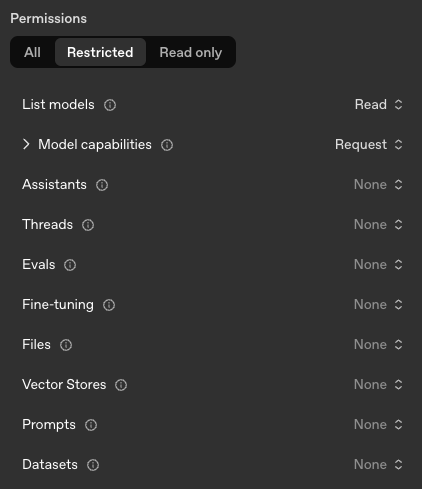
### Anthropic [#anthropic]
Set the base URL and provide an API key.
The default `https://api.anthropic.com/` targets Anthropic's public API; override it for Anthropic-compatible brokers.
Anthropic does not allow [API keys](https://console.anthropic.com/settings/keys) to have restricted permissions at the time of writing (June 2026).
#### Claude Platform for AWS [#claude-platform-for-aws]
Claude Platform for AWS is Anthropic's own Messages API hosted on AWS.
It is an authentication method on the `anthropic` provider type, not a separate provider type: requests and responses are the standard Anthropic format with standard Anthropic model IDs, and only routing and authentication differ.
It is distinct from [Amazon Bedrock](#amazon-bedrock), which is a separate provider type.
Every Claude Platform provider requires:
* A **region**, for example `us-east-1`.
It selects the default endpoint `https://aws-external-anthropic..api.aws` and, for IAM authentication, the signing scope.
Set it explicitly even when you override the endpoint, so requests routed through a proxy are still signed for the correct region.
* A **workspace ID**, sent as the `anthropic-workspace-id` header on every request.
AI Gateway sets the header from provider configuration and strips any value a client sends, so a client cannot choose which workspace its traffic is attributed to.
AI Gateway chooses authentication from the credentials available for each request:
1. When [Bring Your Own Key](#bring-your-own-key) is enabled, a client key takes precedence over stored provider keys and IAM signing.
2. Otherwise, AI Gateway uses the provider's stored API-key collection, with key pooling, rotation, masking, and [key failover](#key-failover).
3. When no client or stored provider key is available, AI Gateway signs the request with AWS SigV4 for the `aws-external-anthropic` service using its ambient AWS credentials.
Configure the AWS identity on the gateway process through the default AWS credential chain, such as an instance profile, container identity, or `AWS_PROFILE`.
Individual Claude Platform provider settings do not select an AWS identity or authentication mode.
Adding a stored key selects API-key authentication; removing the last stored key allows requests without a client key to use IAM.
A supplied key that fails authentication does not trigger a fallback to IAM.
A client sending an ordinary Anthropic key to a Claude Platform provider receives an upstream authentication error.
### Amazon Bedrock [#amazon-bedrock]
Bedrock providers serve Anthropic models hosted on AWS and authenticate with AWS credentials rather than a registered API key.
Configure:
* A **protocol**, either `InvokeModel` or `Mantle`.
It determines the endpoint format and which of the fields below apply.
See [InvokeModel](#invokemodel) and [Mantle](#mantle).
* An **endpoint** in the format the protocol requires: `https://bedrock-runtime..amazonaws.com` for InvokeModel or `https://bedrock-mantle..api.aws/anthropic` for Mantle.
The AWS region is read from the endpoint host.
* The **model** and **small fast model** identifiers, for InvokeModel only.
Mantle providers do not set them; the client chooses the model on each request and AI Gateway forwards it upstream.
#### InvokeModel [#invokemodel]
The legacy Bedrock runtime API.
AI Gateway translates each request into Bedrock's InvokeModel format and sends it to `https://bedrock-runtime..amazonaws.com`.
Still supported, but Mantle is recommended for new deployments.
#### Mantle [#mantle]
The newer Anthropic-compatible Bedrock endpoint, recommended by AWS for new deployments.
AI Gateway serves Anthropic models through the native Messages API, forwarding the request body **unchanged** and only applying AWS SigV4 signing with the provider's base identity.
To route Claude Code through a Mantle provider, run it in mantle mode with client-side signing disabled so the gateway signs centrally:
```sh
export CLAUDE_CODE_USE_MANTLE=1
export CLAUDE_CODE_SKIP_MANTLE_AUTH=1
export ANTHROPIC_BEDROCK_MANTLE_BASE_URL="${CODER_URL}/api/v2/ai-gateway/${PROVIDER_NAME}"
export ANTHROPIC_AUTH_TOKEN="${CODER_TOKEN}"
```
You can also validate that the provider works with `curl`:
```sh
curl "${CODER_URL}/api/v2/ai-gateway/${PROVIDER_NAME}/v1/messages" \
-H "Content-Type: application/json" \
-H "Authorization: Bearer ${CODER_TOKEN}" \
-H "Anthropic-Version: 2023-06-01" \
-d '{"model": "anthropic.claude-sonnet-5","max_tokens": 1024,"messages": [{"role": "user", "content": "Hello, Claude"}]}'
```
#### AWS credentials [#aws-credentials]
Do not attach API keys to a Bedrock provider.
The provider itself always authenticates with AWS credentials.
When [BYOK](/beta-docs/@main/ai-coder/ai-gateway/auth/#bring-your-own-key-byok) is enabled, a user can save a personal Amazon Bedrock API key under their [Agents API keys](/beta-docs/@main/ai-coder/agents/models/#user-api-keys-byok).
AI Gateway then sends that key as a bearer token for the user's requests instead of signing them with the deployment's AWS credentials.
Requests from users without a personal key continue to use the credentials below.
AI Gateway resolves AWS credentials one of three ways:
* **AWS SDK default credential chain (recommended).**
When no explicit credentials are configured, the AWS SDK resolves them automatically from the environment: IAM Roles (instance profiles, IRSA, ECS task roles), shared config files, environment variables, SSO, and more.
Attaching an IAM Role to the compute running Coder follows [AWS best practices](https://docs.aws.amazon.com/IAM/latest/UserGuide/best-practices.html) for temporary credentials.
The role must permit `bedrock:InvokeModel` and `bedrock:InvokeModelWithResponseStream` for the configured models.
* **Static credentials.**
Provide an access key and secret for an IAM user with the same Bedrock permissions.
* **Assumed IAM role.**
Set a **Role ARN** to have the gateway assume that role before calling Bedrock, signing requests with the resulting temporary credentials.
This works on top of either of the above base identities and supports cross-account Bedrock access.
See [IAM role assumption](#iam-role-assumption).
#### Static Bedrock credentials [#static-bedrock-credentials]
When you cannot use the default credential chain, create a dedicated IAM user and generate a static access key:
1. **Choose a region** where you want to use Bedrock.
2. **Generate API keys** in the [AWS Bedrock console](https://us-east-1.console.aws.amazon.com/bedrock/home?region=us-east-1#/api-keys/long-term/create) (replace `us-east-1` in the URL with your chosen region):
* Choose an expiry period for the key.
* Select **Generate**.
* This creates an IAM user with strictly-scoped permissions for Bedrock access.
3. **Create an access key** for the IAM user:
* After generating the API key, select **"You can directly modify permissions for the IAM user associated"**.
* In the IAM user page, navigate to the **Security credentials** tab.
* Under **Access keys**, select **Create access key**.
* Select **"Application running outside AWS"** as the use case.
* Select **Next**.
* Add a description like "Coder AI Gateway token".
* Select **Create access key**.
* Save both the access key ID and secret access key securely.
4. **Enter the access key ID and secret access key** when you add or edit the Bedrock provider from the dashboard or the [AI Providers API](/beta-docs/@main/reference/api/aiproviders/), along with the region (or base URL) and model identifiers.
#### IAM role assumption [#iam-role-assumption]
Set the optional **Role ARN** field to have the gateway assume an IAM role before calling Bedrock.
The base identity (static credentials or the default credential chain) signs an STS `AssumeRole` call, and the temporary credentials it returns sign Bedrock requests.
The field is optional: a provider with no Role ARN authenticates with its base identity directly, exactly as described above.
To use role assumption:
1. **Create the IAM role** in the target account and grant it `bedrock:InvokeModel` and `bedrock:InvokeModelWithResponseStream` for the configured models.
The base identity does not need Bedrock permissions itself; the assumed role does.
2. **Configure the role's trust policy** to allow the gateway's base identity to assume it.
3. **Enter the Role ARN** when you add or edit the Bedrock provider.
It must be a valid IAM role ARN, for example `arn:aws:iam::123456789012:role/BedrockRole`.
Each provider assumes a single role.
To use several roles, configure one provider per role.
#### External ID [#external-id]
When a Bedrock provider assumes a role, the gateway generates a unique **external ID** for it and sends that value on every `AssumeRole` call.
The external ID guards against the [confused deputy problem](https://docs.aws.amazon.com/IAM/latest/UserGuide/confused-deputy.html) on cross-account assumption.
The gateway generates and owns the value, as AWS [recommends](https://docs.aws.amazon.com/IAM/latest/UserGuide/id_roles_create_for-user_externalid.html): you cannot set or change it.
It is not a secret, and it is shown on the provider's edit page once a Role ARN is configured.
To enforce it, add the external ID to the target role's trust policy as an `sts:ExternalId` condition:
```json
{
"Effect": "Allow",
"Principal": { "AWS": "" },
"Action": "sts:AssumeRole",
"Condition": { "StringEquals": { "sts:ExternalId": "" } }
}
```
The gateway sends the external ID whether or not the trust policy checks it.
Until you add the `sts:ExternalId` condition, the value is sent but not enforced, and the role can still be assumed without it.
To rotate the external ID, recreate the provider.
#### Application inference profiles [#application-inference-profiles]
For InvokeModel, the **model** and **small fast model** identifiers can be [application inference profile](https://docs.aws.amazon.com/bedrock/latest/userguide/cost-mgmt-application-inference-profiles.html) ARNs, which attribute Bedrock spend to a team or workload through AWS cost allocation tags.
AI Gateway passes the profile upstream so AWS records the attribution, while internally resolving and using the underlying model identity, including for usage pricing.
Resolution requires a `GetInferenceProfile` call, so the AWS identity used by the gateway must have `bedrock:GetInferenceProfile` permission for the profile.
Providers configured with plain model identifiers do not need this permission.
If resolution fails, the provider is skipped.
### GitHub Copilot [#github-copilot]
GitHub Copilot offers three plans: Individual, Business, and Enterprise, each with its own API endpoint.
Add one `copilot` provider per plan your organization uses, setting the base URL accordingly:
| Plan | Base URL |
| ---------- | ------------------------------------------ |
| Individual | `https://api.individual.githubcopilot.com` |
| Business | `https://api.business.githubcopilot.com` |
| Enterprise | `https://api.enterprise.githubcopilot.com` |
Copilot providers authenticate with each user's request-time GitHub OAuth token, so do not attach API keys.
For client-side setup (proxy, certificates, IDE configuration), see [GitHub Copilot client configuration](/beta-docs/@main/ai-coder/ai-gateway/clients/copilot/).
### ChatGPT [#chatgpt]
ChatGPT subscriptions (Plus, Pro, Business) are supported through a provider of type `openai` with a specific name and base URL:
| Field | Value |
| -------- | --------------------------------------- |
| Type | `openai` |
| Name | `chatgpt` |
| Base URL | `https://chatgpt.com/backend-api/codex` |
The name must be exactly `chatgpt`.
It determines the route clients use to reach the provider: `/api/v2/ai-gateway/chatgpt/v1`.
If no provider with this name exists, requests to that route fail with `404 route not supported`.
Do not attach API keys.
ChatGPT providers authenticate with each user's ChatGPT OAuth token through [BYOK](/beta-docs/@main/ai-coder/ai-gateway/auth/#bring-your-own-key-byok), so BYOK must remain enabled.
For client-side setup, see the [Codex CLI ChatGPT subscription configuration](/beta-docs/@main/ai-coder/ai-gateway/clients/codex/#byok-chatgpt-subscription).
### OpenAI-compatible providers [#openai-compatible-providers]
Azure-hosted OpenAI, Google, OpenRouter, Vercel, and any other OpenAI-compatible service are configured with the matching type (or the generic `openai-compat`), the provider's OpenAI-compatible base URL, and an API key.
See the [Supported APIs](/beta-docs/@main/ai-coder/ai-gateway/reference/#supported-apis) section for precise endpoint coverage and interception behavior.
## Provider lifecycle [#provider-lifecycle]
Every provider carries an explicit status, reported by the [`provider_info`](/beta-docs/@main/ai-coder/ai-gateway/monitoring/#prometheus-metrics) metrics.
`coder_ai_gateway_provider_info` reports `enabled`, `disabled`, and `error`, and `coder_ai_gateway_proxy_provider_info` also reports `proxy_excluded`:
| Status | Meaning | Effect on requests |
| ---------------- | ------------------------------------------------------------------------------------------------------------------------------------------------------------------- | ------------------------------------------------------------------------------------------------------------------------------ |
| `enabled` | Configuration is valid and the provider is serving traffic | Requests are proxied to the upstream |
| `disabled` | The provider exists but has been turned off | Requests are rejected with a non-retryable error |
| `error` | The provider is enabled but cannot be built (missing credentials, bad config) | Requests fail; the error is surfaced in metrics |
| `proxy_excluded` | Another enabled provider already claims this hostname; the AI Gateway Proxy routes traffic to the first claimant (by database name sort order, `ORDER BY name ASC`) | Proxy-routed requests go to the first claimant; direct routing (`/api/v2/ai-gateway/{name}/...`) still works for this provider |
Disabling a provider does not delete it, its credentials, or its historical interception data.
Re-enabling restores it to service.
## Monitoring and reloads [#monitoring-and-reloads]
Provider configuration changes take effect automatically, without restarting `coderd`.
AI Gateway records the timestamp of each reload attempt and each successful reload, exposed as Prometheus metrics:
* `coder_ai_gateway_providers_last_reload_timestamp_seconds`
* `coder_ai_gateway_providers_last_reload_success_timestamp_seconds`
If you run the [external proxy](/beta-docs/@main/ai-coder/ai-gateway/ai-gateway-proxy/), it exposes the same pair under the `coder_ai_gateway_proxy_` prefix.
Each [standalone gateway](/beta-docs/@main/ai-coder/ai-gateway/standalone/) replica reloads providers independently and replaces only its own provider snapshot.
If a reload fails, that replica retains its previous provider snapshot and continues serving from it.
A growing gap between the attempt and success timestamps means reloads are firing but failing to apply.
Alert on that gap rather than on a single failure, which may resolve on the next change.
Refer to [Monitoring](/beta-docs/@main/ai-coder/ai-gateway/monitoring/#prometheus-metrics) for the full metric list and sample alert queries.
## Key failover [#key-failover]
You can configure multiple centralized API keys for a single provider instance so that AI Gateway automatically retries with the next key when one fails.
This is transparent to end users, and clients see no difference in behavior or need any configuration changes.
Key failover is supported for **OpenAI** and **Anthropic** providers.
Amazon Bedrock and GitHub Copilot do not support key failover.
Multiple keys can be added per provider through the [AI Providers API](/beta-docs/@main/reference/api/aiproviders/).
Each provider supports a maximum of **5 keys**.
### Failover behavior [#failover-behavior]
Every request starts with the first key in the list.
If a key is rate-limited (`429 Too Many Requests`) or fails authentication (`401 Unauthorized`), AI Gateway puts that key on a temporary cooldown and retries the request with the next available key.
Keys recover automatically when the cooldown elapses, so failover stays transparent to end users.
Any other response, including a `403 Forbidden`, is returned to the caller unchanged.
If all keys in the pool are exhausted, AI Gateway returns:
* `429 Too Many Requests` when at least one key is rate-limited, with a `Retry-After` header set to the shortest cooldown across all keys.
* `502 Bad Gateway` when every key is in an authentication-failure cooldown.
The keys still recover automatically once their cooldowns elapse, so no `Retry-After` is sent.
## Bring Your Own Key [#bring-your-own-key]
A provider's configured credentials are the centralized default.
When Bring Your Own Key (BYOK) is enabled, a user's own credential takes precedence over the provider's for that user's requests, and AI Gateway falls back to the provider credentials when the user has none.
See [Authentication](/beta-docs/@main/ai-coder/ai-gateway/auth/#bring-your-own-key-byok) for the BYOK flow and how to enable or disable it.
## Failure modes [#failure-modes]
| Symptom | Likely cause | Corrective action |
| --------------------------------------------- | ----------------------------------------------- | ------------------------------------- |
| Provider returns errors with no upstream call | The provider is `disabled` or in `error` status | Consult the `coderd` logs for details |
| Configuration changes not taking effect | Reloads are firing but failing to apply | Consult the `coderd` logs for details |