# Add a programming language to your template

Now that you've finished [Launch your first workspace](/beta-docs/get-started/), you can add another language toolchain to every workspace you create.

The Quickstart template installs a language only when the workspace owner selects it from the **Programming Languages** parameter.
In this guide, you add Ruby as an option.

<Callout type="info" title="Note">
  This guide assumes your Quickstart template is open for editing.
  If it's not, you can edit the template from the web by finding the template, selecting the three dots menu, and selecting **Edit files**.
  Refer to [Customize workspace startup](/beta-docs/get-started/customize-your-template/#open-the-template-for-editing) for more information.
</Callout>

## What you'll do [#what-youll-do]

* ✅ Add a Ruby option to the **Programming Languages** parameter.
* ✅ Publish the change and apply it to your running workspace.
* ✅ Install the Ruby toolchain so selecting Ruby works.

## Parameters in brief [#parameters-in-brief]

A parameter is a question Coder asks when someone creates a workspace.
Each parameter comes from a `coder_parameter` [data source](https://developer.hashicorp.com/terraform/language/data-sources) in the template.
The **Programming Languages** parameter is a multi-select list, and each language the reader can choose is an `option` block:

```tf
data "coder_parameter" "languages" {
  name         = "languages"
  display_name = "Programming Languages"
  description  = "Select the languages to pre-install in your workspace"
  type         = "list(string)"
  form_type    = "multi-select"
  default      = jsonencode(["python"])
  mutable      = true
  icon         = "/icon/code.svg"
  order        = 1

  option {
    name  = "Python"
    value = "python"
    icon  = "/icon/python.svg"
  }
  # ...more options
}
```

This produces the following dropdown parameter:

![Programming Language dropdown parameter from the Quickstart template](/beta-docs/images/screenshots/quickstart-language-param.png)*Programming Language dropdown parameter from the Quickstart template*

Adding an `option` adds a choice to that list.

<div className="fd-steps">
  <div className="fd-step">
    ## Add the Ruby option [#add-the-ruby-option]

    In `main.tf`, find the `data "coder_parameter" "languages"` block.
    Add a Ruby `option` after the last existing option, before the parameter's closing brace:

    ```tf
      option {
        name  = "Ruby"
        value = "ruby"
        icon  = "/icon/ruby.svg"
      }
    ```

    <Callout type="idea" title="Important">
      The `option` block must sit at the same indentation as the other `option` blocks inside the parameter.
      Coder reads the parameter's choices from these blocks, so a misplaced `option` doesn't appear in the form.
    </Callout>

    The `icon` value points at an icon bundled with your Coder deployment.
    To browse the full set and copy a path, open `https://<your-coder-url>/icons`.

    Now publish the change as a new template version:

    <Tabs items="[&#x22;UI&#x22;, &#x22;CLI&#x22;]" groupId="coder-docs-tab:cli-ui" persist="true">
      <Tab value="UI">
        In the web editor, make the edit above in `main.tf`.
        Select **Build**, wait for the build to pass, then select **Publish**.
      </Tab>

      <Tab value="CLI">
        Make the edit in `~/coder-quickstart/main.tf`, then publish a new version:

        ```sh
        coder templates push -d ~/coder-quickstart -y quickstart
        ```
      </Tab>
    </Tabs>
  </div>

  <div className="fd-step">
    ## Add Ruby to your workspace [#add-ruby-to-your-workspace]

    Your workspace from [Launch your first workspace](/beta-docs/get-started/) is still on the old template version.
    Update it to the version you just published, and add Ruby to its **Programming Languages** selection:

    <Tabs items="[&#x22;UI&#x22;, &#x22;CLI&#x22;]" groupId="coder-docs-tab:cli-ui" persist="true">
      <Tab value="UI">
        1. From your workspace, open **Workspace settings** (top right), then select **Parameters**.
        2. Add **Ruby** to the **Programming Languages** parameter.
        3. Apply the change. Coder updates the workspace to the new template version and restarts it with Ruby selected.
      </Tab>

      <Tab value="CLI">
        Update the workspace and re-select its parameters.
        Replace `<your-workspace>` with your workspace's name (run `coder list` to see it):

        ```sh
        coder update <your-workspace> --always-prompt
        ```

        When prompted for **Programming Languages**, add **Ruby**, then let the workspace rebuild.
      </Tab>
    </Tabs>

    Adding the Ruby option to the parameter shows the following:
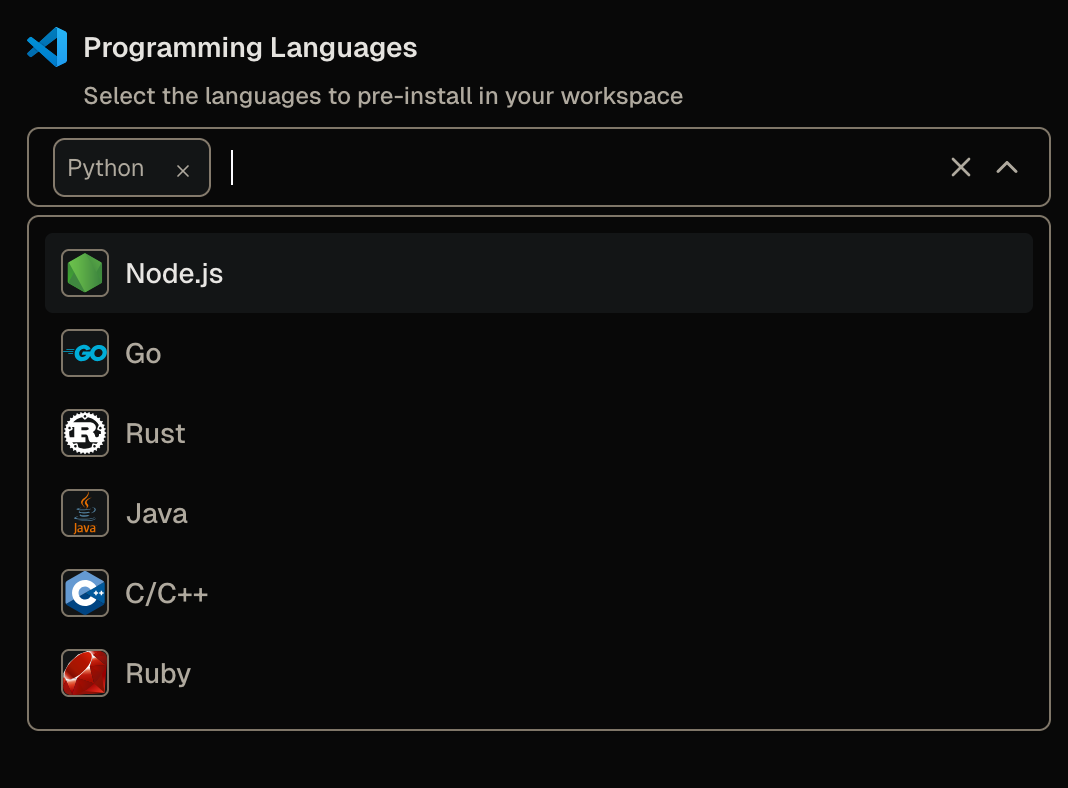
    ![Programming Language dropdown parameter from the Quickstart template with Ruby](/beta-docs/images/screenshots/quickstart-language-param-ruby.png)*Programming Language dropdown parameter from the Quickstart template with Ruby*
  </div>

  <div className="fd-step">
    ## Check whether Ruby is installed [#check-whether-ruby-is-installed]

    When the workspace restarts, open a terminal and ask for the Ruby version:

    ```sh
    ruby --version
    ```

    The command fails:

    ```txt
    ruby: command not found
    ```

    You added the option, selected it, and rebuilt the workspace, but Ruby isn't there.
    Adding the `option` only changed the form.
    It added Ruby to the list of choices, but nothing in the template acts on that choice yet.
    A separate startup script installs each selected toolchain, and you haven't taught it about Ruby.
  </div>

  <div className="fd-step">
    ## Install Ruby when the workspace starts [#install-ruby-when-the-workspace-starts]

    The template installs each selected language from `install-languages.sh.tftpl`, a startup script that runs when the workspace boots.
    Open that file and add a branch that installs Ruby when the reader selects it:

    ```sh
    if echo "$LANGUAGES" | grep -q "ruby"; then
      if command -v ruby >/dev/null 2>&1; then
        echo "Ruby: $(ruby --version | head -1)"
      else
        echo "Installing Ruby toolchain..."
        apt_update
        sudo apt-get install -y -qq ruby-full
        echo "Installed Ruby: $(ruby --version | head -1)"
      fi
    fi
    ```

    The script installs Ruby with `apt-get`, the package manager built into the workspace image.

    <Callout type="warn" title="Warning">
      Use the package manager the workspace image provides, not a personal one.
      If you replace the `apt-get` line with `brew install ruby`, the build fails: the `codercom/example-base:ubuntu` image doesn't include Homebrew, so the workspace logs `brew: command not found` and Ruby never installs.
      To install a personal tool like a Homebrew formula in your own workspace, refer to [Install your own command-line tools](/beta-docs/get-started/customize-your-template/install-command-line-tools/).
    </Callout>

    Publish the change, then update your workspace again:

    <Tabs items="[&#x22;UI&#x22;, &#x22;CLI&#x22;]" groupId="coder-docs-tab:cli-ui" persist="true">
      <Tab value="UI">
        1. In the web editor, make the edit above in `install-languages.sh.tftpl`.
        2. Select **Build**, wait for the build to pass, then select **Publish**.
        3. On your workspace's home tab, select **Update and restart**.
      </Tab>

      <Tab value="CLI">
        Make the edit in `~/coder-quickstart/install-languages.sh.tftpl`, then publish and update:

        ```sh
        coder templates push -d ~/coder-quickstart -y quickstart
        coder update <your-workspace>
        ```
      </Tab>
    </Tabs>

    Ruby is already selected, so you don't change parameters this time.
    When the workspace restarts, open a terminal and check again:

    ```sh
    ruby --version
    ```

    This time the workspace reports a Ruby version.
  </div>

  <div className="fd-step">
    ## Add a Ruby preset [#add-a-ruby-preset]

    Steps 1 through 4 make Ruby selectable as a parameter and install it at startup.
    The Quickstart template also ships presets: named bundles of parameter values that appear on the workspace creation form:
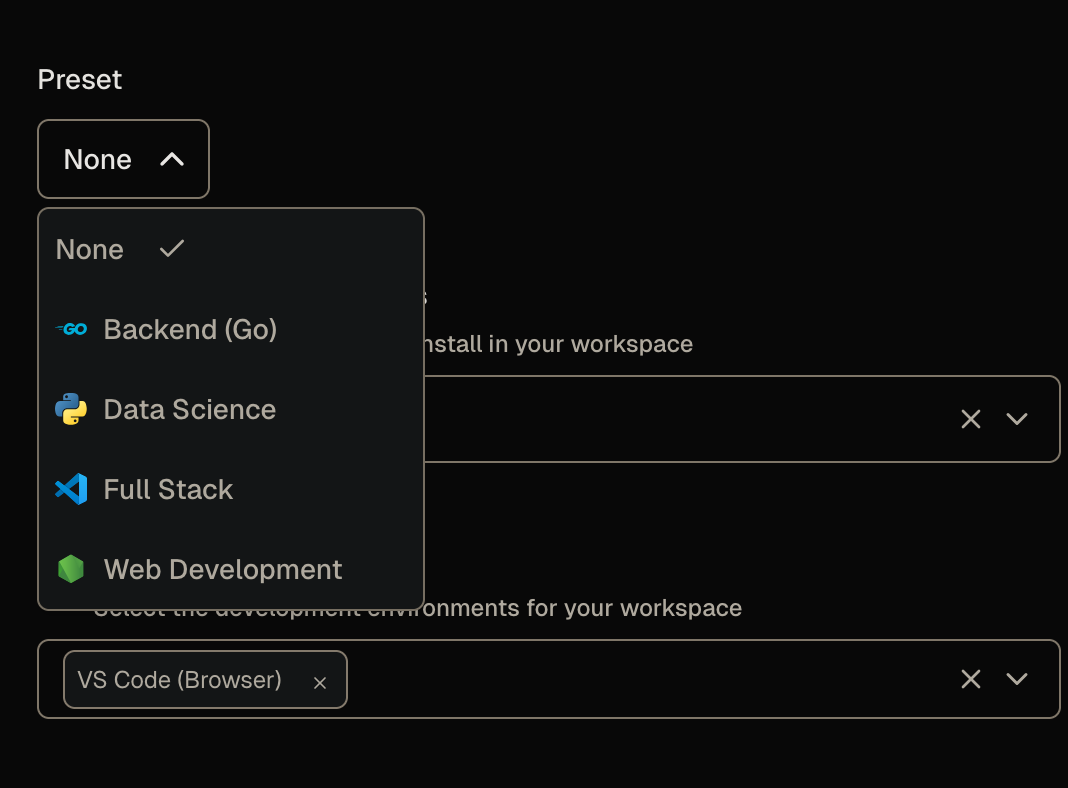
    ![Default presets with the Quickstart template](/beta-docs/images/screenshots/quickstart-default-presets.png)*Default presets with the Quickstart template*

    The shipped presets cover combinations like Go and Python, but none selects Ruby, so add one to keep the parameter and preset choices in sync.

    In `main.tf`, find the `# --- Presets ---` section and add a Ruby preset next to the existing ones:

    ```tf
    data "coder_workspace_preset" "ruby_dev" {
      name = "Ruby Development"
      icon = "/icon/ruby.svg"
      parameters = {
        languages      = jsonencode(["ruby"])
        ides           = jsonencode(["code-server", "jetbrains"])
        jetbrains_ides = jsonencode(["RM"])
        git_repo       = ""
      }
    }
    ```

    This preset adds JetBrains RubyMine as a default option for the language, but you can customize the preferred IDEs in this default based on your needs.

    Publish the template again.
    The next time you create a workspace, **Ruby Development** appears in the preset list and preselects Ruby:
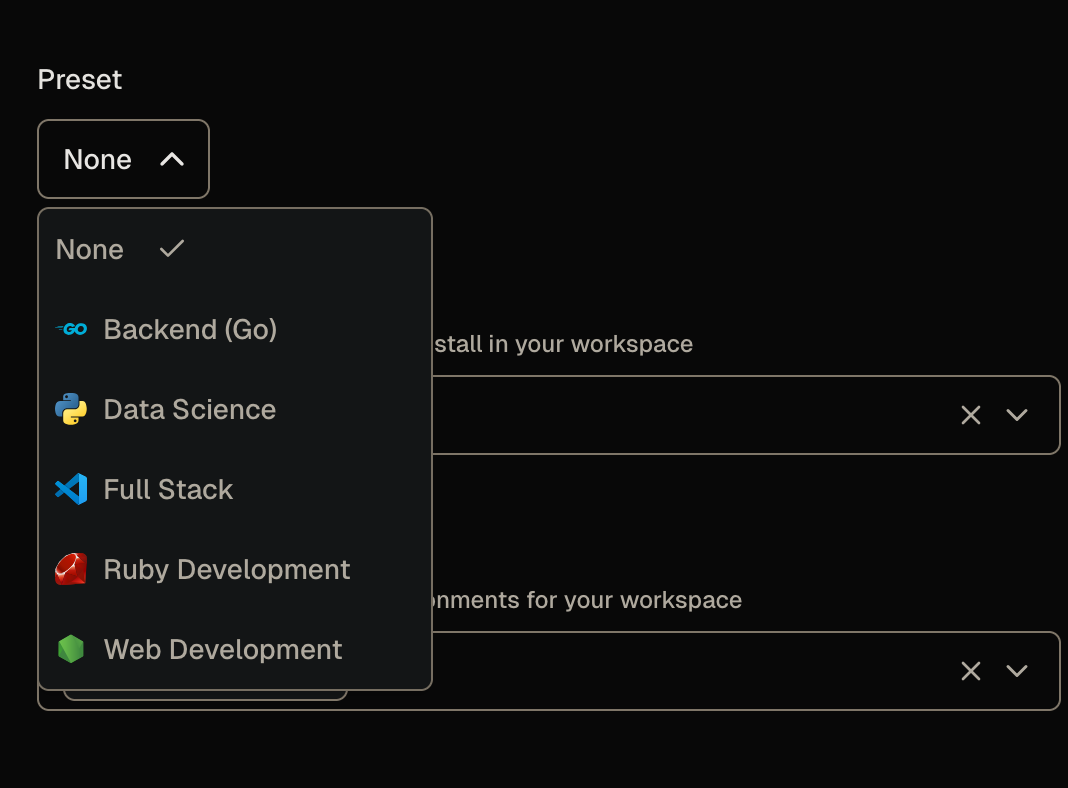
    ![Updated presets with the Quickstart template](/beta-docs/images/screenshots/quickstart-updated-presets.png)*Updated presets with the Quickstart template*

    Expanding the preset parameters after selecting **Ruby Development** shows the parameter values Coder will use to create the workspace:
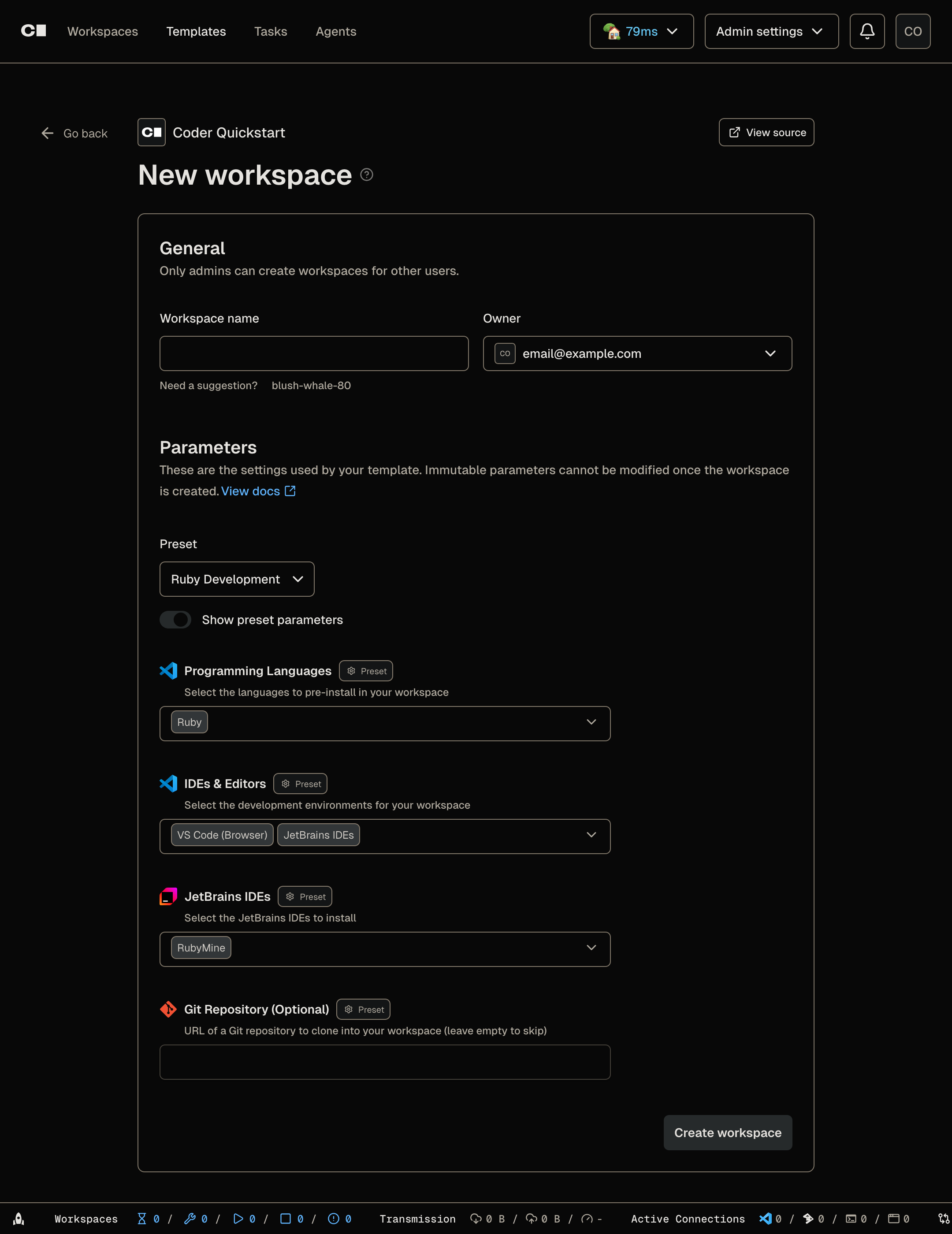
    ![Expanded parameter values for the Ruby Development preset](/beta-docs/images/screenshots/quickstart-ruby-preset.png)*Expanded parameter values for the Ruby Development preset*
  </div>
</div>

## What just happened [#what-just-happened]

You changed two different things to add one language:

* The `coder_parameter` `option` block added Ruby to the workspace creation form.
* The startup script installed the Ruby toolchain when a workspace owner selected Ruby.

A parameter collects a choice.
A startup script acts on it.
A new language needs both.

You also added support for a new preset, so workspace users can launch a workspace from this template quickly, without having to fill out the parameters manually.

<Accordions type="single">
  <Accordion title="How does Coder install the language you pick?">
    The selection travels through the template in four steps:

    1. The `option` block in `data "coder_parameter" "languages"` (`main.tf`) adds `ruby` to the values the form accepts.

    2. When the workspace builds, `local.languages` decodes the selection in `main.tf`:

       ```tf
       languages = jsondecode(data.coder_parameter.languages.value)
       ```

    3. `coder_script.install_languages` renders the startup script with that list and runs it on the agent (also in `main.tf`):

       ```tf
       script = templatefile("${path.module}/install-languages.sh.tftpl", {
         LANGUAGES = join(",", local.languages)
       })
       ```

    4. Inside the rendered script, the `ruby` branch matches and installs the toolchain:

       ```sh
       if echo "$LANGUAGES" | grep -q "ruby"; then
       ```

    The first three steps ran as soon as you added the option, which is why Ruby appeared in the form.
    Step 4 is the part you were missing in Step 3, so the script had nothing to do for `ruby`.
  </Accordion>
</Accordions>

<Accordions type="single">
  <Accordion title="Why a .tftpl file instead of a plain script?">
    The install script needs to know which languages the workspace owner selected, and only Terraform has that value when the workspace builds.
    `templatefile()` renders `install-languages.sh.tftpl` and replaces `${LANGUAGES}` with `join(",", local.languages)`, producing a finished script with the selection baked in.
    A static `.sh` file couldn't receive that value, so the `.tftpl` is the bridge between the parameter and the shell script.
  </Accordion>
</Accordions>

## Final code [#final-code]

<Accordions type="single">
  <Accordion title="The complete template files">
    Your template files after this guide's changes, starting from the Quickstart template:

    <Tabs items="[&#x22;main.tf&#x22;, &#x22;install-languages.sh.tftpl&#x22;]" groupId="coder-docs-tab:install-languages-sh-tftpl-main-tf" persist="true">
      <Tab value="main.tf">
        ```tf
        terraform {
          required_providers {
            coder = {
              source = "coder/coder"
            }
            docker = {
              source = "kreuzwerker/docker"
            }
            external = {
              source = "hashicorp/external"
            }
          }
        }

        variable "docker_socket" {
          default     = ""
          description = "(Optional) Docker socket URI"
          type        = string
        }

        provider "docker" {
          host = var.docker_socket != "" ? var.docker_socket : null
        }

        data "coder_provisioner" "me" {}
        data "coder_workspace" "me" {}
        data "coder_workspace_owner" "me" {}

        # --- Parameters ---

        data "coder_parameter" "languages" {
          name         = "languages"
          display_name = "Programming Languages"
          description  = "Select the languages to pre-install in your workspace"
          type         = "list(string)"
          form_type    = "multi-select"
          default      = jsonencode(["python"])
          mutable      = true
          icon         = "/icon/code.svg"
          order        = 1

          option {
            name  = "Python"
            value = "python"
            icon  = "/icon/python.svg"
          }
          option {
            name  = "Node.js"
            value = "nodejs"
            icon  = "/icon/nodejs.svg"
          }
          option {
            name  = "Go"
            value = "go"
            icon  = "/icon/go.svg"
          }
          option {
            name  = "Rust"
            value = "rust"
            icon  = "/icon/rust.svg"
          }
          option {
            name  = "Java"
            value = "java"
            icon  = "/icon/java.svg"
          }
          option {
            name  = "C/C++"
            value = "cpp"
            icon  = "/icon/cpp.svg"
          }
          option {
            name  = "Ruby"
            value = "ruby"
            icon  = "/icon/ruby.svg"
          }
        }

        data "coder_parameter" "ides" {
          name         = "ides"
          display_name = "IDEs & Editors"
          description  = "Select the development environments for your workspace"
          type         = "list(string)"
          form_type    = "multi-select"
          default      = jsonencode(["code-server"])
          mutable      = true
          icon         = "/icon/code.svg"
          order        = 2

          option {
            name  = "VS Code (Browser)"
            value = "code-server"
            icon  = "/icon/code.svg"
          }
          option {
            name  = "Cursor"
            value = "cursor"
            icon  = "/icon/cursor.svg"
          }
          option {
            name  = "JetBrains IDEs"
            value = "jetbrains"
            icon  = "/icon/jetbrains.svg"
          }
          option {
            name  = "Zed"
            value = "zed"
            icon  = "/icon/zed.svg"
          }
          option {
            name  = "Devin Desktop"
            value = "devin-desktop"
            icon  = "/icon/devin.svg"
          }
        }

        # Shown only when "JetBrains IDEs" is selected in the IDEs parameter.
        # Pre-selects IDEs that match the chosen languages.
        data "coder_parameter" "jetbrains_ides" {
          count        = contains(local.ides, "jetbrains") ? 1 : 0
          name         = "jetbrains_ides"
          display_name = "JetBrains IDEs"
          description  = "Select the JetBrains IDEs to install"
          type         = "list(string)"
          form_type    = "multi-select"
          default      = jsonencode(local.jetbrains_ides_from_languages)
          mutable      = true
          icon         = "/icon/jetbrains.svg"
          order        = 3

          option {
            name  = "IntelliJ IDEA"
            value = "IU"
            icon  = "/icon/intellij.svg"
          }
          option {
            name  = "PyCharm"
            value = "PY"
            icon  = "/icon/pycharm.svg"
          }
          option {
            name  = "GoLand"
            value = "GO"
            icon  = "/icon/goland.svg"
          }
          option {
            name  = "WebStorm"
            value = "WS"
            icon  = "/icon/webstorm.svg"
          }
          option {
            name  = "RustRover"
            value = "RR"
            icon  = "/icon/rustrover.svg"
          }
          option {
            name  = "CLion"
            value = "CL"
            icon  = "/icon/clion.svg"
          }
          option {
            name  = "PhpStorm"
            value = "PS"
            icon  = "/icon/phpstorm.svg"
          }
          option {
            name  = "RubyMine"
            value = "RM"
            icon  = "/icon/rubymine.svg"
          }
          option {
            name  = "Rider"
            value = "RD"
            icon  = "/icon/rider.svg"
          }
        }

        data "coder_parameter" "git_repo" {
          name         = "git_repo"
          display_name = "Git Repository (Optional)"
          description  = "URL of a Git repository to clone into your workspace (leave empty to skip)"
          type         = "string"
          default      = ""
          mutable      = true
          icon         = "/icon/git.svg"
          order        = 4
        }

        # --- Locals ---

        locals {
          username  = data.coder_workspace_owner.me.name
          languages = jsondecode(data.coder_parameter.languages.value)
          ides      = jsondecode(data.coder_parameter.ides.value)

          # Map selected languages to the relevant JetBrains IDE product codes.
          # Used as the default for the JetBrains IDE selector parameter.
          jetbrains_by_language = {
            python = ["PY"]
            go     = ["GO"]
            java   = ["IU"]
            nodejs = ["WS"]
            rust   = ["RR"]
            cpp    = ["CL"]
          }
          jetbrains_ides_from_languages = distinct(flatten([
            for lang in local.languages : lookup(local.jetbrains_by_language, lang, [])
          ]))

          # The actual JetBrains IDEs to install, from the user's selection
          # in the conditional JetBrains parameter (or empty if not shown).
          jetbrains_selected = contains(local.ides, "jetbrains") ? jsondecode(data.coder_parameter.jetbrains_ides[0].value) : []
        }

        # --- Agent ---

        resource "coder_agent" "main" {
          arch           = data.coder_provisioner.me.arch
          os             = "linux"
          startup_script = <<-EOT
            set -e
            if [ ! -f ~/.init_done ]; then
              cp -rT /etc/skel ~
              touch ~/.init_done
            fi
          EOT

          env = {
            GIT_AUTHOR_NAME     = coalesce(data.coder_workspace_owner.me.full_name, data.coder_workspace_owner.me.name)
            GIT_AUTHOR_EMAIL    = "${data.coder_workspace_owner.me.email}"
            GIT_COMMITTER_NAME  = coalesce(data.coder_workspace_owner.me.full_name, data.coder_workspace_owner.me.name)
            GIT_COMMITTER_EMAIL = "${data.coder_workspace_owner.me.email}"
          }

          metadata {
            display_name = "CPU Usage"
            key          = "0_cpu_usage"
            script       = "coder stat cpu"
            interval     = 10
            timeout      = 1
          }

          metadata {
            display_name = "RAM Usage"
            key          = "1_ram_usage"
            script       = "coder stat mem"
            interval     = 10
            timeout      = 1
          }

          metadata {
            display_name = "Home Disk"
            key          = "3_home_disk"
            script       = "coder stat disk --path $${HOME}"
            interval     = 60
            timeout      = 1
          }
        }

        # --- Language installation ---
        # All languages install in a single script to avoid apt-get lock
        # conflicts (coder_script resources run in parallel).

        resource "coder_script" "install_languages" {
          count              = length(local.languages) > 0 ? 1 : 0
          agent_id           = coder_agent.main.id
          display_name       = "Install Languages"
          icon               = "/icon/code.svg"
          run_on_start       = true
          start_blocks_login = true
          script = templatefile("${path.module}/install-languages.sh.tftpl", {
            LANGUAGES = join(",", local.languages)
          })
        }

        # --- IDE modules ---

        module "code-server" {
          count    = data.coder_workspace.me.start_count * (contains(local.ides, "code-server") ? 1 : 0)
          source   = "registry.coder.com/coder/code-server/coder"
          version  = "~> 1.0"
          agent_id = coder_agent.main.id
          order    = 1
        }

        module "cursor" {
          count    = data.coder_workspace.me.start_count * (contains(local.ides, "cursor") ? 1 : 0)
          source   = "registry.coder.com/coder/cursor/coder"
          version  = "~> 1.0"
          agent_id = coder_agent.main.id
          folder   = "/home/coder"
          order    = 3
        }

        # TODO: Re-add the coder/jetbrains module once Coder's dynamic
        # parameter system respects module count for parameter visibility.
        # The module's internal coder_parameter appears even when count = 0,
        # creating a ghost parameter in the workspace creation form.
        # module "jetbrains" {
        #   count    = data.coder_workspace.me.start_count * (contains(local.ides, "jetbrains") && length(local.jetbrains_selected) > 0 ? 1 : 0)
        #   source   = "registry.coder.com/coder/jetbrains/coder"
        #   version  = "~> 1.0"
        #   agent_id = coder_agent.main.id
        #   folder   = "/home/coder"
        #   default  = toset(local.jetbrains_selected)
        # }

        module "zed" {
          count    = data.coder_workspace.me.start_count * (contains(local.ides, "zed") ? 1 : 0)
          source   = "registry.coder.com/coder/zed/coder"
          version  = "~> 1.0"
          agent_id = coder_agent.main.id
          folder   = "/home/coder"
          order    = 5
        }

        module "devin-desktop" {
          count    = data.coder_workspace.me.start_count * (contains(local.ides, "devin-desktop") ? 1 : 0)
          source   = "registry.coder.com/coder/devin-desktop/coder"
          version  = "~> 1.0"
          agent_id = coder_agent.main.id
          folder   = "/home/coder"
          order    = 6
        }

        # --- Git clone ---

        module "git-clone" {
          count    = data.coder_workspace.me.start_count * (data.coder_parameter.git_repo.value != "" ? 1 : 0)
          source   = "registry.coder.com/coder/git-clone/coder"
          version  = "~> 2.0"
          agent_id = coder_agent.main.id
          url      = data.coder_parameter.git_repo.value
        }

        # --- Presets ---

        data "coder_workspace_preset" "web_dev" {
          name = "Web Development"
          icon = "/icon/nodejs.svg"
          parameters = {
            languages = jsonencode(["python", "nodejs"])
            ides      = jsonencode(["code-server"])
            git_repo  = ""
          }
        }

        data "coder_workspace_preset" "backend_go" {
          name = "Backend (Go)"
          icon = "/icon/go.svg"
          parameters = {
            languages      = jsonencode(["go"])
            ides           = jsonencode(["code-server", "jetbrains"])
            jetbrains_ides = jsonencode(["GO"])
            git_repo       = ""
          }
        }

        data "coder_workspace_preset" "data_science" {
          name = "Data Science"
          icon = "/icon/python.svg"
          parameters = {
            languages = jsonencode(["python"])
            ides      = jsonencode(["code-server"])
            git_repo  = ""
          }
        }

        data "coder_workspace_preset" "full_stack" {
          name = "Full Stack"
          icon = "/icon/code.svg"
          parameters = {
            languages = jsonencode(["python", "nodejs", "go"])
            ides      = jsonencode(["code-server", "cursor"])
            git_repo  = ""
          }
        }

        data "coder_workspace_preset" "ruby_dev" {
          name = "Ruby Development"
          icon = "/icon/ruby.svg"
          parameters = {
            languages      = jsonencode(["ruby"])
            ides           = jsonencode(["code-server", "jetbrains"])
            jetbrains_ides = jsonencode(["RM"])
            git_repo       = ""
          }
        }

        # --- Docker resources ---

        resource "docker_volume" "home_volume" {
          name = "coder-${data.coder_workspace.me.id}-home"
          lifecycle {
            ignore_changes = all
          }
          labels {
            label = "coder.owner"
            value = data.coder_workspace_owner.me.name
          }
          labels {
            label = "coder.owner_id"
            value = data.coder_workspace_owner.me.id
          }
          labels {
            label = "coder.workspace_id"
            value = data.coder_workspace.me.id
          }
          labels {
            label = "coder.workspace_name_at_creation"
            value = data.coder_workspace.me.name
          }
          depends_on = []
        }

        resource "docker_container" "workspace" {
          count    = data.coder_workspace.me.start_count
          image    = "codercom/example-base:ubuntu"
          name     = "coder-${data.coder_workspace_owner.me.name}-${lower(data.coder_workspace.me.name)}"
          hostname = data.coder_workspace.me.name
          entrypoint = [
            "sh", "-c",
            replace(coder_agent.main.init_script, "/localhost|127\\.0\\.0\\.1/", "host.docker.internal"),
          ]
          env = ["CODER_AGENT_TOKEN=${coder_agent.main.token}"]
          host {
            host = "host.docker.internal"
            ip   = "host-gateway"
          }
          volumes {
            container_path = "/home/coder"
            volume_name    = docker_volume.home_volume.name
            read_only      = false
          }
          labels {
            label = "coder.owner"
            value = data.coder_workspace_owner.me.name
          }
          labels {
            label = "coder.owner_id"
            value = data.coder_workspace_owner.me.id
          }
          labels {
            label = "coder.workspace_id"
            value = data.coder_workspace.me.id
          }
          labels {
            label = "coder.workspace_name"
            value = data.coder_workspace.me.name
          }
          depends_on = []
        }
        ```
      </Tab>

      <Tab value="install-languages.sh.tftpl">
        ```sh
        #!/bin/bash
        set -e

        LANGUAGES="${LANGUAGES}"
        APT_UPDATED=false

        apt_update() {
          if [ "$APT_UPDATED" = "false" ]; then
            sudo apt-get update -qq
            APT_UPDATED=true
          fi
        }

        if echo "$LANGUAGES" | grep -q "python"; then
          if command -v python3 >/dev/null 2>&1; then
            echo "Python: $(python3 --version)"
          else
            echo "Installing Python..."
            apt_update
            sudo apt-get install -y -qq python3 python3-pip python3-venv
            echo "Installed Python: $(python3 --version)"
          fi
        fi

        if echo "$LANGUAGES" | grep -q "nodejs"; then
          if command -v node >/dev/null 2>&1; then
            echo "Node.js: $(node --version)"
          else
            echo "Installing Node.js 22..."
            curl -fsSL https://deb.nodesource.com/setup_22.x | sudo -E bash -
            sudo apt-get install -y -qq nodejs
            echo "Installed Node.js: $(node --version)"
          fi
        fi

        if echo "$LANGUAGES" | grep -q "go"; then
          if command -v /usr/local/go/bin/go >/dev/null 2>&1; then
            echo "Go: $(/usr/local/go/bin/go version)"
          else
            echo "Installing Go..."
            ARCH=$(uname -m)
            case $ARCH in
              x86_64)  GOARCH="amd64" ;;
              aarch64) GOARCH="arm64" ;;
              *)       echo "Unsupported architecture: $ARCH"; exit 1 ;;
            esac
            GO_VERSION=$(curl -fsSL "https://go.dev/VERSION?m=text" | head -1)
            curl -fsSL "https://go.dev/dl/$${GO_VERSION}.linux-$${GOARCH}.tar.gz" | sudo tar -C /usr/local -xz
            echo 'export PATH=$PATH:/usr/local/go/bin:$HOME/go/bin' | sudo tee /etc/profile.d/go.sh >/dev/null
            echo "Installed Go: $(/usr/local/go/bin/go version)"
          fi
        fi

        if echo "$LANGUAGES" | grep -q "rust"; then
          if command -v rustc >/dev/null 2>&1 || [ -f "$HOME/.cargo/bin/rustc" ]; then
            RUSTC=$${HOME}/.cargo/bin/rustc
            command -v rustc >/dev/null 2>&1 && RUSTC=rustc
            echo "Rust: $($RUSTC --version)"
          else
            echo "Installing Rust..."
            curl --proto '=https' --tlsv1.2 -sSf https://sh.rustup.rs | sh -s -- -y
            echo "Installed Rust: $($HOME/.cargo/bin/rustc --version)"
          fi
        fi

        if echo "$LANGUAGES" | grep -q "java"; then
          if command -v java >/dev/null 2>&1; then
            echo "Java: $(java --version 2>&1 | head -1)"
          else
            echo "Installing Java (OpenJDK 21)..."
            apt_update
            sudo apt-get install -y -qq openjdk-21-jdk
            echo "Installed Java: $(java --version 2>&1 | head -1)"
          fi
        fi

        if echo "$LANGUAGES" | grep -q "cpp"; then
          if command -v gcc >/dev/null 2>&1; then
            echo "C/C++: $(gcc --version | head -1)"
          else
            echo "Installing C/C++ toolchain..."
            apt_update
            sudo apt-get install -y -qq gcc g++ make cmake
            echo "Installed C/C++: $(gcc --version | head -1)"
          fi
        fi

        if echo "$LANGUAGES" | grep -q "ruby"; then
          if command -v ruby >/dev/null 2>&1; then
            echo "Ruby: $(ruby --version | head -1)"
          else
            echo "Installing Ruby toolchain..."
            apt_update
            sudo apt-get install -y -qq ruby-full
            echo "Installed Ruby: $(ruby --version | head -1)"
          fi
        fi

        echo "Language setup complete."
        ```
      </Tab>
    </Tabs>
  </Accordion>
</Accordions>

## What's next? [#whats-next]

Now that you added a language, you can [install your own command-line tools](/beta-docs/get-started/customize-your-template/install-command-line-tools/).

## Learn more [#learn-more]

* [Parameters](/beta-docs/admin/templates/extending-templates/parameters/) in the Coder documentation
* [Terraform data sources](https://developer.hashicorp.com/terraform/language/data-sources)
* [Terraform types](https://developer.hashicorp.com/terraform/language/expressions/types) for parameter values
