# Zed
[Zed](https://zed.dev/) is an [open-source](https://github.com/zed-industries/zed)
multiplayer code editor from the creators of Atom and Tree-sitter.
## Use Zed to connect to Coder via SSH [#use-zed-to-connect-to-coder-via-ssh]
Use the Coder CLI to log in and configure SSH, then connect to your workspace with Zed:
1. [Install Zed](https://zed.dev/docs/)
2. Install Coder CLI:
Our install script is the fastest way to install Coder on Linux/macOS:
```sh
curl -L https://coder.com/install.sh | sh
```
Refer to [GitHub releases](https://github.com/coder/coder/releases) for
alternate installation methods (e.g. standalone binaries, system packages).
Our install script is the fastest way to install Coder on Linux/macOS:
```sh
curl -L https://coder.com/install.sh | sh
```
Refer to [GitHub releases](https://github.com/coder/coder/releases) for
alternate installation methods (e.g. standalone binaries, system packages).
Use [GitHub releases](https://github.com/coder/coder/releases) to download the
Windows installer (`.msi`) or standalone binary (`.exe`).

Alternatively, you can use the
[`winget`](https://learn.microsoft.com/en-us/windows/package-manager/winget/#use-winget)
package manager to install Coder:
```ps1
winget install Coder.Coder
```
Consult the [Coder CLI documentation](/beta-docs/install/cli/) for more options.
3. Log in to your Coder deployment and authenticate when prompted:
```sh
coder login coder.example.com
```
4. Configure Coder SSH:
```sh
coder config-ssh
```
5. Connect to the workspace via SSH:
```sh
zed ssh://coder.workspace-name
```
Or use Zed's [Remote Development](https://zed.dev/docs/remote-development#setup) to connect to the workspace:
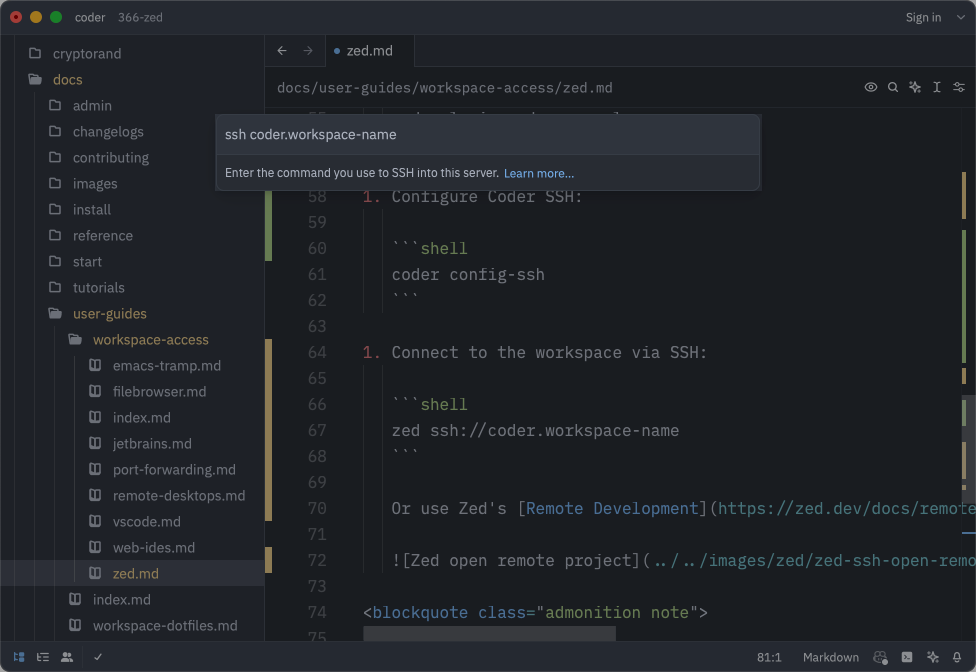
If you have any suggestions or experience any issues, please
[create a GitHub issue](https://github.com/coder/coder/issues) or share in
[our Discord channel](https://discord.gg/coder).