# Claude Desktop
[Claude Desktop](https://claude.com/download) is Anthropic's desktop app for Claude.
Claude Desktop can list your running Coder workspaces, so you can connect to them from the app.
This integration is implemented by Claude Desktop, not by Coder.
Anthropic's documentation doesn't currently describe it, and the behavior can change between Claude Desktop versions.
## Prerequisites
* [Claude Desktop](https://claude.com/download) installed on your local machine.
* The [Coder CLI](/docs/@main/workspaces/workspace-access/#install-the-cli) installed and on your `PATH`.
* The Coder CLI authenticated with your deployment:
```sh
coder login
```
* At least one running workspace.
## Set up Claude Desktop
1. Install the Coder CLI and confirm `coder version` works in your terminal.
2. Authenticate the CLI with your deployment:
```sh
coder login
```
3. Restart Claude Desktop.
Your running workspaces appear in Claude Desktop.
## Show workspace status in Claude Code
The `coder-workspace-status` plugin shows the status of the workspace Claude Code runs in, right above the prompt.
The status covers health, startup scripts, autostop, repositories, and ports opened during the session.
Run `/coder-workspace-status` for a card with links to the dashboard, a browser terminal, and the workspace's apps.
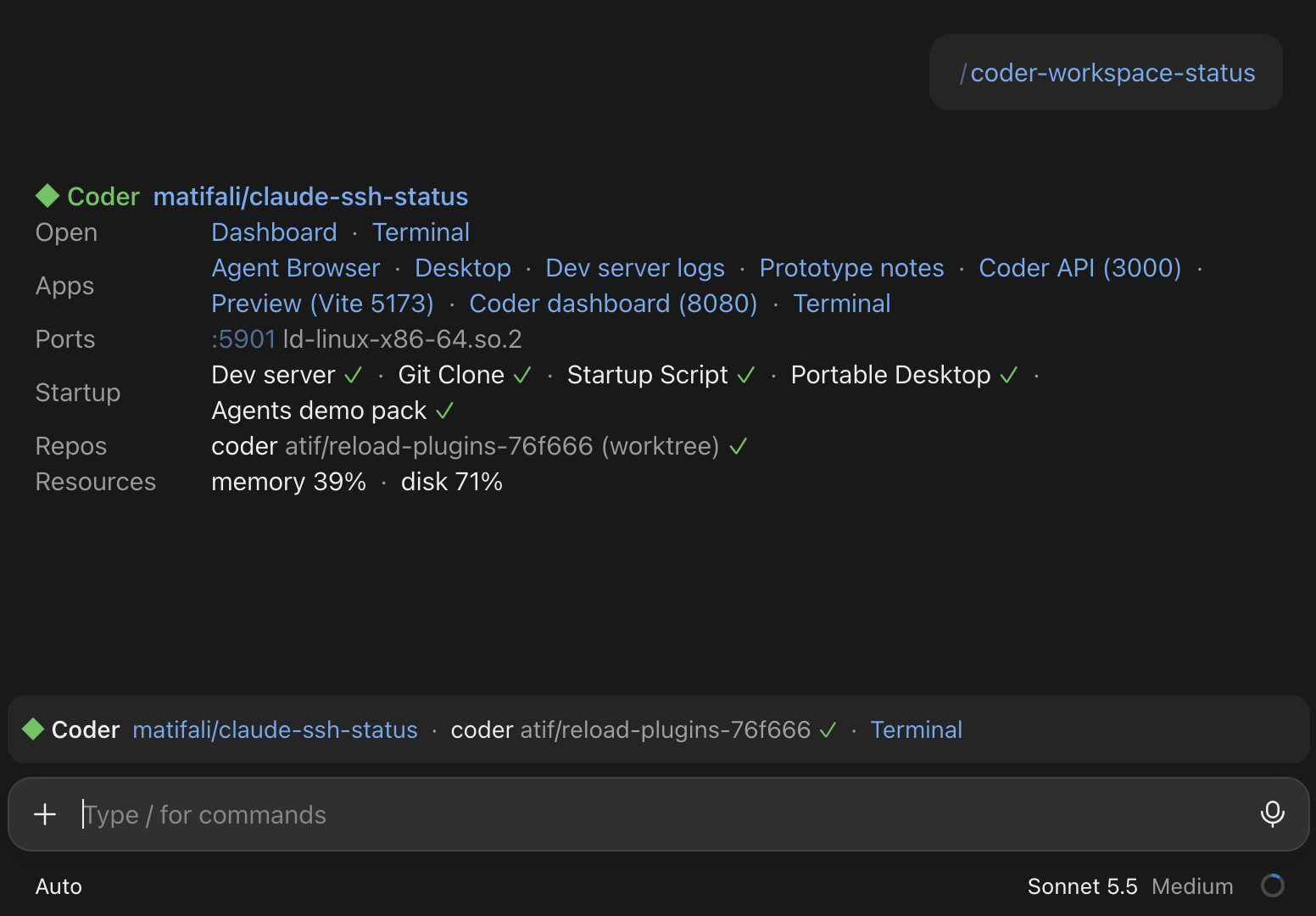
The status line above the prompt, and the card that `/coder-workspace-status` draws.
The plugin works with Claude Code only, version 2.1.287 or later.
Install it in the workspace, where Claude Code runs:
```sh
claude plugin marketplace add coder/skills
claude plugin install coder-workspace-status@coder-skills
```
Then start a new session, or run `/reload-plugins` in the current one.
To install the plugin in every workspace a template creates, run the same two commands from a [`coder_script`](https://registry.terraform.io/providers/coder/coder/latest/docs/resources/script) that runs after Claude Code is installed.
Visit the [plugin's README](https://github.com/coder/skills/tree/main/plugins/coder-workspace-status) for everything it shows and the data it reads.
## Troubleshooting
If your workspaces don't appear in Claude Desktop, check the following:
1. The Coder CLI is installed and on your `PATH`.
Run `coder version`.
2. You're logged in.
Run `coder login ` if needed.
3. The workspace is running.
## Next steps
Claude Desktop connects to workspaces you already have.
To explore other ways to use Claude with Coder:
* [Agent Relay for Claude Code](/docs/@main/agent-relay/claude-code/): run Claude Code's cloud sessions inside self-hosted Coder workspaces.
Unlike the Claude Desktop integration, Agent Relay orchestrates the workspaces itself.
It creates a workspace from a template for each session and deletes it when the session ends, instead of using your existing workspaces.
Visit the [Agent Relay overview](/docs/@main/agent-relay/) for how it works.
* [Claude Code with AI Gateway](/docs/@main/ai-governance/ai-gateway/clients/claude-code/): route Claude Code running in a workspace through AI Gateway.
* [Sign in to Claude Code with a Claude subscription](/docs/@main/workspaces/workspace-access/claude-code-subscription/): authenticate Claude Code in a workspace with your Claude subscription.