# Open in Coder
You can embed an "Open in Coder" button into your git repos or internal wikis to
let developers quickly launch a new workspace.
## How it works
To support any infrastructure and software stack, Coder provides a generic
approach for "Open in Coder" flows.
### 1. Set up git authentication
See [External Authentication](/docs/@v2.29.1/admin/external-auth/) to set up Git authentication
in your Coder deployment.
### 2. Modify your template to auto-clone repos
The id in the template's `coder_external_auth` data source must match the
`CODER_EXTERNAL_AUTH_X_ID` in the Coder deployment configuration.
If you want the template to clone a specific git repo:
```hcl
# Require external authentication to use this template
data "coder_external_auth" "github" {
id = "primary-github"
}
resource "coder_agent" "dev" {
# ...
dir = "~/coder"
startup_script =< [!NOTE]
> The `dir` attribute can be set in multiple ways, for example:
>
> - `~/coder`
> - `/home/coder/coder`
> - `coder` (relative to the home directory)
If you want the template to support any repository via
[parameters](/docs/@v2.29.1/admin/templates/extending-templates/parameters/)
```hcl
# Require external authentication to use this template
data "coder_external_auth" "github" {
id = "primary-github"
}
# Prompt the user for the git repo URL
data "coder_parameter" "git_repo" {
name = "git_repo"
display_name = "Git repository"
default = "https://github.com/coder/coder"
}
locals {
folder_name = try(element(split("/", data.coder_parameter.git_repo.value), length(split("/", data.coder_parameter.git_repo.value)) - 1), "")
}
resource "coder_agent" "dev" {
# ...
dir = "~/${local.folder_name}"
startup_script =<) and `YOUR_TEMPLATE` with the name of your template.
### 4. Optional: pre-fill parameter values in the "Create Workspace" page
This can be used to pre-fill the git repo URL, disk size, image, etc.
```md
[](https://YOUR_ACCESS_URL/templates/YOUR_TEMPLATE/workspace?param.git_repo=https://github.com/coder/slog¶m.home_disk_size%20%28GB%29=20)
```
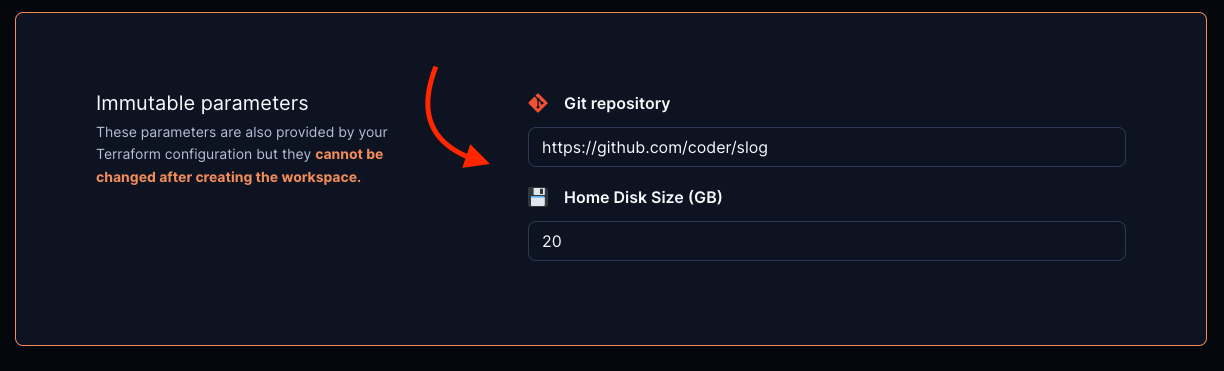
### 5. Optional: disable specific parameter fields by including their names as
specified in your template in the `disable_params` search params list
```md
[](https://YOUR_ACCESS_URL/templates/YOUR_TEMPLATE/workspace?disable_params=first_parameter,second_parameter)
```
### Example: Kubernetes
For a full example of the Open in Coder flow in Kubernetes, check out
[this example template](https://github.com/bpmct/coder-templates/tree/main/kubernetes-open-in-coder).