Deployment health
Use Coder's deployment health page to monitor your control plane and its dependencies.
On this page
Coder includes an operator-friendly deployment health page that provides a number of details about the health of your Coder deployment.
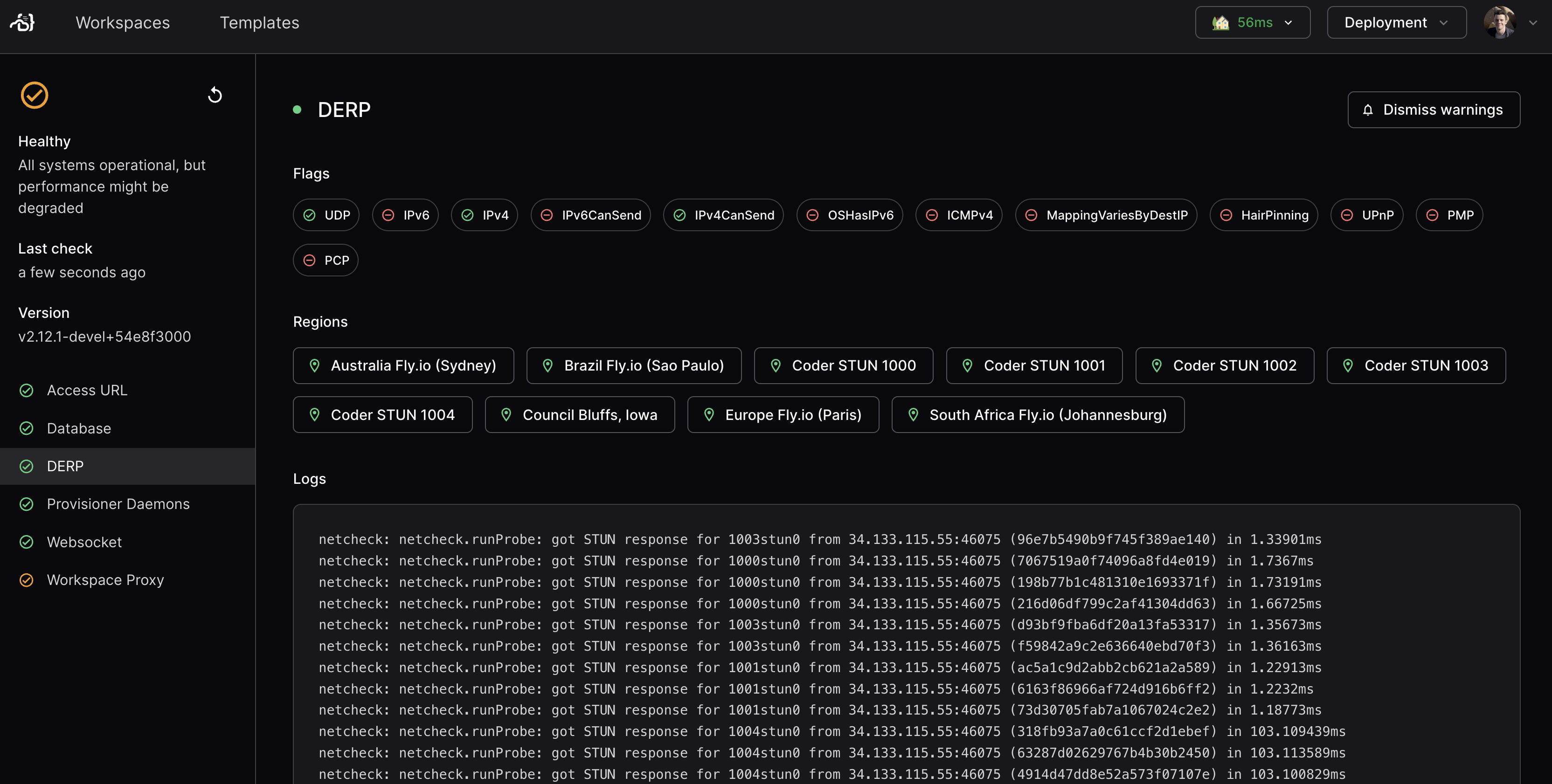
You can view it at https://${CODER_URL}/health, or you can alternatively view the JSON response directly.
The deployment health page is broken up into the following sections:
Access URL
The Access URL section shows checks related to Coder's access URL.
Coder will periodically send a GET request to ${CODER_ACCESS_URL}/healthz and validate that the response is 200 OK.
The expected response body is also the string OK.
If there is an issue, you might see one of the following errors reported:
EACS01
Access URL not set
Problem: no access URL has been configured.
Solution: configure an access URL for Coder.
EACS02
Access URL invalid
Problem:
${CODER_ACCESS_URL}/healthz is not a valid URL.
Solution:
Ensure that the access URL is a valid URL accepted by url.Parse.
Example: https://coder.example.com/.
You can use the Go playground for additional testing.
EACS03
Failed to fetch /healthz
Problem:
Coder was unable to execute a GET request to ${CODER_ACCESS_URL}/healthz.
This could be due to a number of reasons, including but not limited to:
- DNS lookup failure
- A misconfigured firewall
- A misconfigured reverse proxy
- Invalid or expired Secure Sockets Layer (SSL) certificates
Solution: Investigate and resolve the root cause of the connection issue.
To troubleshoot further, you can log into the machine running Coder and attempt to run the following command:
curl -v ${CODER_ACCESS_URL}/healthz
# Expected output:
# *   Trying XXX.XXX.XXX.XXX:443
# * Connected to https://coder.company.com (XXX.XXX.XXX.XXX) port 443 (#0)
# [...]
# OK
The output of this command should aid further diagnosis.
EACS04
/healthz did not return 200 OK
Problem:
Coder was able to execute a GET request to ${CODER_ACCESS_URL}/healthz, but the response code was not 200 OK as expected.
This could mean, for instance, that:
- The request did not actually hit your Coder instance (potentially an incorrect DNS entry)
- The request hit your Coder instance, but on an unexpected path (potentially a misconfigured reverse proxy)
Solution:
Inspect the HealthzResponse in the health check output.
This should give you a good indication of the root cause.
Database
Coder continuously executes a short database query to validate that it can reach its configured database, and also measures the median latency over 5 attempts.
EDB01
Database Ping Failed
Problem: This error code is returned if any attempt to execute this database query fails.
Solution: Investigate the health of the database.
EDB02
Database Latency High
Problem: This code is returned if the median latency is higher than the configured threshold. This might not be an error as such, but is an indication of a potential issue.
Solution: Investigate the sizing of the configured database with regard to Coder's current activity and usage. It might be necessary to increase the resources allocated to Coder's database. Alternatively, you can raise the configured threshold to a higher value (this will not address the root cause).
Tip
You can enable detailed database metrics in Coder's Prometheus endpoint. If you have tracing enabled, these traces might also contain useful information regarding Coder's database activity.
DERP
Coder workspace agents can use Designated Encrypted Relay for Packets (DERP) to communicate with Coder. This requires connectivity to a number of configured DERP servers which are used to relay traffic between Coder and workspace agents. Coder periodically queries the health of its configured DERP servers and can return one or more of the following:
EDERP01
DERP Node Uses Websocket
Problem:
When Coder attempts to establish a connection to one or more DERP servers, it sends a specific Upgrade: derp HTTP header.
Some load balancers might block this header, in which case Coder will fall back to Upgrade: websocket.
This is not necessarily a fatal error, but a possible indication of a misconfigured reverse HTTP proxy. Additionally, while workspace users should still be able to reach their workspaces, connection performance might be degraded.
Note
This might also be shown if you have forced websocket connections for DERP.
Solution:
make sure that any proxies you use allow connection upgrade with the Upgrade: derp header.
EDERP02
One or more DERP nodes are unhealthy
Problem: This is shown if Coder is unable to reach one or more configured DERP servers. Clients will fall back to use the remaining DERP servers, but performance might be impacted for clients closest to the unhealthy DERP server.
Solution: Make sure that the DERP server is available and reachable over the network, for example:
curl -v "https://coder.company.com/derp"
# Expected output:
# *   Trying XXX.XXX.XXX.XXX
# * Connected to https://coder.company.com (XXX.XXX.XXX.XXX) port 443 (#0)
# DERP requires connection upgrade
EDERP03
No DERP servers available
Problem: This is shown when Coder's effective DERP map does not contain any DERP servers. Without at least one working DERP server, workspace networking might not work.
This can happen if the built-in DERP server is disabled and no external DERP map is configured, or if workspace proxies are expected to provide DERP but no healthy DERP-enabled proxy is currently available.
Solution: Make sure that at least one DERP server is available to the deployment. For example:
- Restart
coderdwith the built-in DERP server enabled - Restart
coderdwith an external DERP map configured - Make sure a workspace proxy with DERP server enabled is running and healthy
ESTUN01
No STUN servers available
Problem: This is shown if no Session Traversal Utilities for Network Address Translation (STUN) servers are available. Coder will use STUN to establish direct connections. Without at least one working STUN server, direct connections might not be possible.
Solution: Make sure that the configured STUN severs are reachable from Coder and that User Datagram Protocol (UDP) traffic can be sent/received on the configured port.
ESTUN02
STUN returned different addresses and you may be behind a hard NAT
Problem:
This is a warning shown when multiple attempts to determine our public IP address/port via STUN resulted in different ip:port combinations.
This is a sign that you are behind a "hard Network Address Translation (NAT)", and might result in difficulty establishing direct connections.
However, it does not mean that direct connections are impossible.
Solution: Engage with your network administrator.
Websocket
Coder makes heavy use of WebSockets for long-lived connections:
- Between users interacting with Coder's Web UI (for example, the built-in terminal, or VSCode Web),
- Between workspace agents and
coderd, - Between Coder workspace proxies and
coderd.
Any issues causing failures to establish WebSocket connections will result in severe impairment of functionality for users. To validate this functionality, Coder will periodically attempt to establish a WebSocket connection with itself using the configured Access URL, send a message over the connection, and attempt to read back that same message.
EWS01
Failed to establish a WebSocket connection
Problem: Coder was unable to establish a WebSocket connection over its own Access URL.
Solution: There are multiple possible causes of this problem:
-
Make sure Coder's configured Access URL can be reached from the server running Coder, using standard troubleshooting tools like
curl:curl -v "https://coder.company.com" -
Make sure that any reverse proxy that is serving Coder's configured access URL allows connection upgrade with the header
Upgrade: websocket.
EWS02
Failed to echo a WebSocket message
Problem: Coder was able to establish a WebSocket connection, but was unable to write a message.
Solution: There are multiple possible causes of this problem:
- Validate that any reverse proxy servers in front of Coder's configured access URL are not prematurely closing the connection.
- Validate that the network link between Coder and the workspace proxy is stable, for example, by using
ping. - Validate that any internal network infrastructure (for example, firewalls, proxies, virtual private networks (VPNs)) do not interfere with WebSocket connections.
Workspace Proxy
If you have configured Workspace Proxies, Coder will periodically query their availability and show their status here.
EWP01
Error Updating Workspace Proxy Health
Problem: Coder was unable to query the connected workspace proxies for their health status.
Solution: This might be a transient issue. If it persists, it could signify a connectivity issue.
EWP02
Error Fetching Workspace Proxies
Problem: Coder was unable to fetch the stored workspace proxy health data from the database.
Solution: This might be a transient issue. If it persists, it could signify an issue with Coder's configured database.
EWP04
One or more Workspace Proxies Unhealthy
Problem: One or more workspace proxies are not reachable.
Solution: Make sure that Coder can establish a connection to the configured workspace proxies.
EPD01
No Provisioner Daemons Available
Problem: No provisioner daemons are registered with Coder. No workspaces can be built until there is at least one provisioner daemon running.
Solution:
If you are using External Provisioner Daemons, make sure that they are able to successfully connect to Coder.
Otherwise, make sure --provisioner-daemons is set to a value greater than 0.
Note
This might be a transient issue if you are currently in the process of updating your deployment.
EPD02
Provisioner Daemon Version Mismatch
Problem: One or more provisioner daemons report a different major or minor version than the main deployment. It is important that provisioner daemons are updated at the same time as the main deployment to minimize the risk of API incompatibility.
Solution: Update the provisioner daemon to match the currently running version of Coder.
Note
This might be a transient issue if you are currently in the process of updating your deployment.
EPD03
Provisioner Daemon API Version Mismatch
Problem: One or more provisioner daemons are using APIs that are marked as deprecated. These deprecated APIs might be removed in a future release of Coder, at which point the affected provisioner daemons will no longer be able to connect to Coder.
Solution: Update the provisioner daemon to match the currently running version of Coder.
Note
This might be a transient issue if you are currently in the process of updating your deployment.
Pubsub
Coder uses a publish-subscribe (pubsub) system to send events between its components and replicas.
The health check reports which pubsub backend the Coder replica uses, either nats for the embedded NATS server or postgres for PostgreSQL, and whether that backend is connected.
This section appears in the JSON response.
EPS01
Pubsub not connected
Problem:
The Coder replica isn't connected to its pubsub backend.
With the postgres backend, the replica's PostgreSQL listener connection is down.
With the nats backend, one or more of the replica's connections to its embedded NATS server aren't in the connected state.
While the replica is disconnected, it misses events, so features that depend on them, such as workspace build updates, can be delayed.
Solution:
Coder tries to reconnect automatically, so this might be a transient issue.
If it persists with the postgres backend, investigate the health of the database and the network path between Coder and the database.
If it persists with the nats backend, inspect the Coder server logs for NATS errors and restart the affected replica.
EPS02
Embedded NATS server not running
Problem: The embedded NATS server in the Coder replica isn't running. The replica can't send or receive pubsub events until the server runs again.
Solution: Inspect the Coder server logs for NATS errors, then restart the affected replica.
EUNKNOWN
Unknown Error
Problem: This error is shown when an unexpected error occurred evaluating deployment health. It might resolve on its own.
Solution: This might be a bug. File a GitHub issue!