Every AI coding agent you deploy works with whatever its environment gives it. It runs commands, installs packages, pushes code and calls APIs using the credentials, network paths and cloud permissions in front of it. That’s what makes agents useful. It’s also what makes a prompt injection hidden in an issue or a dependency so dangerous.
Most teams start securing agents from the inside. System prompts and rules files are guidance: useful defaults that an agent talked into something can ignore. Approval modes go further, because the harness asks a person before it runs a command. That’s a real control, but it runs in or next to the agent’s process, and it’s only as strong as that process.
Underneath both sits a third kind of control, the security boundary, enforced independently of the agent’s decisions.
A security boundary is enforced outside the agent and protected from modification or bypass by it.
Real agent security comes from layers of those boundaries, each one catching what the others miss.
Safety engineers have pictured this for decades with James Reason’s Swiss cheese model. Every layer of defense has holes, and harm gets through only when the holes in the layers that matter for that action line up. No single slice is perfect, so the goal is enough slices that the holes rarely align. The model is a way to reason about coverage, not a guarantee, and our build showed where it needs qualifying.
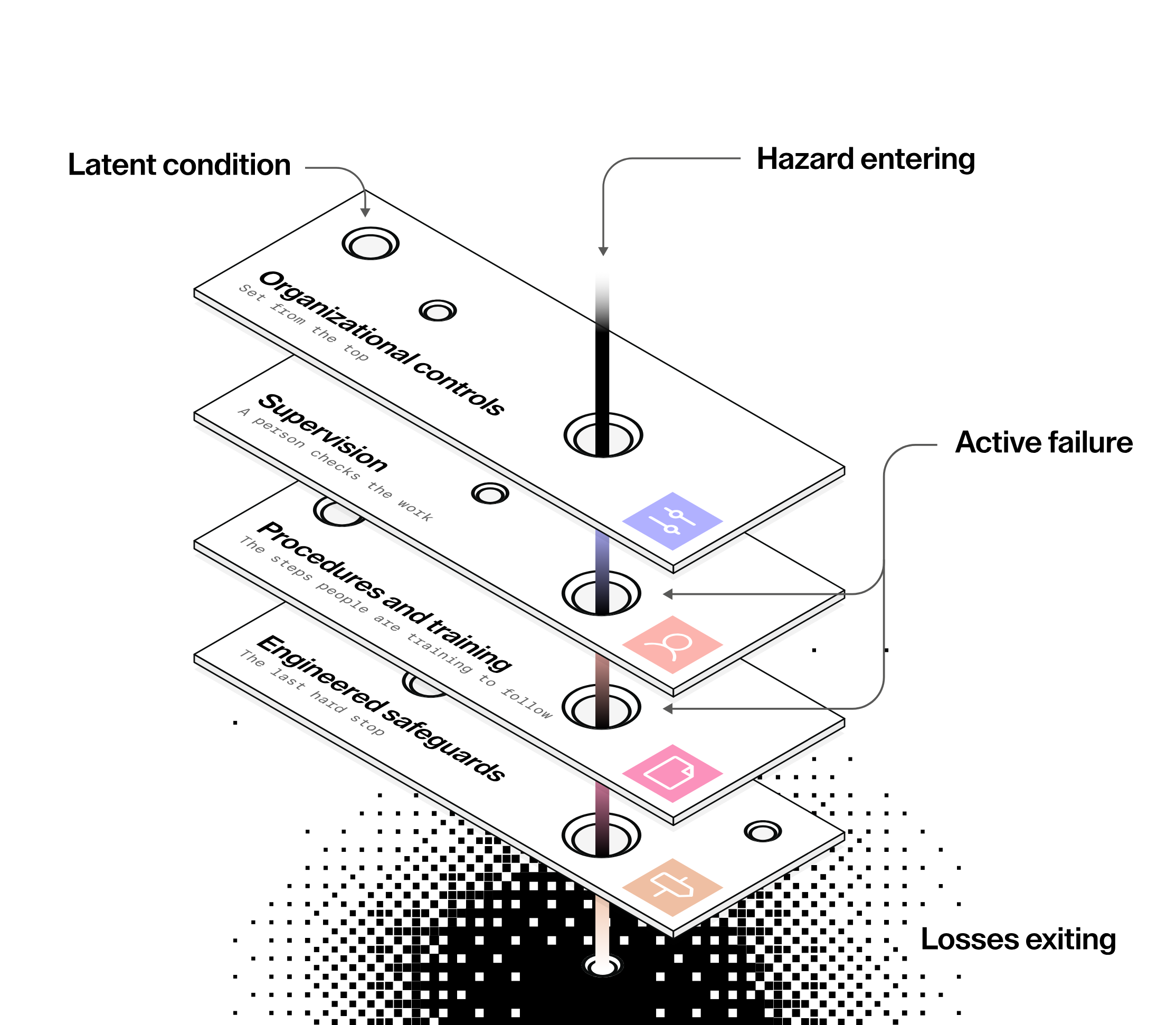 Harm gets through when the holes in the layers that matter for an action line up.
Agent security works the same way. We recently built and tested a reference design on Amazon EKS with the new AWS Nitro Sandboxes, and it showed both the model and its limits.
Coder’s whitepaper The AI Operating Layer sets out five requirements for the environment where AI runs: contain the data, scope the access, govern the models, audit everything and control the spend. Meeting them takes complementary controls, coordinated in one environment. Our reference build shows how those controls work together, and where coverage still depends on the agent.
No single control is enough
Here’s the moment that convinced us. Our reference build routes model traffic through AI Gateway, part of Coder AI Governance, which gives the platform team vetted models, spend limits and a record of every session. For the agents that use it, that’s strong governance. Provider keys never enter the workspace, and the workspace can’t reach the provider directly.
Then we ran a second vendor’s agent, Kiro CLI, in the same kind of governed workspace. It signed in with its own identity and talked to its own service, so it never showed up in AI Gateway at all. That isn’t a flaw in Kiro, which has its own enterprise controls. It’s a fact about gateways: they govern the agents that use them.
The infrastructure still saw its connections. We installed Kiro and wrote its egress bundle ourselves, listing only the hosts its core features need, but we didn’t connect it to AI Gateway. Chat traffic reached Kiro’s runtime host because the bundle included it. Telemetry was refused 95 times and self-update 6 times, because those hosts weren’t on the list. The gateway slice didn’t apply to that agent, and the network and identity slices still did.
Be precise about what that buys you. The infrastructure constrained where Kiro could connect, what it could read in AWS and what VM it ran in. It didn’t govern Kiro’s model use, which stayed with Kiro’s own service and controls. Meeting the full AI Operating Layer requirements for an agent like this also takes verified model, audit and spend controls, through the vendor’s own enterprise features or another approved integration. Still, if your agent security story is a single gateway, a single policy or a single sandbox, there’s an agent out there it doesn’t cover.
This is also where the Swiss cheese picture needs care. A slice an agent skips isn’t a slice for that agent. In this build, Kiro’s model traffic bypassed AI Gateway, while the workspace’s network and identity controls still applied. Some holes line up by design, since github.com is allowed at every layer that reads host names. And the slices aren’t fully independent, because one template and one cluster stack configure most of them. So count slices per agent and per path, not per architecture diagram.
What a layer looks like
A security boundary is enforced outside the process it constrains, by something the agent can’t reconfigure. A governed agent workspace stacks several of them, from the agent outward:
- Admission policy. The workspace can’t run privileged, gain capabilities or touch the host, and it can’t leave the nodes and the sandbox it was placed on.
- Isolation. Each workspace runs in its own VM with its own kernel. In our build, that’s an AWS Nitro Sandbox, which gives each Kubernetes Pod a hardware-isolated VM enforced by the Nitro Hypervisor.
- Network policy. The workspace can reach only a few destinations, enforced on the node rather than in the workspace, on nodes that deny traffic by default.
- A per-workspace egress allowlist. Each workspace reaches only the host names its job needs.
- A shared egress edge. The security team sets one outer bound for every workspace on the agent nodes.
- Scoped identity. Each workspace gets its own cloud credentials and its own slice of data.
- AI governance. Models, spend and session records are managed centrally, for every agent that routes through the gateway.
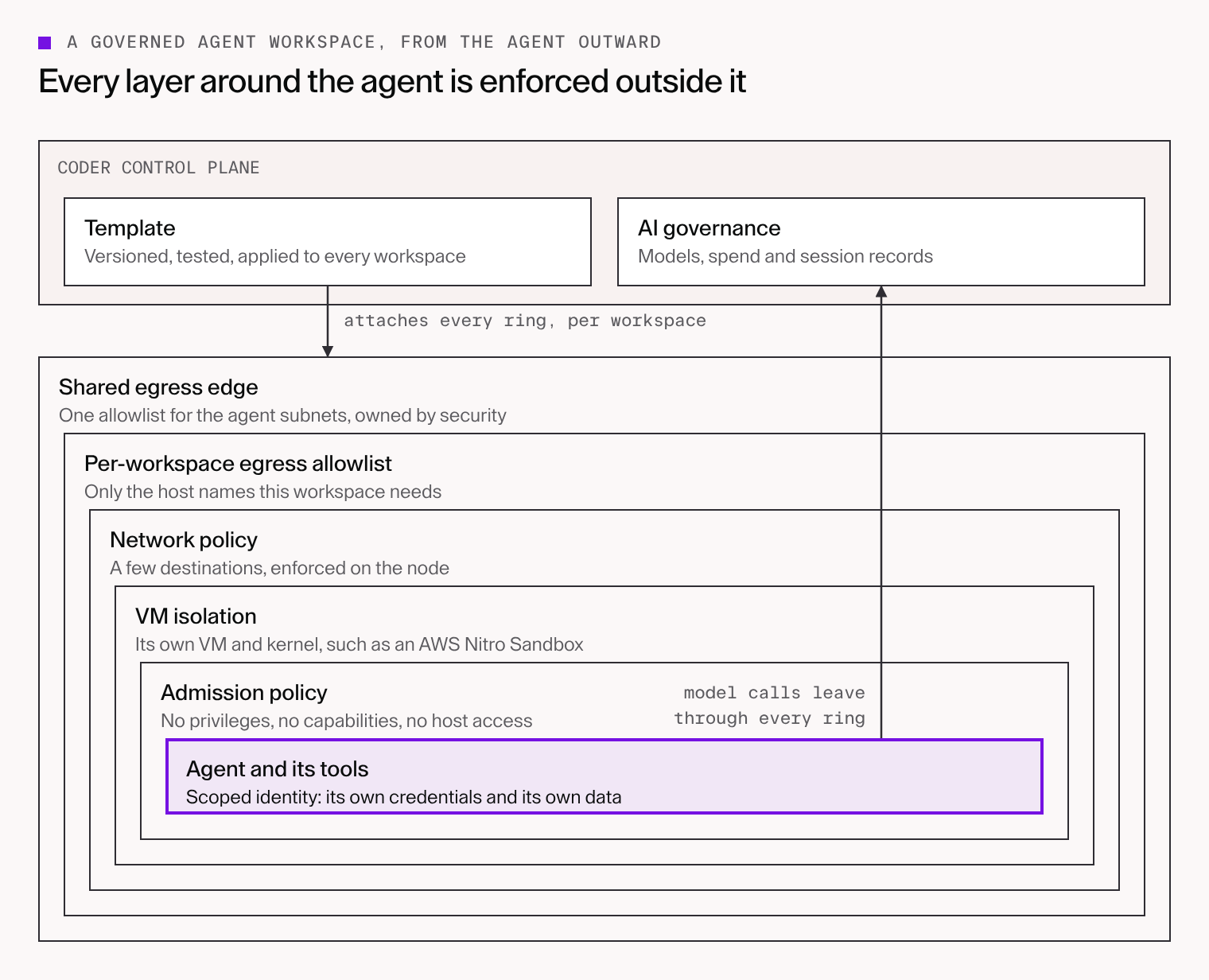 Each ring is enforced by something outside the one inside it. An agent that gets past one ring still meets the next.
None of these is new on its own. Most platform teams already know Pod Security, NetworkPolicy, egress proxies and IAM. What changes with agents is that every workspace needs that baseline, enforced the same way every time, including the workspaces running an agent you didn’t pick.
Orchestration turns layers into the default
Layers only protect you when they’re applied consistently. A NetworkPolicy one workspace forgot, or an IAM role one team widened, is the gap an agent walks through. Reason called these latent conditions, and our own build had one: the agent nodes allowed traffic by default, so our documented stop step would have opened a workspace instead of closing it. A reviewer caught it, and we fixed it and retested. That makes orchestration, and the review and tests around it, part of the security model.
In our reference build, a versioned Terraform template creates each workspace’s own resources when a user creates it: its sandbox, its service account and cloud session, its storage prefix, its egress proxy and its allowlist. It attaches them to controls the security team manages centrally, such as the firewall, the admission rules and the IAM role. Nobody assembles those by hand.
Three practices kept the layers honest:
- Separation of duties. The security team owns the shared firewall and the admission rules in a separate stack. A template can narrow the firewall’s list but never widen it, and it can’t move a workspace off the firewalled nodes. The people who own the outer bound don’t write the templates.
- Tests on the template. Test the template, including the failure paths, and make those tests a release gate rather than something run by hand.
- A fast secure path. Prebuilt workspaces made a governed workspace ready in about 10 seconds in our runs, which removes one common reason for engineers to work around the controls.
This is where Coder fits. Coder provides secure infrastructure for AI-powered development. Its templates create each workspace’s resources and attach them to central controls, and AI Gateway governs the model traffic routed through it, so an agent you didn’t choose still runs inside controls you did.
Climb only as far as your risk requires
The layers form a ladder. Near the top, controls are coarse and cheap to run: a VM boundary, a network policy, a host allowlist. Further down, the network rungs get finer-grained, more expensive and harder to operate. The useful question isn’t how many layers you can add. It’s how far down the ladder your risk actually requires you to go.
Host allowlists have a known limit. They can’t see a method or a path. In our demo, every GitHub write an agent tried reached GitHub, an approved host. GitHub turned them away on credentials, not the network. Destination controls decide where connections can go, not which account, repository or content a permitted connection carries.
There’s one case that gets past every cheaper network layer. A prompt injection hands the agent an attacker’s GitHub token, and the agent pushes your code to the attacker’s repository on github.com. The host is allowed, the credential is valid, and the gateway never sees a git push. Telling your repositories from the attacker’s takes either a mandatory Git broker that forwards only to your organization, or TLS inspection with a rule that reads the path.
TLS inspection isn’t free. The firewall sees plaintext, including the tokens in every request, and the CA private key becomes a secret that can mint certificates your workspaces trust for any name. On AWS Network Firewall it adds about $555 a month for two endpoints, before anyone operates it.
Keep it off by default. For GitHub, a Git broker may cover the same risk with less exposure. If you do need inspection, scope it to one host and count every exemption as a gap.
Even with every rung in place, two classes of risk remain: sending data through a service the workspace is allowed to reach, and harmful actions taken with valid credentials. The network can’t judge whether a push is a good one. Branch protection, required reviews, deployment approvals and reviewed MCP servers decide what an agent’s allowed access can change, and they apply at every rung.
Where to start
If you’re putting agents into production, here’s the order we’d work in:
- Isolate and constrain the workspace. One VM per workspace, an admission policy with no privileges, and a network policy that allows only what the workspace needs, on nodes that deny traffic by default. Test the failure paths too.
- Route models through a gateway and scope identity. Keep provider keys out of the workspace and provider hosts off every allowlist. Give each workspace its own cloud session, its own storage and narrowly scoped tokens.
- Bound egress in two places. A short allowlist per workspace, and a shared allowlist owned by the security team. Ship the egress proxy logs off the node and read them, because they show you the agents that skip the gateway.
- Close the edges around the workspace. Constrain the control plane’s own egress, tie credentials to your network, encrypt what the platform stores, alert on context, and test a stop procedure.
- Govern actions throughout. Branch protection, required reviews, deployment approvals and reviewed MCP servers decide what the agent’s access can change.
- Add a Git broker or TLS inspection only for a specific risk, scoped to one host and off by default.
How to get started
Coder runs on Amazon EKS in your own AWS account. To try this pattern, start with Coder’s published AWS guidance: Install Coder from AWS Marketplace for a proof of concept on Community Edition, or AWS Coder AI-DLC GitOps for a fuller layout with the Coder server in private subnets and managed PostgreSQL. AI Gateway is part of Coder AI Governance, which is included with a Premium license.
Then add the governed-agents-nitro template from the Coder Registry. It covers the workspace side, and its README lists the cluster-side controls you set up separately, such as the firewall, the admission rules and the IAM role. Add the layers one rung at a time, testing each before you move to the next. For a closer look at how a layered design fits your infrastructure, reach out to our technical sales team.


