April 2026 update: This post references Coder Tasks, an earlier approach to orchestrating agent workflows on Coder infrastructure. For the latest capabilities, check out Coder Agents.
Developers live inside their IDE. It is where they read code, write code, debug, review diffs, and think. Every time they leave that environment to open a browser tab, trigger a background workflow, check logs, or monitor an agent, they break flow. Even small context switches add up. And as autonomous AI agents become a bigger part of the development process, that problem compounds. Agents need to be launched, monitored, and managed, and right now, that means leaving the IDE entirely.
That's the gap Coder Tasks was built to close. Last year, we introduced Coder Tasks as an interface for running and managing background agentic workflows. Every Task runs in a Coder workspace that has the correct repositories, credentials, and network access. It has been widely used by enterprises as they retain control; all activity is auditable while the developers can use the Coder UI or API to create a Task and monitor its progress.
Until now, Tasks were not available where engineers work most - inside their IDE. That is why we are bringing Coder Tasks directly to the IDE starting with VS Code and its forks like Cursor. Instead of opening a browser to create a Task, monitor progress, or download logs, developers can launch and manage Coder Tasks directly from the IDE.
This keeps engineers in flow. It eliminates context switching to a browser. Developers can stay in their editor and let autonomous workflows run in the background..
Once the Coder extension is installed from the VS Code marketplace, two Coder icons appear in the sidebar. One icon connects to standard Coder workspaces. The other opens the Coder Tasks view, as shown:
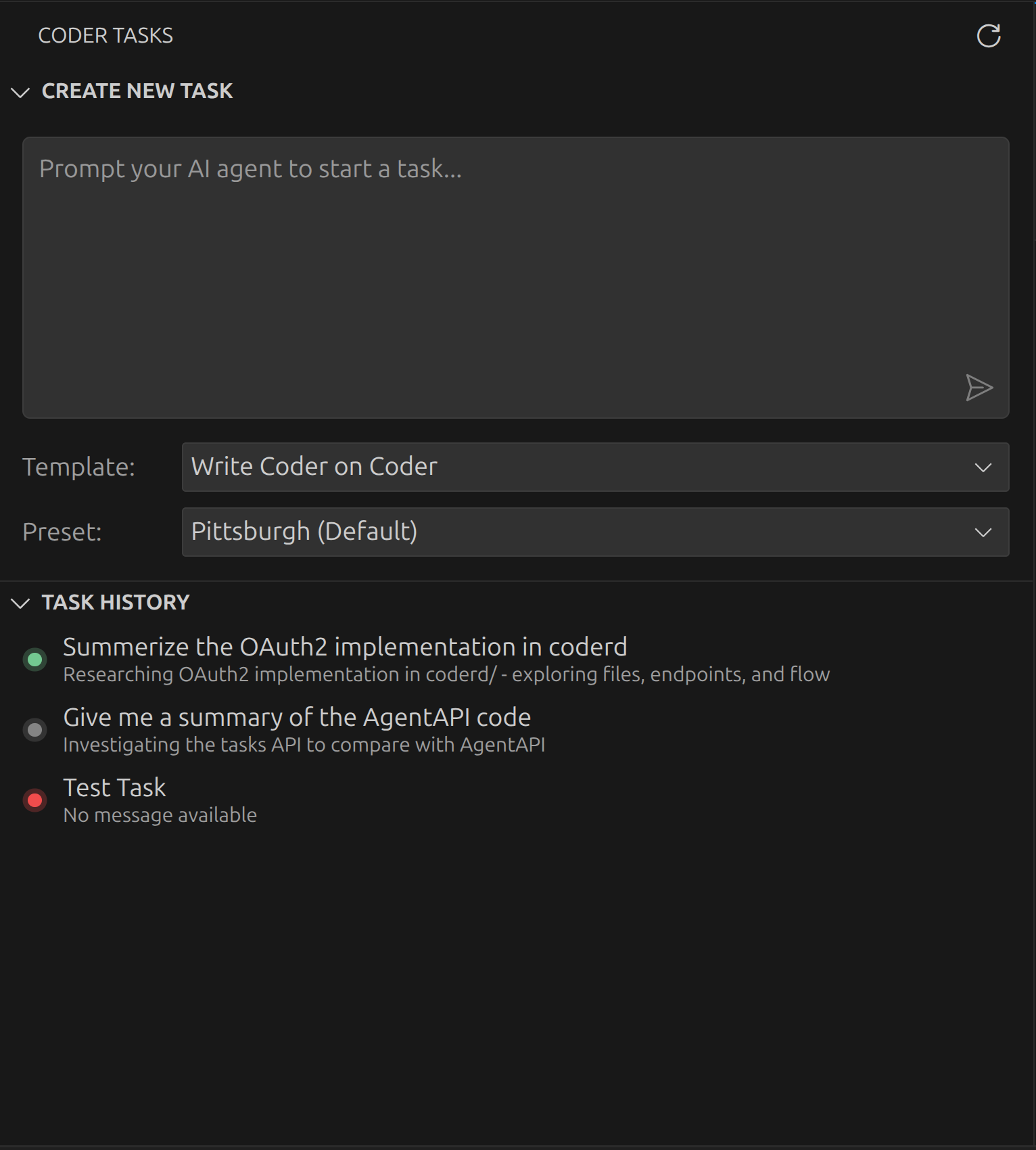
From the Tasks view developers can:
- Select a task template
- Configure preset parameters
- Prompt the agent
- Create and launch the Task
After a Task is created, the Task History panel provides control and insight. Developers can:
- View chat logs from the autonomous workflow
- Pause or resume the Task workspace
- Download logs for audit or inspection
- Delete the Task workspace when the work is complete
How it works: A common use case
Lets say you are in Cursor implementing a feature, and want to have an agent write unit tests for your new API while you start on the frontend. Instead of breaking the flow or switching tabs to an AI chat interface:
- Initiate: From within the IDE, you go to the Coder Tasks interface.
- Prompt: You enter a prompt such as “Create a new branch, and write unit tests that cover the basic test scenarios for the new API I implemented” and create the task.
- Continue: You immediately return to coding your frontend while the task runs in the background.
- Monitor: At any time, you can check the status (idle/active/errored) or view the last message sent by the agent directly in the extension.
- Finalize: Once the agent has finished working, you can create a PR from the branch and merge it.
The entire experience stays inside your IDE.
It solves for more than a UI inconvenience
Many IDE-agent experiences rely on SaaS/remote compute that is disconnected from enterprise command and controls. These agents may not have access to internal services or VPC resources. Or they may require broad external access that admins can’t audit and approve. In either case, productivity suffers or risk increases.
Coder Tasks solve this directly. Every Task runs inside a secure Coder workspace. That workspace is defined as code and hosted in your own environment inheriting network access, IAM policies, and controls of the hosting environment defined by you. It has access to correct repos, credentials, and internal connectivity already configured.
The IDE is where development happens. As autonomous agents become a bigger part of that work, enterprises need them to run where developers already are, not in a separate tab, not on disconnected SaaS, but inside governed workspaces with the right access and full auditability.
Coder Tasks in VS Code brings those two things together. Developers stay in flow. Admins stay in control.
Install the Coder extension from the VS Code Marketplace and try it today. If you want to see how Coder Tasks fits into your enterprise AI stack, book a demo.
Resources