Coder is a self-hosted platform for running AI coding agents and cloud development environments on infrastructure you control. It works with any agent, cloud, IDE, OS, Git provider, and identity provider.
For security teams and platform engineers, the question is no longer whether to adopt AI agents, but how to do it without losing visibility, control, and auditability.
The thing with coding agents is that they work. One popular streaming service has roughly 10% of its production codebase written by agents, reviewed and approved by humans. Coder runs at around 30%. Anthropic recently shared that over 80% of the code merged into their production codebase was authored by Claude Code. The technology is only getting better. That is the very reason admins and CISOs are paying close attention to how agents are deployed and governed.
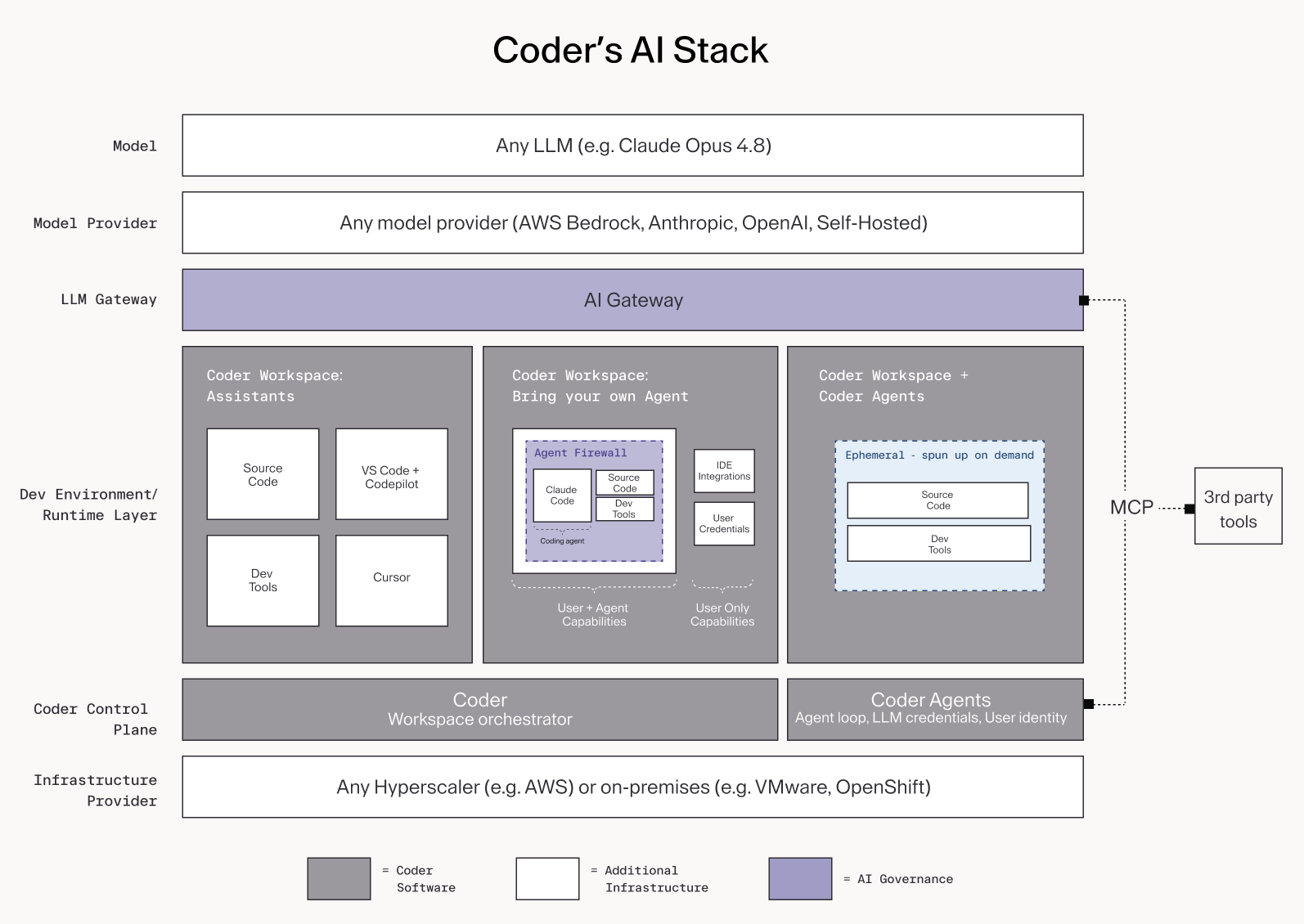
Coder offers a secure and standardized way to govern and scale AI agents across your development environments. This blog covers what goes inside our AI stack and how each layer helps teams reduce the risks of agents going rogue. Going bottom up in the stack:
Infrastructure layer: deployment flexibility
This is the foundation where the hardware lives, representing any public cloud (AWS, GCP, Azure) or private infrastructure (VMware, OpenShift, bare metal). Coder is self-hosted, so you can even deploy it in air-gapped data centers to meet regulatory requirements. Since Coder runs inside your own infrastructure, it inherits all the access and security policies you define.
On top of the infrastructure, you can run Kubernetes, VMs on EC2, OpenStack, VMware, and so on. This abstracts the compute layer so teams don't need to handle raw infrastructure and can standardize how environments are provisioned. Most commonly, teams deploy Kubernetes clusters for cloud-native workloads and AWS EC2 for monorepo-heavy environments.
The next three layers are Coder software: an AI control plane, a development environment, and an AI Gateway.
Control plane: the orchestration layer
Coder's AI control plane manages workspace lifecycles, user authentication, workspace configuration, and external integrations. Both UI and API are supported for template creation, provisioning, RBAC, and lifecycle management.
Coder separates who defines environments from who uses them. Admins create and manage Templates; developers use those Terraform-based templates to launch Workspaces. This keeps environments consistent and repeatable across teams.
With Coder Agents, the control plane also runs the agent loop itself, more on that below.
Development environment: where standardization meets execution
This is the most critical part of the stack. The development environment is where code gets written, tested, and executed. It spans three workspace configurations, each designed for a different way of working with AI. Workspaces are configured via Templates, giving admins pre-configured tools, policies, and governance applied at runtime, keeping environments consistent across your fleet. With Coder Agents, workspaces are spun up on demand and torn down when the task is done.
Three common paths we see teams take when adopting AI in their development environments:
- Coding Assistants are the most widely adopted form of AI in development today and often serve as a gateway to running agents. They run inside Coder Workspaces rather than on local machines, providing faster onboarding, standardized environments, and security through isolated compute. Coder integrates with agentic IDEs such as Cursor, Windsurf, and Zed, and template admins can pre-install extensions like GitHub Copilot and Roo Code. The developer is always in control, with AI acting as an assistant rather than an autonomous actor.
As teams move from developer-assisted AI to autonomous workflows, they typically choose between running third-party agents inside a workspace or using Coder Agents.
- Bring your own agent, such as Claude Code, Codex, Goose, or a custom agent, runs inside a Coder workspace alongside a developer. The developer and agent share access to source code and dev tools. Admins control what tools and integrations are available via templates. By design, agents operate with lower access levels than developers.
- Coder Agents is Coder's native self-hosted AI coding agent. Unlike third-party agents that run inside a workspace, Coder Agents runs the agent loop in the control plane. LLM API keys never enter workspaces, the agent operates with the same permissions as the user who invoked it, and every action is tied to that user's identity. Workspaces are provisioned on demand for specific tasks such as writing or editing code, pull requests that require code changes and torn down when the task is done. Supports multi-turn conversations, sub-agent delegation, and can be triggered from chat, API, CI, GitHub Actions, Slack, and Jira.
Teams can run agents both ways from the same Coder deployment, using the same templates, identity, and access controls.
Coder Agents vs bring your own agent: which one to use
The two are not mutually exclusive but they serve different needs.
Bring your own agent when your team already has a preferred agent (Claude Code, Codex, Goose) and wants to keep using it inside a governed environment. The agent runs inside the workspace alongside the developer. Admins define the access levels for both developers and the agents. This is the lower-friction path for teams already running third-party agents who want to add governance without changing how developers work.
Use Coder Agents for fully autonomous workflows without a developer actively supervising each run. The agent loop runs in the control plane, credentials never enter the workspace, and workspaces are spun up and torn down per task. This is the better fit for background tasks, ticket-driven workflows, and any scenario where you want the agent operating independently at scale.
The practical difference is where the agent loop runs and who holds the credentials. With Bring your own Agent, the agent runs in the workspace and the developer manages the session. With Coder Agents, the control plane manages the session and the workspace is just compute.
Agent Firewall: contain and monitor agent network access
Included with Coder Premium licenses, AI Governance includes Agent Firewall, which enforces a default-deny network policy for third-party agents running inside each Workspace. Any request outside the allow list is blocked and logged. Narrowly scoped network policies also make anomaly detection practical because unexpected spikes in API calls become easier to identify.
Here is an example Agent Firewall rules file for a DoD / public-sector deployment:
AI Gateway: observe and control LLM access
AI Gateway is included with Coder Premium licenses as part of AI Governance. It sits between AI tools such as Claude Code, Codex, or custom agents and upstream model providers like Anthropic, OpenAI, AWS Bedrock, or self-hosted models. It replaces scattered API keys with a single access point. We have seen teams managing over 500 individual keys to the same provider, making it straightforward to grant, revoke, and track usage by user and agent. It centralizes authentication, full prompt audit trails with session-level provenance, per-user token attribution and spend visibility, and centralized MCP server administration.
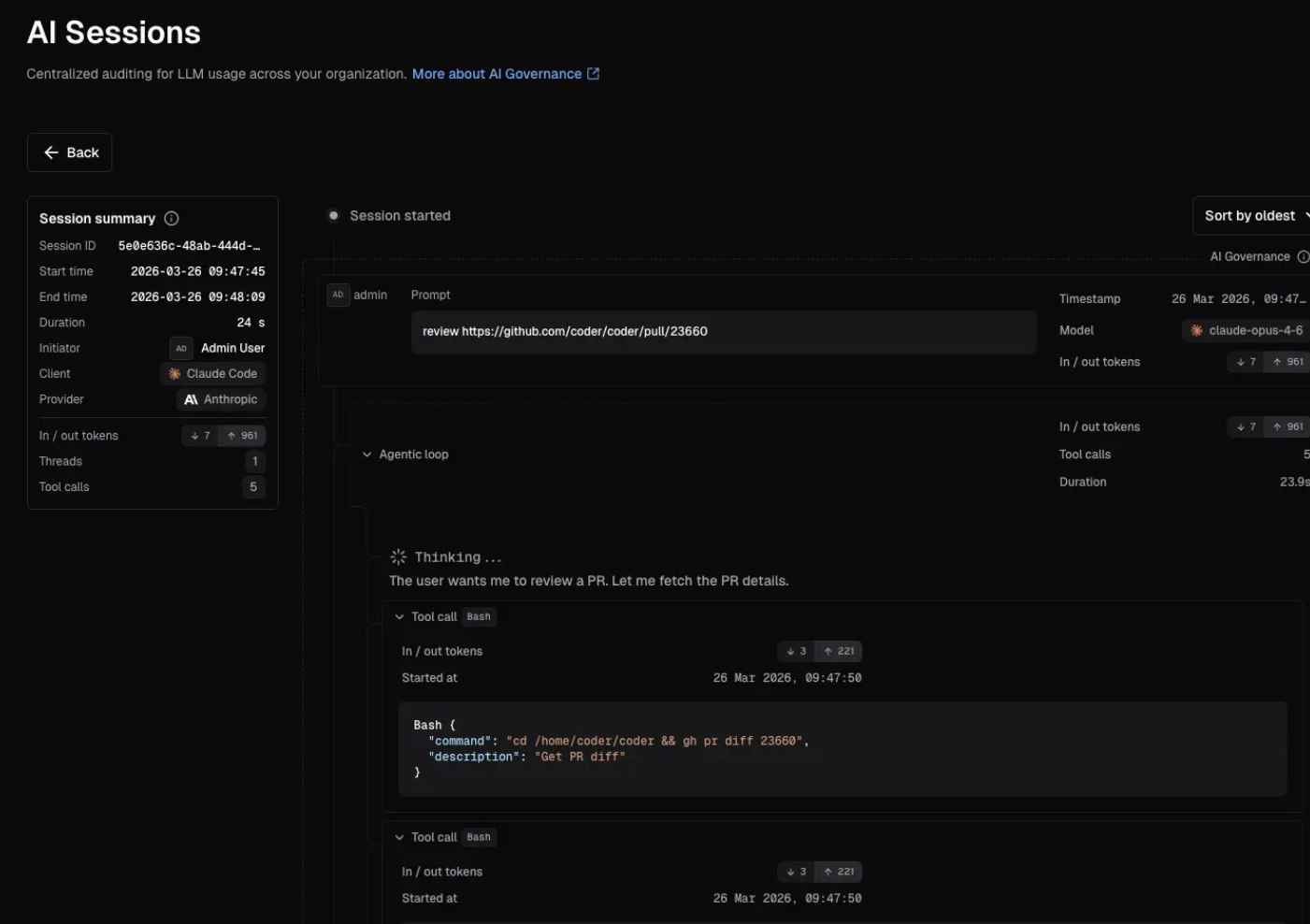
Structured logs are exported to any SIEM such as Splunk or Grafana Loki. Both third-party agents running inside workspaces and Coder Agents running in the control plane route through AI Gateway, giving platform teams consistent visibility and governance across all agent activity.
Model provider
A model provider standardizes access to AI models. AI Gateway connects to model providers for centralized authentication, observability, and cost management. Common providers include AWS Bedrock, Anthropic, and OpenAI, and you can also self-host your own.
LLM models
Coder is model-agnostic. Teams configure which models their AI agents and assistants use through AI Gateway, maintaining consistent governance, compliance, and security controls regardless of vendor. With Coder Agents, teams can switch between models or providers without changing platforms or re-architecting workflows. Common examples: Claude Opus 4.8, GPT-5.5, self-hosted Llama variants.
From architecture to action
The stack you've just seen is how enterprises in financial services, defense, and high tech are running AI agents in production today. According to Gartner's 2026 CIO and Technology Executive Survey, only 17% of organizations have deployed AI agents to date, yet more than 60% expect to do so within the next two years (source). The difference between the deployments that succeed and the over 40% of agentic AI projects Gartner predicts will be canceled by 2027 is governance infrastructure in place before agents go to production.
- Security teams get deterministic controls rather than policy documents hoping developers comply
- Platform engineers get consistent environments rather than snowflake setups that break in production
- Developers get AI acceleration rather than friction and endless security exceptions
- Leadership gets production deployment and measurable ROI rather than stalled pilots and wasted investment
Ready to see how this stack works in your environment? Try Coder or talk to us.
Resources