The first time someone usually encounters a coding agent like Claude Code is through the blinking dialogue box of a terminal. You shoot off a question, the agent goes off and presumably reads the codebase, and like communion with the spirits, you go back and forth until you finish the task. That’s great, and it’s still how most of us at Coder work day to day.
But some of the most useful agent work we run never starts with prompting. It’s the chores like checking whether a PR needs a docs update, grading a module against our standards, or taking a first pass at a new issue. Everyone agrees these matter. Nobody remembers to do them every time, and the ones that slip have a way of coming back to haunt you.
So we stopped asking people to remember. We run these chores as background jobs: a GitHub Action (or a schedule) that hands the work to a coding agent in a Coder workspace and posts the result where the team already looks. Below are the real ones we run today, with links, and what we learned building them. The last one, code review, is our most complex: a panel of agents reviewing every round of a PR.
Synchronous agents vs. headless background jobs
When you run Claude Code yourself, you are the trigger, the reviewer, and the identity. You decide when to start, you watch it work, and every commit it makes is yours.
A background job flips each of those:
- It starts on an event, not a person (e.g., a PR is opened, an issue is labeled, it’s Monday morning)
- It runs as a bot account, not as you
- Its instructions live in the repo (e.g., a skill or a rubric), so changing the standard changes the next run
- It leaves something behind (e.g., a PR comment, a GitHub Discussion, a draft PR) instead of a terminal session
- Nobody is watching, (it often runs in the middle of the night), so it has to clean up after itself and say so when it fails
The second list sounds like more work, and it is. The payoff is that the check happens on every PR, not just the ones where someone thought to ask.
Example 1: doc-check, a docs review on every PR
Docs drift is the classic chore. An engineer adds a new feature, the generated CLI reference updates itself, but the guide that actually explains the feature quietly becomes a ghost of the old behavior.
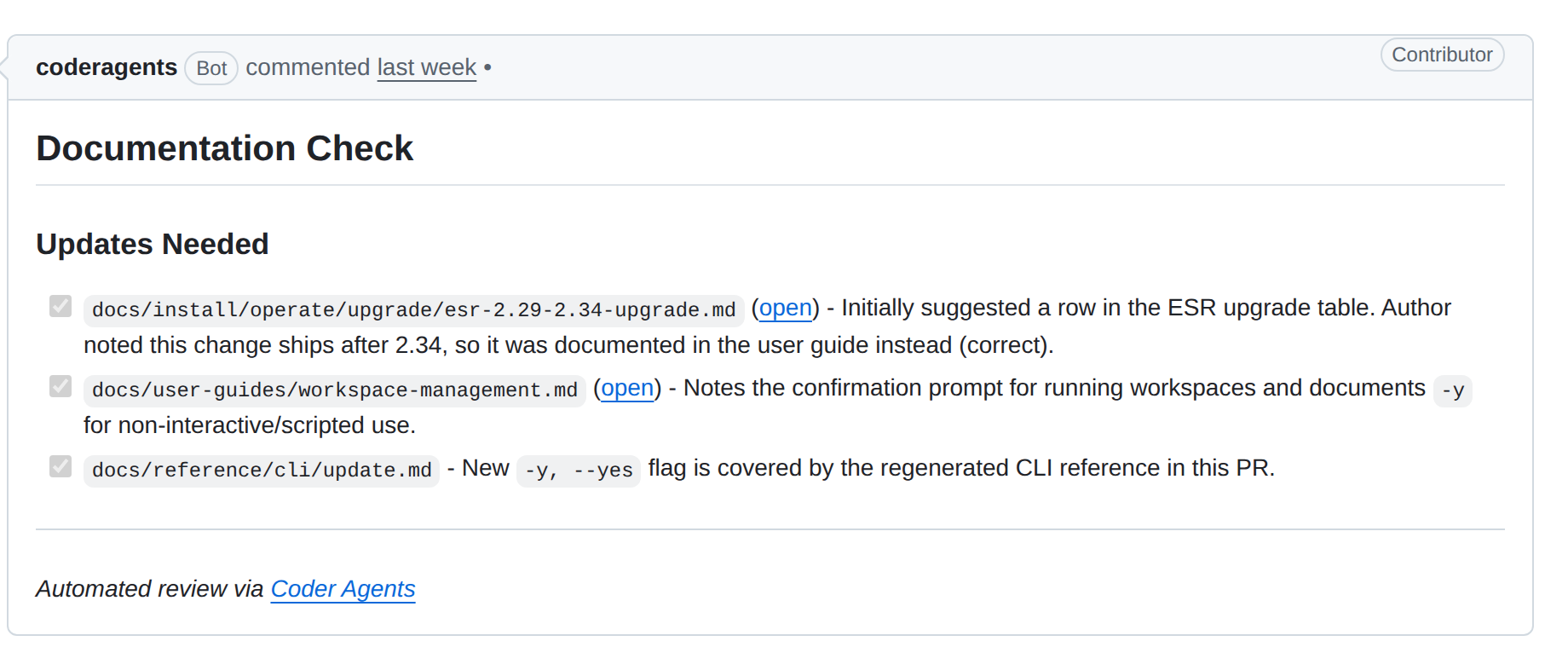
Our doc-check workflow runs on every PR in coder/coder when it’s opened, pushed to, or marked ready for review. It starts a Coder Agents chat with agents-chat-action, and the agent follows our doc-check skill: read the diff with gh, search the docs, and comment only if something is missing or wrong.
Here’s a real one. PR #30150 changed coder update so it asks for confirmation before restarting a running workspace, and added a -y flag to skip the prompt. Small change, regenerated CLI reference, done? Not quite. About three and a half hours after the PR opened, doc-check posted this:
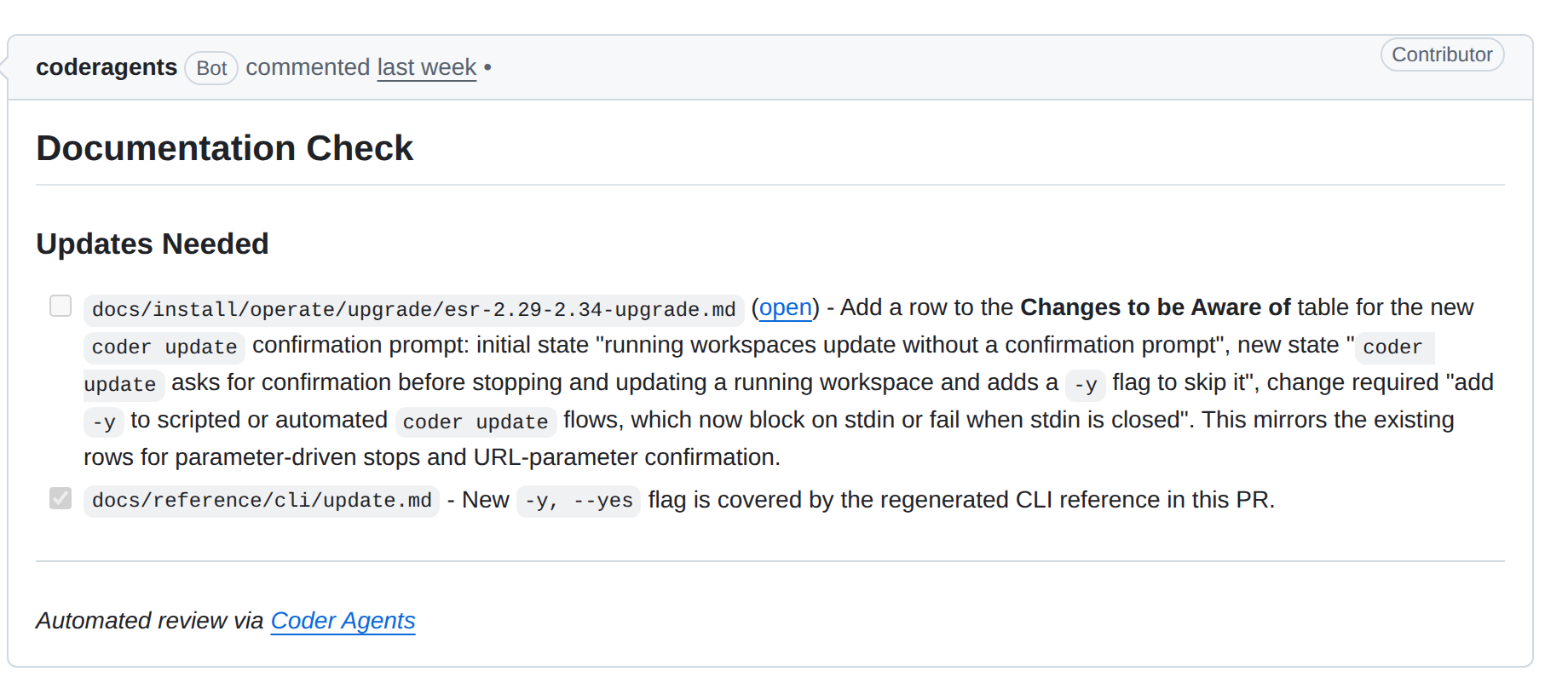 Doc-check’s first pass on coder/coder#30150 (original revision, from the comment’s edit history). Source: github.com/coder/coder/pull/30150#issuecomment-5903582023
That’s the catch a person would make on a good day. Anyone with coder update in a script (e.g., a nightly job that updates workspaces) would now hang on a prompt, or fail when stdin is closed. Doc-check wanted that called out for admins upgrading.
It also wasn’t quite right. It suggested a row in the 2.29 to 2.34 ESR upgrade guide, but this change ships after 2.34. The author pushed a docs commit to the user guide instead and explained why in the PR description:
 The PR description on coder/coder#30150. Source: github.com/coder/coder/pull/30150
The push re-ran doc-check, which read the new commit and the description, agreed, and updated the same comment:
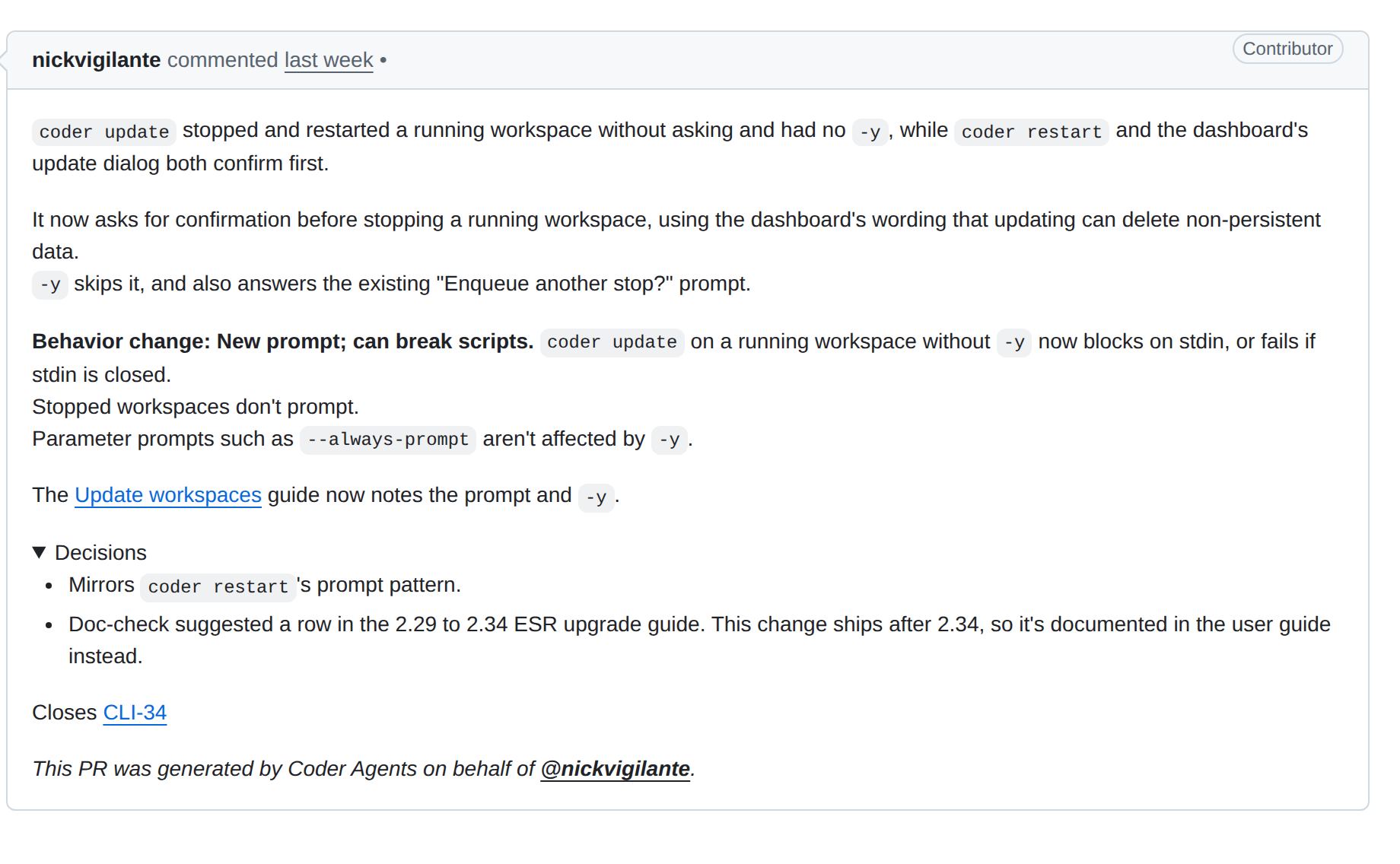 The same doc-check comment after the docs commit. Source: github.com/coder/coder/pull/30150#issuecomment-5903582023
One comment, updated in place, and the PR merged the same day with the docs in it. Nobody had to remember to ask.
A few things we had to get right:
- Not every PR needs a review. A PR that only touches tests, lockfiles, or CSS can’t change the docs, so the workflow skips it before starting anything. Adding the doc-check label forces a review anyway.
- Keep the prompt short. The rules live in the skill, and the prompt just says “review PR #N, here’s why you’re running.” Improving the review means editing one Markdown file.
- One comment, not ten. The agent updates a single sticky comment on the PR, and stays quiet when the docs are fine.
- Zombie workspaces add up. Too many review workspaces left running overload the host, so each PR gets one workspace that the workflow stops after every review and deletes on merge.
- Silence can’t mean “fine” if the agent never looked. If the agent can’t reach its workspace, it has to say it couldn’t review the PR.
Example 2: module scorecards in the Coder Registry
What makes a good Coder Registry module? For a long time, the answer lived in a few reviewers’ heads (e.g., “does this work air-gapped?”, “are secrets marked sensitive?”).
We wrote it down in SCORECARD.md: plain-English criteria for onboarding, credential hygiene, restricted environments, and test coverage, plus a track for agent, IDE, or utility modules. A weekly workflow scores every module in the coder namespace against it and keeps one GitHub Discussion per module, plus a pinned index. Change the rubric and everything gets re-scored. Change a module and just that module does.
The scores are honest, and that includes the skeletons in our own closet. Here’s what a module’s scorecard looks like to anyone browsing the registry repo, using our Claude Code module:
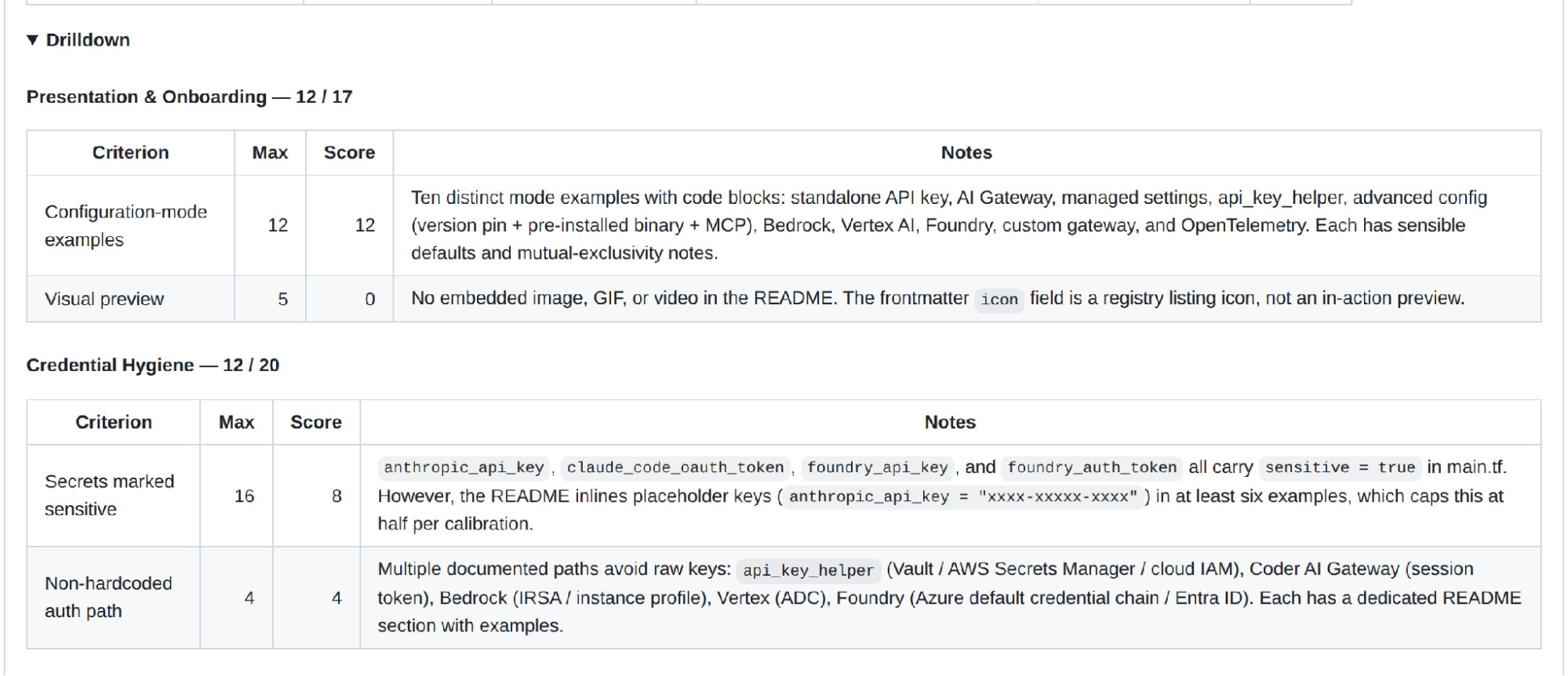
The Claude Code module scorecard in coder/registry. Source: github.com/coder/registry/discussions/970
65 out of 100 for our own Claude Code module. The drilldown says exactly why: there’s no screenshot or GIF in the README, and at least six examples inline a placeholder API key.
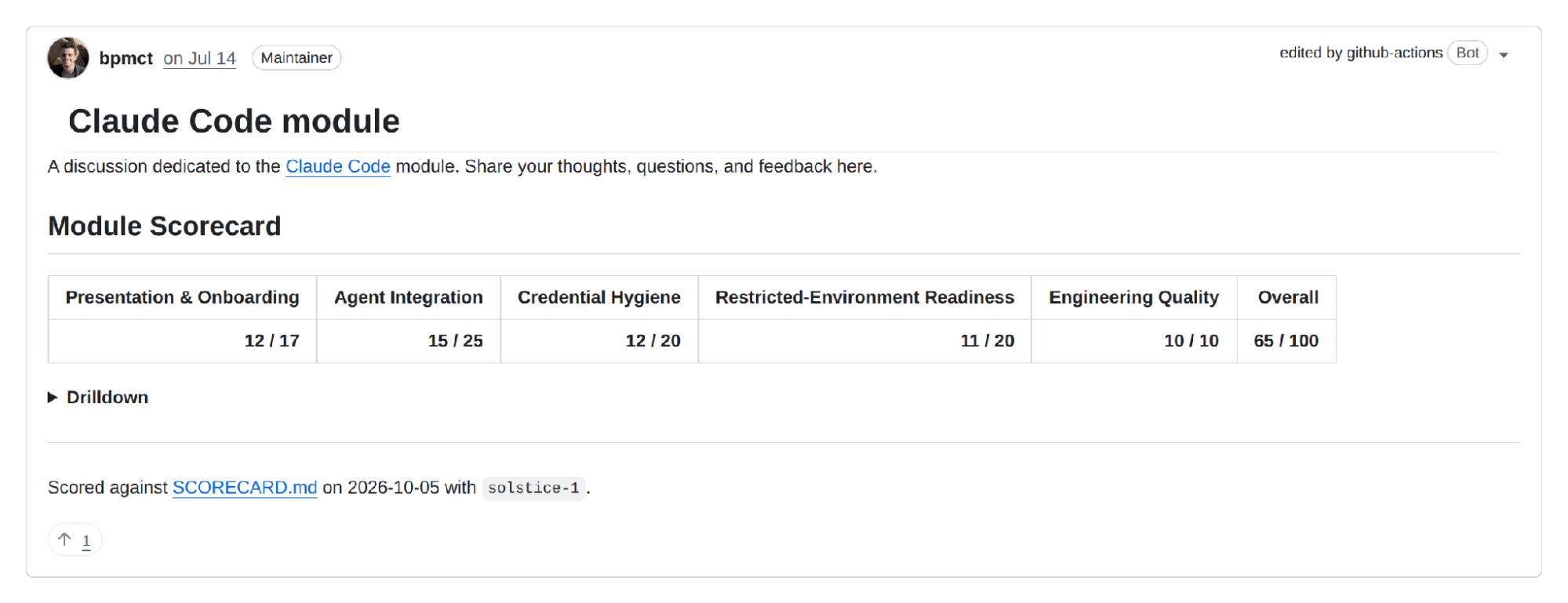 The drilldown on the same scorecard. Source: github.com/coder/registry/discussions/970
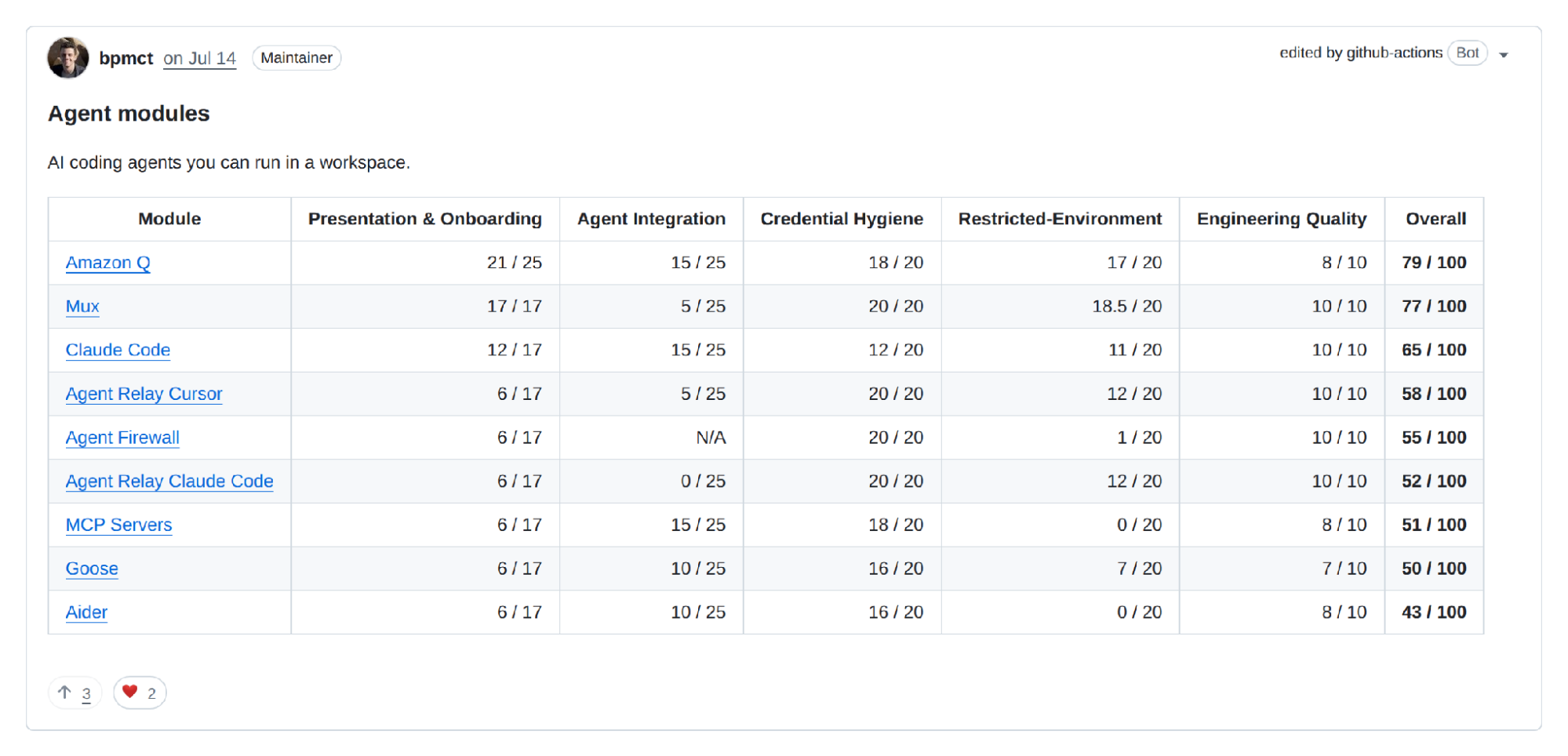
That’s not a gate. It’s a backlog anyone can pick up, and the pinned index says so, with every module ranked in one place:
 Agent modules in the pinned Module Scorecards index. Source: github.com/coder/registry/discussions/1011
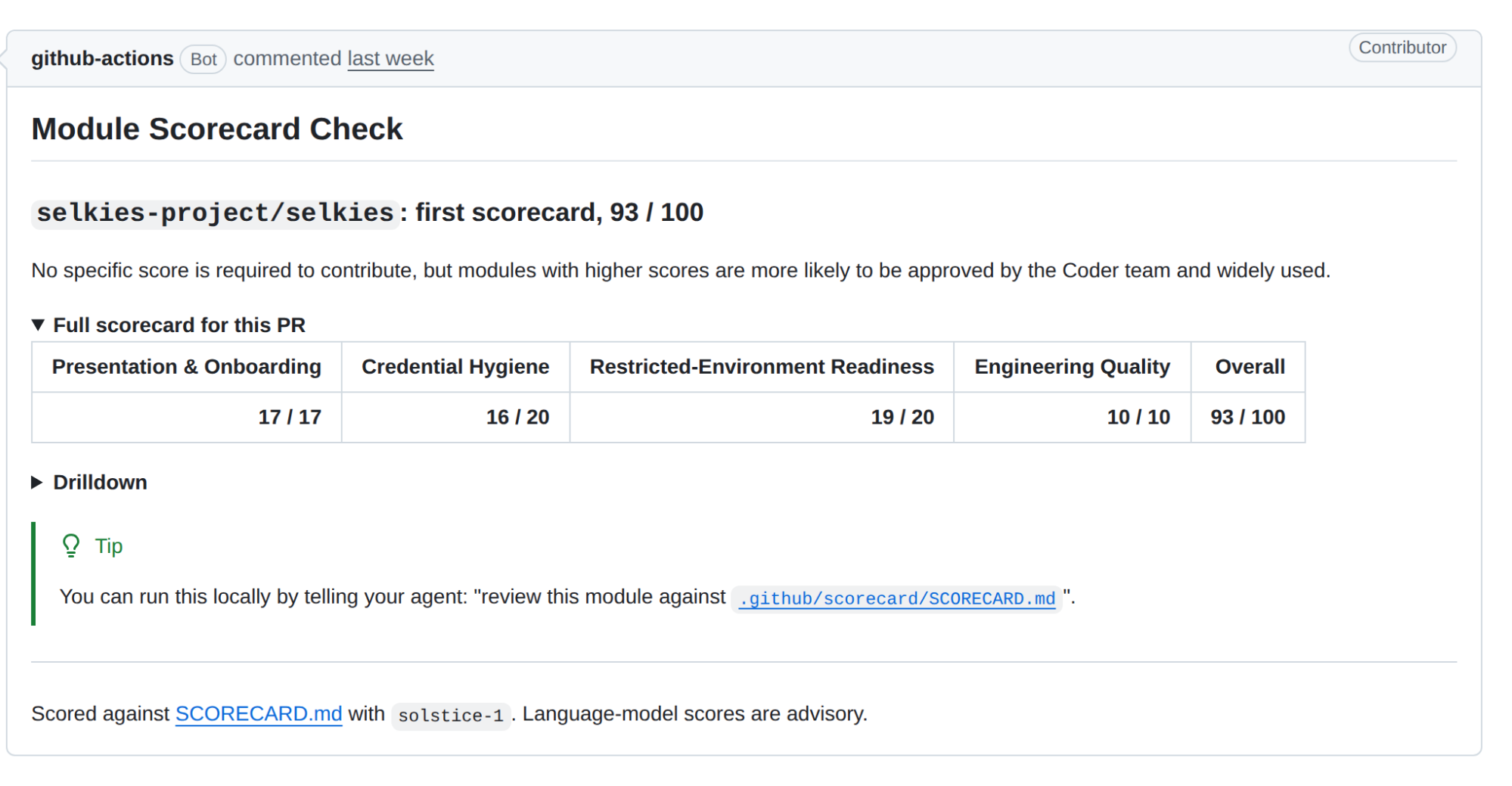
PRs get a check too. When someone contributed a Selkies desktop module, it got a 93/100 scorecard as a PR comment, with notes on every criterion. Maintainers can comment /scorecard to run it on PRs from forks.
 The scorecard check on a new module PR. Source: github.com/coder/registry/pull/1149#issuecomment-5870184919
Some jobs, like this on, don’t always need a full agent with a workspace. It’s a single call per module through our AI Gateway, and a script adds up the points. Grading a few files against a rubric doesn’t need much more. Doc-check does, because it has to go digging through the docs.
Example 3: a first pass on new issues
Triage is the chore where we least want an agent to run ahead. Our triage workflow starts when someone adds the chat-triage label to an issue. It creates a chat through the Chats API and comments the link back on the issue.
The prompt is simple: read the issue and comments, find the root cause, write a plan, and wait for approval before writing any code. The person who labeled the issue gets a head start, not a jump-scare PR.
Example 4: code review with a panel of agents
Code review is where we’ve pushed this furthest. A single agent reading a big diff tends to find the obvious things and miss the rest, the same way a single human reviewer does. So we built a panel.
An author comments /coder-agents-review on a PR in coder/coder. An internal service picks up the comment and opens a Coder Agents chat for that PR (one chat per PR, reused every round) that runs a deep review. You can read a version of the deep-review skill and its reviewer roles in coder/coder. The skill sizes up the change, then spawns reviewers in parallel by specialty (e.g., security, concurrency, database, test coverage, product). It cross-checks what they found, looking for places where reviewers agree and places where they contradict each other, and posts one GitHub review with inline comments and severities from P0 to P4. Small or docs-only PRs get pointed at a lighter review or doc-check instead.
The interesting part is the rounds. On the next /coder-agents-review, the same chat reads the author’s replies and the diff since last time, checks off what was fixed, and only raises what’s new. Findings keep the same ID across rounds, so nothing gets lost or comes back from the dead.
Here’s round 3 on PR #29314, which generates our Prometheus metrics docs from source:
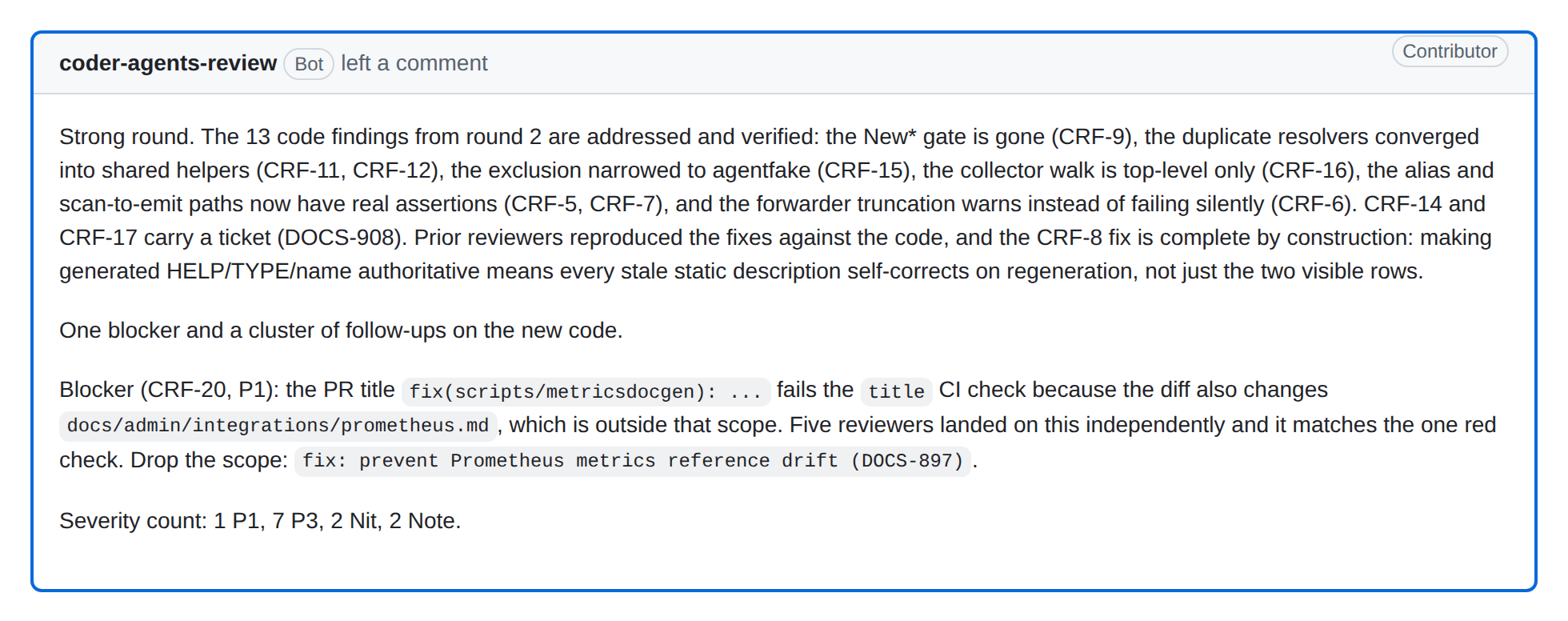 Round 3 of the review panel on coder/coder#29314. Source: github.com/coder/coder/pull/29314#pullrequestreview-5204536355
Round 1 was a quick mechanical pass. Round 2 brought in the full panel (12 reviewers), and four of them independently reproduced the PR’s main claim that the generated page is byte-identical to the hand-written one. One reviewer tried to argue the whole approach was wrong. It couldn’t make the case, and the review explains why. By round 3, the 13 findings from round 2 were verified fixed, and five reviewers had landed on the same blocker on their own.
On smaller PRs the loop is faster. PR #30164 went through seven rounds in a little over two hours before the panel approved it, each round opening with what was fixed since the last one. Authors can even hand the back and forth to their own agent with our coder-agents-review skill: fix, push, ask for another round, repeat until approved. A person still merges.
Putting it together: find, fix, check again
You can try this loop yourself in Coder for Software Teams, a hands-on course on coder.com/learn. It runs in a sandbox with its own Coder deployment and Git server, so there’s nothing to install and nothing left lurking in the shadows.
In the automated workflows challenge, a PR adds a genre filter to an API without documenting it. Doc-check flags it. You ask a Coder Agents chat to fix the docs on that branch, the push re-runs the check, and the comment flips to “All docs up to date.” The background job found the gap, a person directed the fix, and the background job confirmed it.
In the issue backlog challenge, you work the same backlog two ways: once by asking an agent in chat, and once by assigning an issue to agent-bot and letting a workflow pick it up. Both come back as draft PRs under your name, with branch protection as the checkpoint.
None of this needs much glue or dark magic. The script the course uses to start a chat from CI is basically one curl:
Looking forward
Building doc-check and the other jobs above taught us a few lessons that apply to any background job:
- Start with chores. Docs reviews, standards checks, and triage are low risk and easy to judge. Nobody misses doing them by hand.
- Write the standard down. A skill or rubric in the repo is something people can review, argue about, and improve in a PR.
- Post where people already look. One PR comment or one discussion per module. Silence when there’s nothing to say.
- Keep a person in front of the merge. Background jobs comment, score, and plan. People still approve.
- Advice first, gates later. The module scorecard isn’t blocking anything today, and that’s why people trust it.
Looking ahead, not every one of these jobs has to start in CI. Scheduled Slack reports, recurring dashboards, data pipelines could all work.
We think this is where a lot of agent work ends up: not one developer babysitting one session, but a handful of quiet jobs that keep the codebase in better shape every time something changes. The work itself isn’t exciting, and nothing goes bump in the night, but that’s a nightmare we don’t want to deal with anyway.
Try it yourself
The fastest way to see this in action is Coder for Software Teams, our hands-on course on coder.com/learn. In about 35 minutes, you’ll get a workspace with Claude Code, hand an issue to an agent, and watch doc-check flag a PR and then clear it after you fix the docs. Everything runs in a sandbox, so there’s nothing to install.
Alternatively, you can learn about Coder agents in our documentation or contact sales.