Coder powers secure, scalable development across key industries — automotive, finance, government, and technology — enabling faster builds, tighter compliance, and seamless AI adoption in enterprise-grade cloud environments.
If it takes your workspace a long time to start, find out why and make some
changes to your Coder templates to help speed things up.
Monitoring
You can monitor Coder logs through the
system-native tools on your deployment platform, or stream logs to tools like
Splunk, Datadog, Grafana Loki, and others.
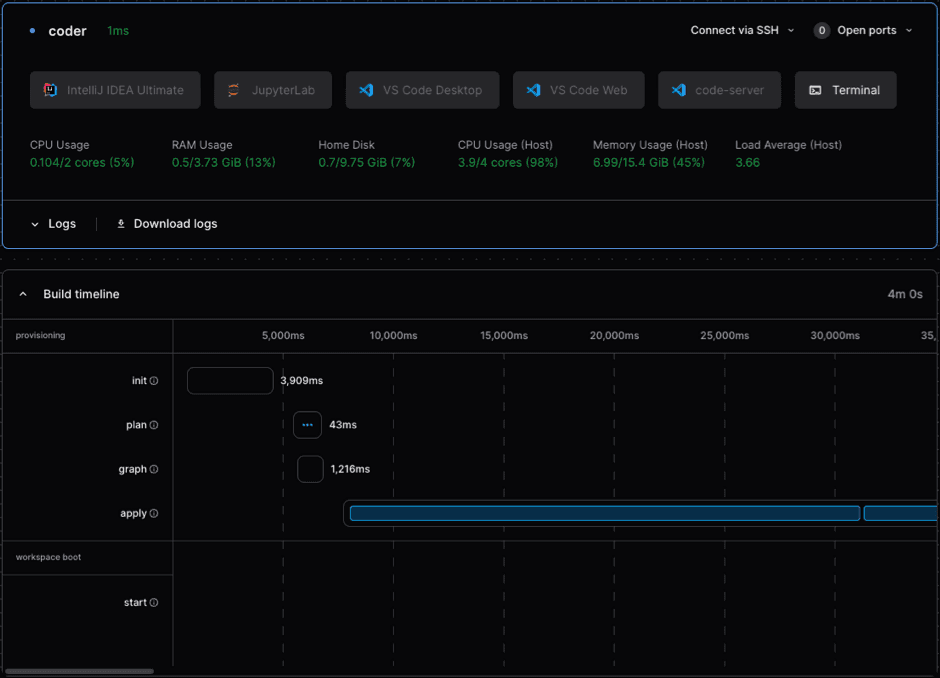
Workspace build timeline
Use the Build timeline to monitor the time it takes to start specific
workspaces. Identify long scripts, resources, and other things you can
potentially optimize within the template.
Adjust this request to match your Coder access URL and workspace:
Use the Observability Helm chart for a
pre-built set of dashboards to monitor your control plane over time. It includes
Grafana, Prometheus, Loki, and Alert Manager out-of-the-box, and can be deployed
on your existing Grafana instance.
We recommend that all administrators deploying on Kubernetes or on an existing
Prometheus or Grafana stack set the observability bundle up with the control
plane from the start. For installation instructions, visit the
observability repository,
or our Kubernetes installation guide.
Enable Prometheus metrics for Coder
Prometheus.io
is included as part of the observability chart. It
offers a variety of
available metrics,
such as coderd_provisionerd_job_timings_seconds and
coderd_agentstats_startup_script_seconds, which measure how long the workspace
takes to provision and how long the startup script takes.
coder server defaults to three provisioner daemons. Each provisioner daemon
can handle one single job, such as start, stop, or delete at a time and can be
resource intensive. When all provisioners are busy, workspaces enter a "pending"
state until a provisioner becomes available.
Increase provisioner daemons
Provisioners are queue-based to reduce unpredictable load to the Coder server.
However, they can be scaled up to allow more concurrent provisioners. You risk
overloading the central Coder server if you use too many built-in provisioners,
so we recommend a maximum of five provisioners. For more than five provisioners,
we recommend that you move to
external provisioners.
If you can’t move to external provisioners, use the provisioner-daemons flag
to increase the number of provisioner daemons to five:
coder server --provisioner-daemons=5
Visit the
CLI documentation for
more information about increasing provisioner daemons, configuring external
provisioners, and other options.
Adjust provisioner CPU/memory
We recommend that you deploy Coder to its own respective Kubernetes cluster,
separate from production applications. Keep in mind that Coder runs development
workloads, so the cluster should be deployed as such, without production-level
configurations.