This post is adapted from a talk I gave at Open Source Summit Europe in Prague in October. The full talk is on YouTube.
For the last two months, we’ve been running open-weight models on a few desktop AI boxes in our Austin office. We’re still early, but I couldn’t find many candid accounts of how a team actually does this, so here’s ours.
This is a product manager’s take: adoption, use cases, and whether it was worth it. I’m not going to get into tokens per second, quantization, or which model is best this week.
What we do at Coder
Coder builds self-hosted cloud development environments and AI coding agents, and we use a lot of AI ourselves. We have about 210 employees, and our AI spend is tracking towards $5 million this year. A few power users and some workflows with no human attached make up a big share of that, so dividing by headcount tells you very little.
Cost reduction wasn’t the primary motivator for our local AI journey, though. Our customers kept asking about local LLMs and AI sovereignty, so we needed to understand the open-weight model stack.
Context on how we use AI
Our spend falls into two buckets:
Chat: Claude or ChatGPT, subscribed directly to the provider.
Coding: Claude Code, Coder Agents, OpenCode, and so on. People pick their own tools, but every request goes through our AI Gateway, which handles attribution, budgets, and which models people can use.
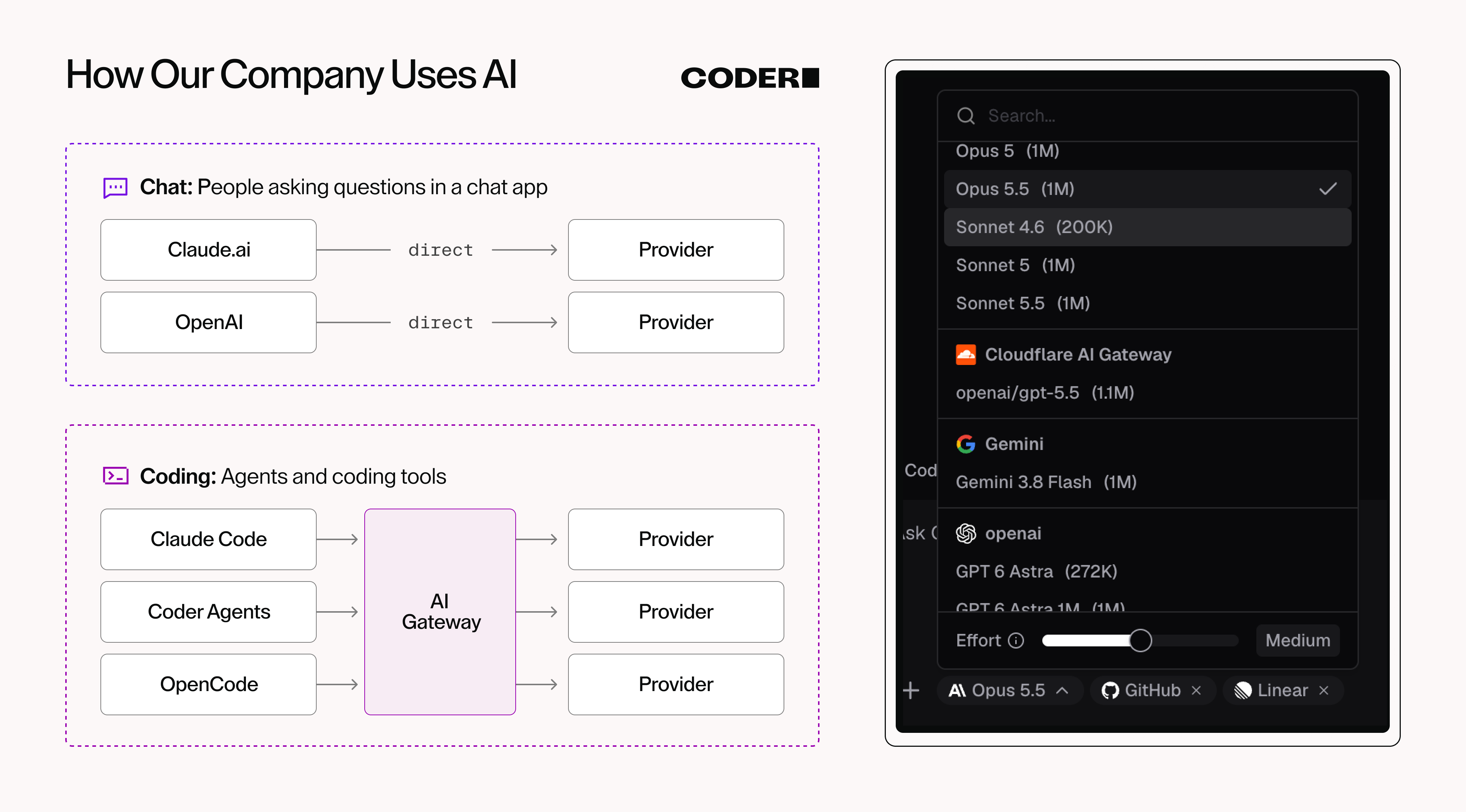 How requests get to a provider and the model picker. The list keeps going.
It started with an NVIDIA and Dell demo box
Solstice started with a demo box. NVIDIA and Dell gave us a Dell Pro Max with GB10, a desktop system for running AI models locally, to show at our conference booth We ran Coder on it for demos and that was the whole plan.
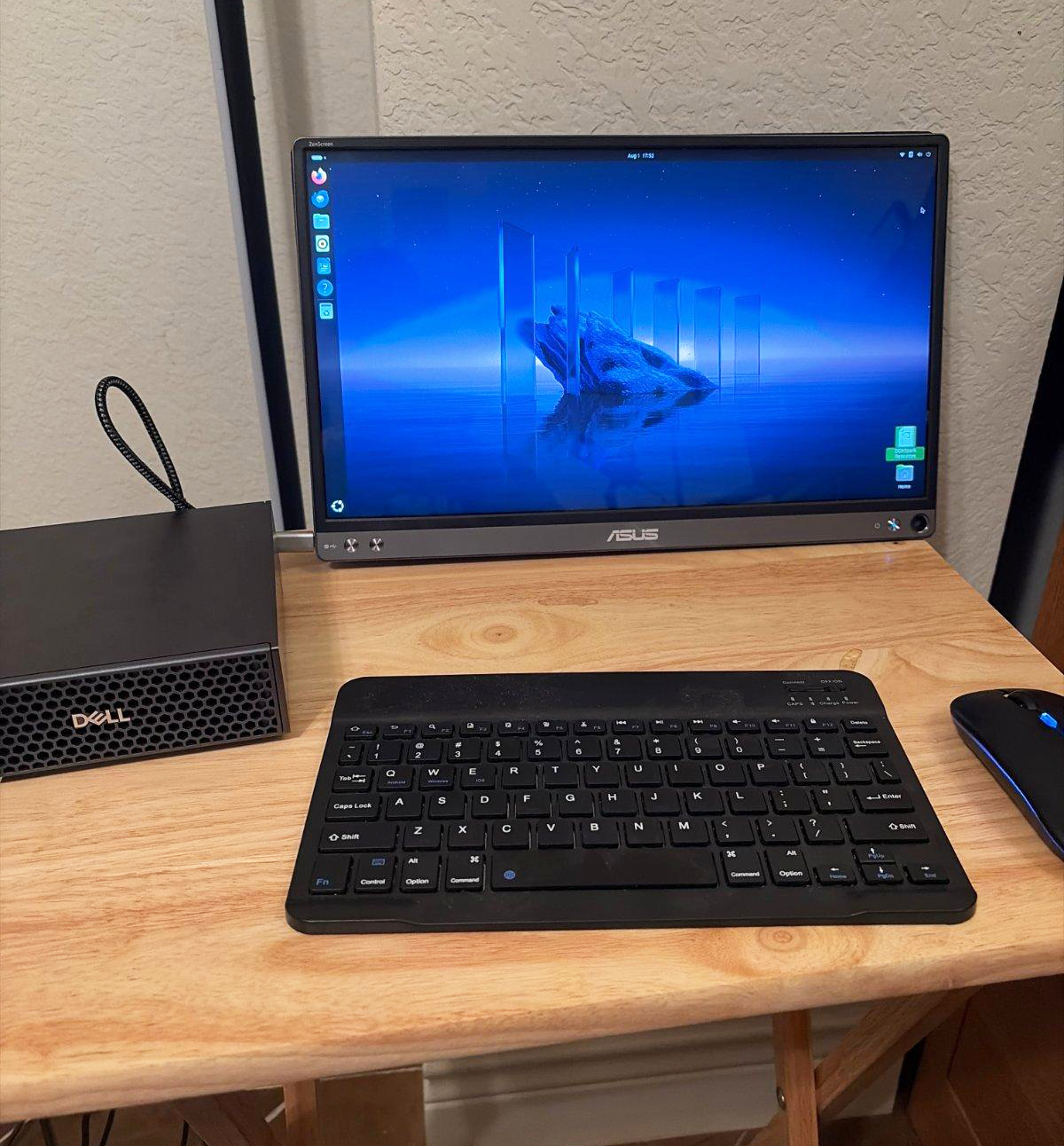 The first GB10 box with a portable monitor and keyboard, our whole demo setup
That partner connection has grown since. Coder has joined NVIDIA Inception, NVIDIA's startup program, and the Open Secure AI Alliance. Inception helps us grow our small setup into a reference architecture for governed agents on NVIDIA hardware. The Alliance holds that AI security depends on the full agent stack, from identity and permissions to guardrails and logs, which matches what we learned running local models behind AI Gateway and agent sandboxes.
Early adoption challenges
Once employees saw the demo boxes, they quickly asked how they could get one. So we bought a few more, and got stuck in what I called our local AI death loop:
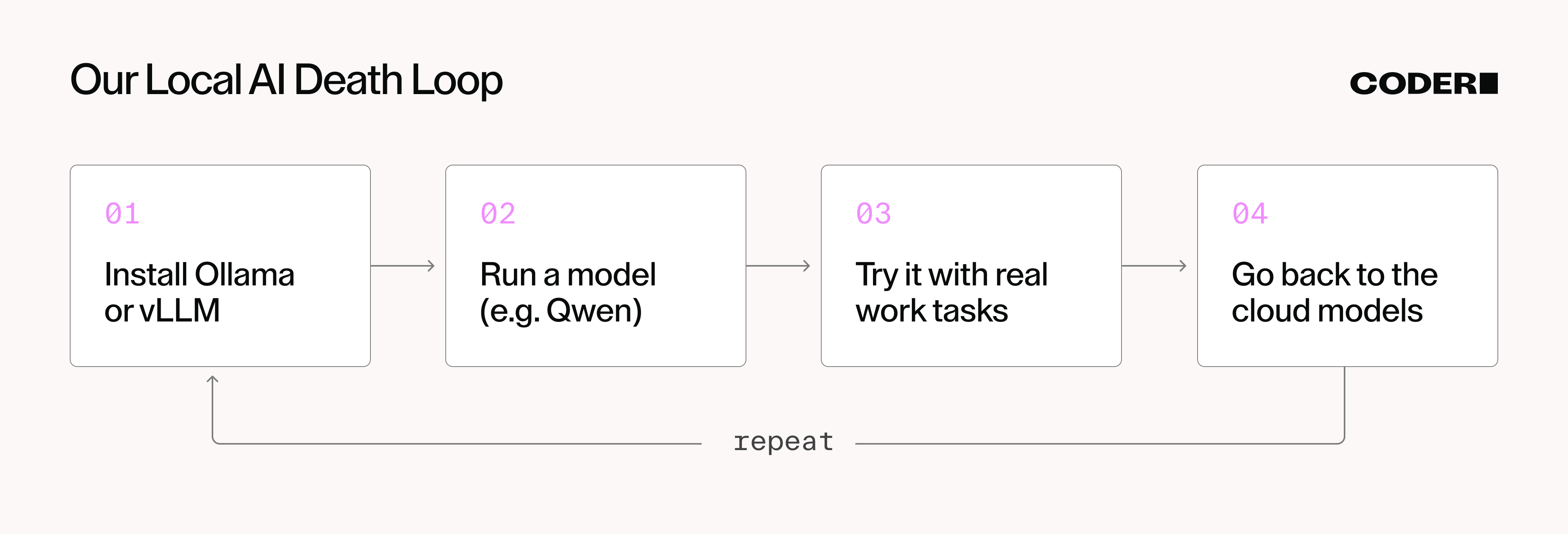
The cloud models were faster and better, so that’s where we kept ending up. I was worried that if we put a box on every desk, most of them would collect dust and we’d still be paying for the cloud.
A new strategy: “Project Solstice”
Since all coding LLM requests go through our AI Gateway, we added a virtual model to the picker next to the Anthropic and OpenAI models. We called it “Solstice,” where just like solar panels, you offset part of the bill with less expensive, local models and go back to the grid (cloud models) for the rest. Here’s how it works:
If the local cluster is online and not overloaded, the request goes there. We’re not paying for the token.
If the boxes are down or overloaded, the request falls back to Sonnet and we pay for it.
Under the hood it’s three layers: Coder AI Gateway for attribution, budgets, and session logging; Bifrost, an open-source gateway, for the switching; and a small shim I wrote that watches box temperature, concurrent requests, and vLLM status so Bifrost knows the load.
The interesting part to me is that adding a local model was a config change. Nobody had to change their tools, and the same attribution and audit trail applied whether a request landed on a GB10 or a frontier API.
We started with automations first
Still, most users still wouldn’t organically pick the model. If you can pick between a Lamborghini and a Civic for the same price, you pick the Lamborghini. Our real “users” were automations that had no choice: our background jobs, which make up roughly 20% of our coding agent spend.
We walked through several of these headless coding agents in a recent post:
doc-check reviews every PR and flags when docs need updating.
Code review spins up agents for security and architecture review on every PR.
Security triage sorts the real reports from the bogus, AI-generated ones on our open-source project.
Module scorecard grades integrations in our registry.
As a plus, the inputs and outputs of these workflows are much more deterministic, compared to someone vibe coding or writing a feature.
Cutting one workflow’s cost by 99%
doc-check is an automation that posts a GitHub comment on the PR that says which docs need updating. It’s a simple workflow, but I’m proud of it. It has led to a lot of documentation getting written that otherwise wouldn’t have.
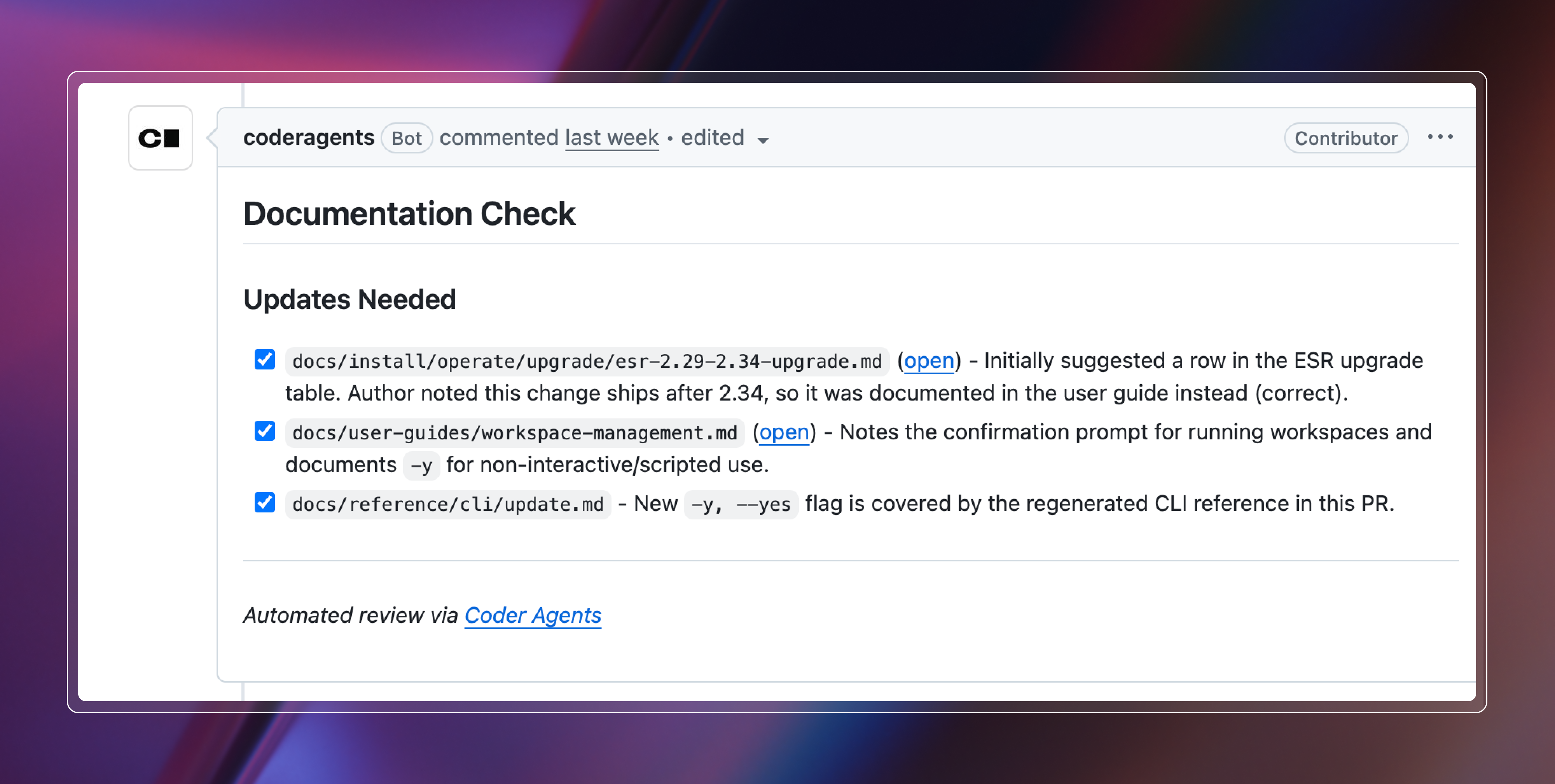 A doc-check comment on a pull request listing the docs that need updates
However, we built it before anyone was thinking about AI cost, so it ran on Opus consuming huge amounts of tokens. With 50 to 100 PRs a day, that was about \$1,750 a month. On one local box it’s now a little under \$11 a month, which is mostly the power it costs to run it. At \$8,000 for a box, this one workflow pays it back in a little over four months.
Switching it over wasn’t painless. We tried a benchmarking loop where a smarter model rewrote the prompt and re-ran the last 100 jobs. Each cycle took 7 hours and progress went up and down. What actually worked was switching the model, watching it fail in a Slack channel, and fixing the prompt by hand. After about 80 good runs we turned the notifications off.
The prompt changes were basic: always look at the code, check these specific parts, use these tools in this order. Opus just did that on its own. The smaller model needed it spelled out.
Scaling the program
We bought more boxes. Three are stacked in the office with a fan pointed at them, and a few went to employees who wanted to run them at home.
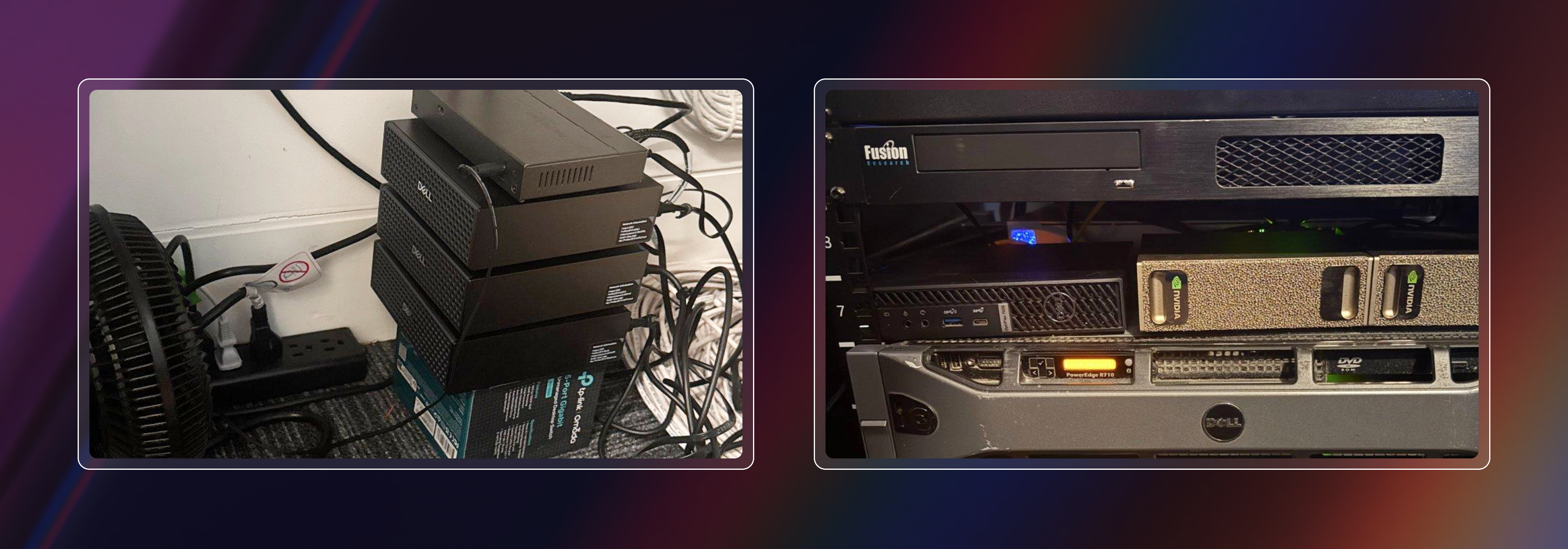 Our setup at the Austin office and a coworker’s home rack
We split the routing into two models: a slow, cheap one (Qwen 3.8) on one box for async jobs like doc-check, where a 30-minute run is fine, and a faster one (DeepSeek V4) across two boxes for interactive use. Both still fall back to Sonnet. I’m not going to spend time on the models, since next month something better will come out.
Adoption was still low and spiky. Asking people to choose a less capable model for interactive work was a hard sell, and hardware we had already paid for needed a steady workload to justify itself.
Auditing 750 issues over a weekend
So I gave it a job I’d never send to a cloud model. On a Friday evening I asked it to go through roughly 750 open issues in our open-source repo and flag which ones were already fixed, duplicated, or stale. I don’t write complicated prompts.
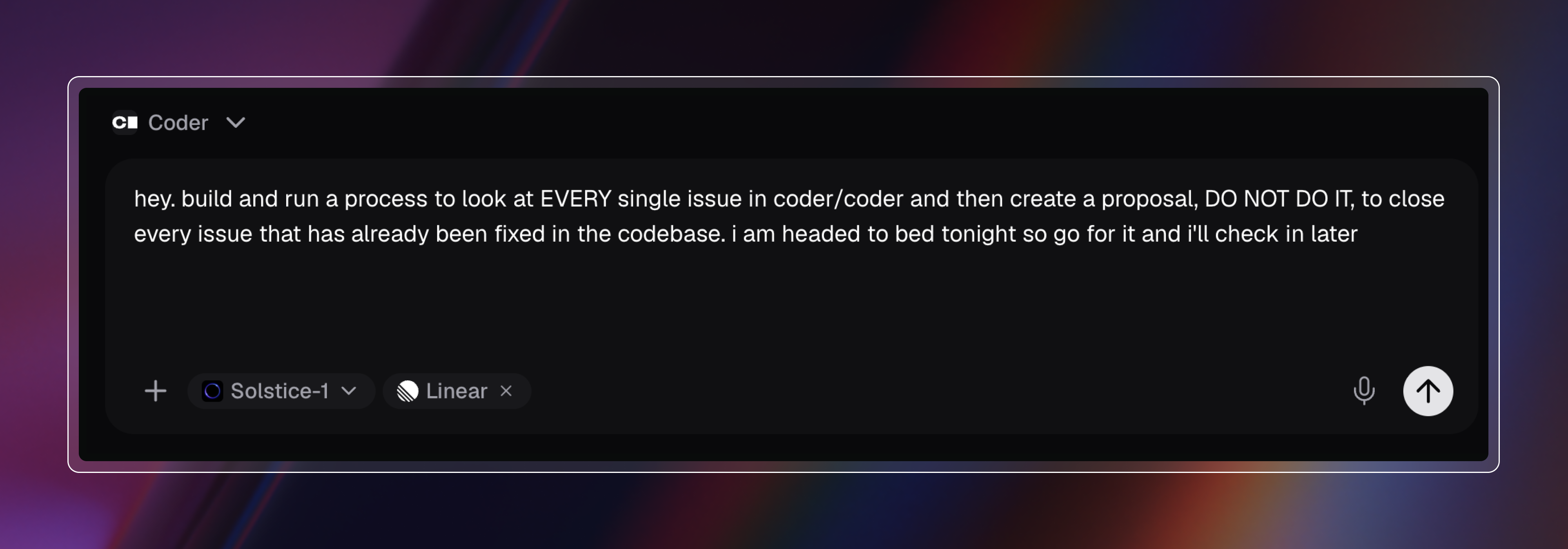 The prompt: build and run a process to look at every issue in coder/coder and propose which ones to close, then check in later
It ran for 56 hours and flagged about 100 issues to close. I went through the top 30 by hand and closed 29 of them.
It cost about \$130, not \$0, because my fallback config was tuned for interactive use and sent some requests to Sonnet. For a job like this I’d rather it queued and took 60 hours.
Lessons learned
The biggest lesson we took away from Project Solstice is to own the layer every request goes through. Once that layer exists, local models, cloud-hosted open-weight models, routing by request type, and stricter budgets all become options you can turn on. Local hardware on its own won't get you off any single provider.
Here’s what else we learned:
- The boxes do pay for themselves on the right work. doc-check alone covers the cost of one in a little over four months.
- That work is almost always asynchronous, because these boxes are slower and less capable than Sonnet even at zero load.
- Benchmarks could never tell us as much as giving the model an actual job and grading its output.
- Local models need more sandboxing, not less. We trust them less than cloud models, so agents run in isolated workspaces behind Agent Firewall's default-deny allowlist.
While we are thrilled with the results of this experiment, none of it offsets our multi-million dollar AI bill. Most of our spend is synchronous chat and coding, which our AI boxes can't handle yet. While optimizing our hardware and running more open-weight models can help, simple things like asking a few power users to dial back can cut spending with no hardware or software changes at all.
Where your team could start
You don't need a server rack or a big budget to try this. Most of what worked for us came down to picking the right first workflow and watching it closely.
Here's where we'd start:
- Automated workflows. List every automation that calls an LLM on a trigger or schedule, along with the model it uses.
- Centralize AI use via a gateway. You can't move work you can't see, which is why our AI Operating Layer whitepaper puts spend visibility at the foundation. Attribution by user and workflow is what showed us doc-check was worth moving.
- Start with one workflow on one box. Pick a job where a slow answer is fine, swap the model, and grade the output by hand until you trust it. A single desktop system like the Dell GB10 we started with is enough.
- Design for fallback. Interactive work should fail over to the cloud quickly. Async work can wait in a queue for free.
- Use spare capacity for work you'd never pay for. Repo audits, backlog cleanup, and long-running analysis become affordable when the hardware is already sitting there.
Next up for us, we're moving more workflows over, starting with customer call transcript analysis we'd rather keep off third-party APIs. In the meantime, you can watch the full talk from Open Source Summit Europe or see how AI Gateway gives you the attribution and routing to run your own experiment.
If you’re running something similar I’d like to hear about it. Feel free to reach out on Discord, and if you want to run Coder on your own hardware, we have a home lab program there too.