Coder powers secure, scalable development across key industries — automotive, finance, government, and technology — enabling faster builds, tighter compliance, and seamless AI adoption in enterprise-grade cloud environments.
Providers are deployment-scoped and managed from the dashboard or the
AI Providers API. See
Setup for the steps to add, edit, and
disable a provider.
This page covers the provider types AI Gateway supports, the setup
considerations for each, how a provider's lifecycle affects request
handling, and how to monitor providers.
Database management of providers
Note
Since v2.34, provider environment variables and flags, including
CODER_AI_GATEWAY_PROVIDER_<N>_*, CODER_AI_GATEWAY_OPENAI_*,
CODER_AI_GATEWAY_ANTHROPIC_*, and their --aibridge/ai-gateway-*
equivalents, are deprecated. Provider configuration is now stored in
the database, and any environment variables set on startup are used to
seed it.
This is a once-off operation. The environment variables have no effect
once seeding has completed.
Any changes to the provider environment variables after seeding will
cause the server to fail to start, to prevent operators from updating a
configuration that is ineffectual.
The environment variables can be safely removed once seeding has
completed. Visit https://<your-coder-host>/ai/settings to see which
providers have been seeded.
After seeding, manage providers through the dashboard or API. A provider
that has been edited or removed there is not recreated or overwritten
from the environment on the next restart.
Provider types
AI Gateway speaks two upstream API formats: the OpenAI format
(Chat Completions and Responses) and the Anthropic format
(Messages). Every provider type maps to one of these.
Type
API format
Setup notes
openai
OpenAI
Native OpenAI, or any OpenAI-compatible endpoint via the base URL
anthropic
Anthropic
Native Anthropic, or an Anthropic-compatible broker
bedrock
Anthropic
Anthropic models hosted on AWS Bedrock; authenticates via AWS
copilot
OpenAI
GitHub Copilot; authenticates via each user's GitHub OAuth token
azure
OpenAI
OpenAI-compatible endpoint only
google
OpenAI
OpenAI-compatible endpoint only
openrouter
OpenAI
OpenAI-compatible endpoint only
vercel
OpenAI
OpenAI-compatible endpoint only
openai-compat
OpenAI
Generic OpenAI-compatible endpoint
azure, google, openrouter, vercel, and openai-compat are
supported only as OpenAI-compatible endpoints: AI Gateway sends them
OpenAI-format requests, so each must expose an OpenAI-compatible API at
its base URL. They have no provider-specific integration beyond that.
OpenAI
Set the base URL to the upstream endpoint and provide an API key. The
default https://api.openai.com/v1/ targets the native OpenAI service;
point it at any OpenAI-compatible endpoint (for example, a hosted proxy
or LiteLLM deployment) when needed.
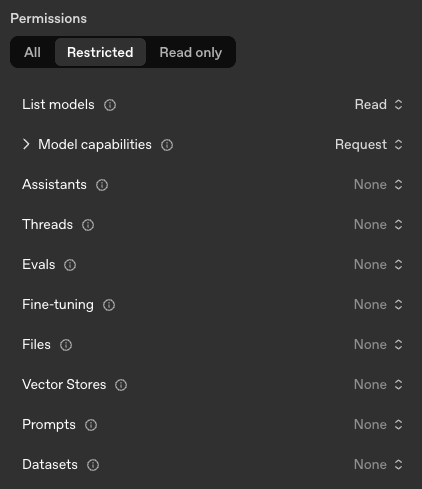
If you create an OpenAI key
with minimal privileges, this is the minimum required set:
Anthropic
Set the base URL and provide an API key. The default
https://api.anthropic.com/ targets Anthropic's public API; override it
for Anthropic-compatible brokers.
Anthropic does not allow API keys
to have restricted permissions at the time of writing (June 2026).
Amazon Bedrock
Bedrock providers serve Anthropic models hosted on AWS and authenticate
with AWS credentials rather than a registered API key. Configure:
A region (or a full base URL when routing through a proxy or a
non-standard endpoint that does not follow the
https://bedrock-runtime.<region>.amazonaws.com format).
The model and small fast model identifiers.
Do not attach API keys to a Bedrock provider.
AI Gateway resolves AWS credentials one of two ways:
AWS SDK default credential chain (recommended). When no explicit
credentials are configured, the AWS SDK resolves them automatically
from the environment: IAM Roles (instance profiles, IRSA, ECS task
roles), shared config files, environment variables, SSO, and more.
Attaching an IAM Role to the compute running Coder follows
AWS best practices
for temporary credentials. The role must permit bedrock:InvokeModel
and bedrock:InvokeModelWithResponseStream for the configured models.
Static credentials. Provide an access key and secret for an IAM
user with the same Bedrock permissions.
GitHub Copilot
GitHub Copilot offers three plans: Individual, Business, and Enterprise,
each with its own API endpoint. Add one copilot provider per plan your
organization uses, setting the base URL accordingly:
Plan
Base URL
Individual
https://api.individual.githubcopilot.com
Business
https://api.business.githubcopilot.com
Enterprise
https://api.enterprise.githubcopilot.com
Copilot providers authenticate with each user's request-time GitHub
OAuth token, so do not attach API keys. For client-side setup (proxy,
certificates, IDE configuration), see
GitHub Copilot client configuration.
OpenAI-compatible providers
Azure-hosted OpenAI, Google, OpenRouter, Vercel, and any other
OpenAI-compatible service are configured with the matching type (or the
generic openai-compat), the provider's OpenAI-compatible base URL, and
an API key.
Note
See the Supported APIs section for
precise endpoint coverage and interception behavior.
Provider lifecycle
Every provider carries an explicit status, surfaced through the
provider_info metric and the API:
Status
Meaning
Effect on requests
enabled
Configuration is valid and the provider is serving traffic
Requests are proxied to the upstream
disabled
The provider exists but has been turned off
Requests are rejected with a non-retryable error
error
The provider is enabled but cannot be built (missing credentials, bad config)
Requests fail; the error is surfaced in metrics
Disabling a provider does not delete it, its credentials, or its
historical interception data. Re-enabling restores it to service.
Monitoring and reloads
Provider configuration changes take effect automatically, without
restarting coderd. AI Gateway records the timestamp of each reload
attempt and each successful reload, exposed as Prometheus metrics:
If you run the external proxy, it exposes
the same pair under the coder_aibridgeproxyd_ prefix.
A growing gap between the attempt and success timestamps means reloads
are firing but failing to apply. Alert on that gap rather than on a
single failure, which may resolve on the next change. See
Monitoring for the full metric list
and sample alert queries.
Key failover
You can configure multiple centralized API keys for a single provider instance
so that AI Gateway automatically retries with the next key when one fails. This
is transparent to end users, and clients see no difference in behavior or need
any configuration changes.
Key failover is supported for OpenAI and Anthropic providers. Amazon
Bedrock and GitHub Copilot do not support key failover.
Multiple keys can be added per provider through the
AI Providers API. Each provider supports
a maximum of 5 keys.
Failover behavior
Every request starts with the first key in the list. If a key is rate-limited
or returns an authentication error, AI Gateway automatically retries the request
with the next available key.
Warning
A key that fails with an authentication error (401 Unauthorized or
403 Forbidden) is permanently disabled and will not be used again until the
server is restarted or the provider configuration is reloaded.
If all keys in the pool are exhausted, AI Gateway returns:
429 Too Many Requests when at least one key is rate-limited, with a Retry-After header set to the shortest cooldown across all keys.
502 Bad Gateway when every key has failed permanently.
Bring Your Own Key
A provider's configured credentials are the centralized default. When
Bring Your Own Key (BYOK) is enabled, a user's own credential takes
precedence over the provider's for that user's requests, and AI Gateway
falls back to the provider credentials when the user has none. See
Authentication for the BYOK flow
and how to enable or disable it.
Failure modes
Symptom
Likely cause
Corrective action
Startup fails referencing an existing provider
Env config drifted from a provider already in the database