Coder powers secure, scalable development across key industries — automotive, finance, government, and technology — enabling faster builds, tighter compliance, and seamless AI adoption in enterprise-grade cloud environments.
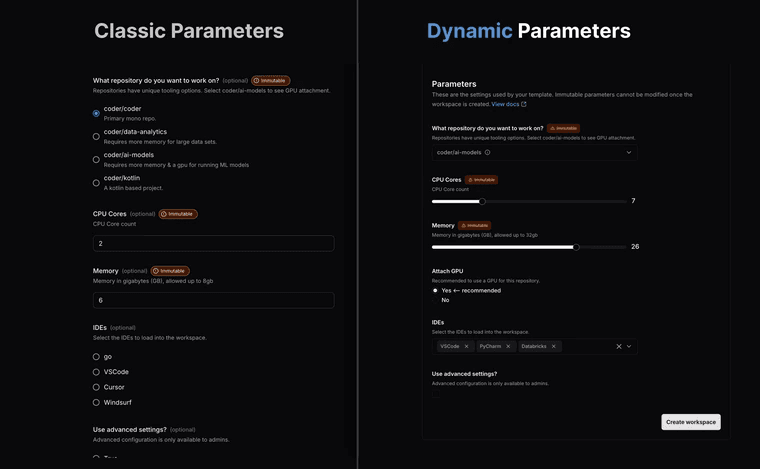
Coder v2.24.0 introduces Dynamic Parameters to extend Coder parameters with conditional form controls,
enriched input types, and user identity awareness.
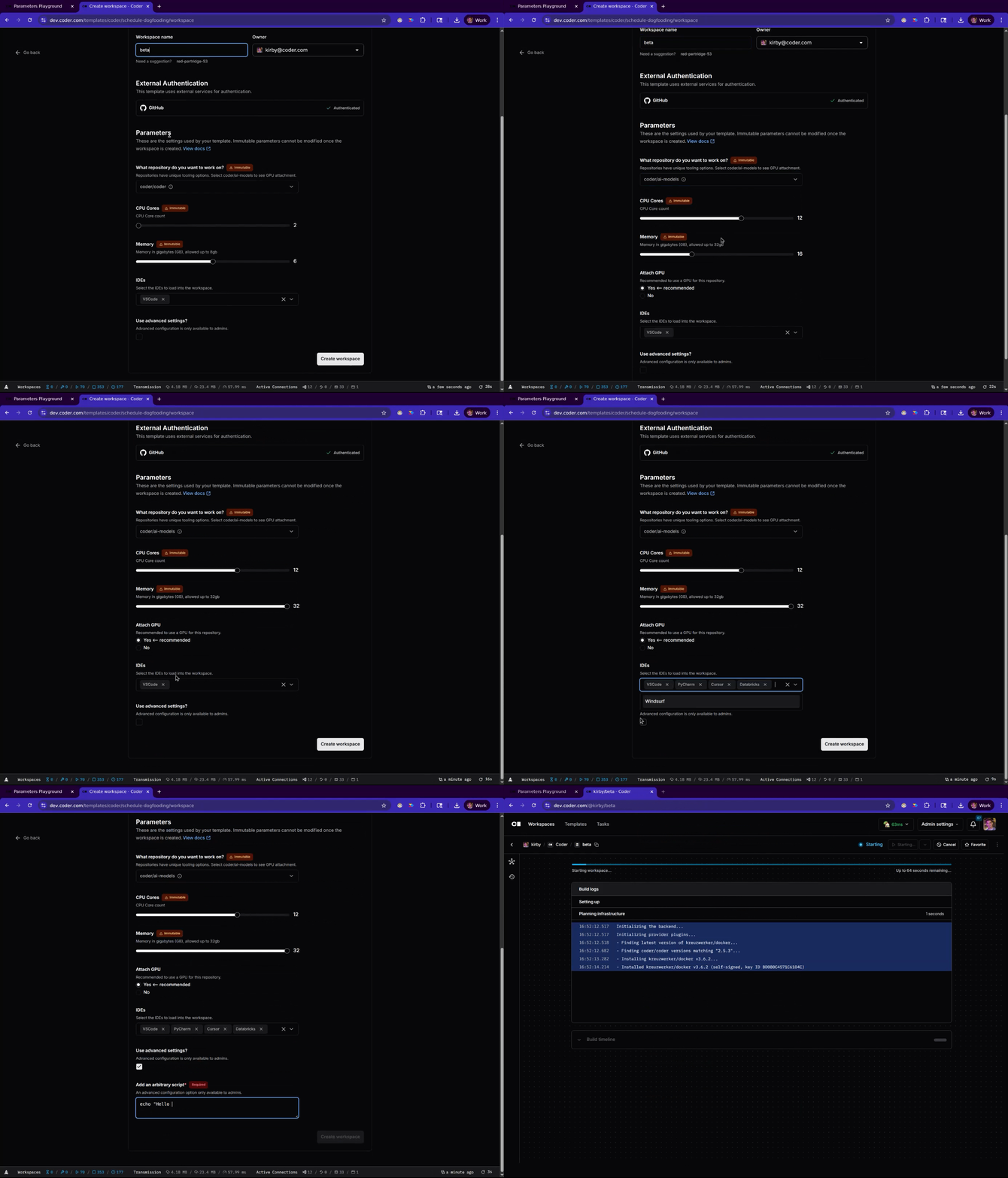
This allows template authors to create interactive workspace creation forms with more environment customization,
and that means fewer templates to maintain.
All parameters are parsed from Terraform, so your workspace creation forms live in the same location as your provisioning code.
You can use all the native Terraform functions and conditionality to create a self-service tooling catalog for every template.
Administrators can use Dynamic Parameters to:
Create parameters which respond to the inputs of others.
Only show parameters when other input criteria are met.
Only show select parameters to target Coder roles or groups.
You can try the Dynamic Parameter syntax and any of the code examples below in the
Parameters Playground.
You should experiment with parameters in the playground before you upgrade live templates.
When You Should Upgrade to Dynamic Parameters
While Dynamic parameters introduce a variety of new powerful tools, all functionality is backwards compatible with
existing coder templates.
When you opt-in to the new experience, no functional changes will be applied to your production parameters.
Some reasons Coder template admins should try Dynamic Parameters:
You maintain or support many templates for teams with unique expectations or use cases.
You want to selectively expose privileged workspace options to admins, power users, or personas.
You want to make the workspace creation flow more ergonomic for developers.
Dynamic Parameters help you reduce template duplication by setting the conditions for which users should see specific parameters.
They reduce the potential complexity of user-facing configuration by allowing administrators to organize a long list of options into interactive, branching paths for workspace customization.
They allow you to set resource guardrails by referencing Coder identity in the coder_workspace_owner data source.
How to use Dynamic Parameters
Dynamic Parameters is the standard workspace creation experience.
In Coder v2.25.0 and later it is enabled automatically, and the classic parameter flow is deprecated.
To use the features described on this page in an existing template:
Update your template to use version >=2.4.0 of the Coder provider with the following Terraform block.
Note that these new features must be declared in your Terraform to start leveraging Dynamic Parameters.
Save and publish the template.
Users should see the updated workspace creation form.
Dynamic Parameters are backwards compatible: switching a template does not change how its existing parameters behave.
If a template's active version was published before Dynamic Parameters, publish a new version to generate the metadata the new form requires.
Upgrade from parameter compatibility mode
Parameter compatibility mode keeps a template on the classic parameter flow.
Coder maintains a separate code path for that flow. It will be removed in a future release, so templates that
use compatibility mode need to be upgraded before then.
To find templates that use compatibility mode, open the Templates page and select the
Templates using compatibility mode filter, or search for compatibility_mode:true.
Select Settings > Parameters on the template, then clear
Use parameter compatibility mode for workspace builds.
Publish a new template version so Coder can resolve the parameter metadata.
If you don't need to change the Terraform, refresh the template data
to publish a new version from the existing source files.
Open the workspace creation form and confirm the parameters render as expected.
You can make the same change through the use_classic_parameter_flow field in the
templates API.
Coder reads Terraform data sources once, when it imports a template version, and stores the results.
Rendering the form evaluates your parameter expressions against those stored results, so a data source whose underlying value changes in your cloud or cluster keeps returning the imported value.
The coder_workspace_owner data source is the exception.
Coder substitutes the identity of the user filling in the form each time it renders, which is what makes Identity-Aware Parameters work.
To pick up a change to any other data source, refresh the template data.
This imports the active version's source files again and publishes the result as a new active version.
Features and Capabilities
Dynamic Parameters introduces three primary enhancements to the standard parameter system:
Conditional Parameters
Parameters can respond to changes in other parameters
Show or hide parameters based on other selections
Modify validation rules conditionally
Create branching paths in workspace creation forms
Conditionally hide parameters based on user's role
Change parameter options based on user groups
Reference user name, groups, and roles in parameter text
Additional Form Inputs
Searchable dropdown lists for easier selection
Multi-select options for choosing multiple items
Secret text inputs for sensitive information
Slider input for disk size, model temperature
Disabled parameters to display immutable data
Important
Dynamic Parameters does not support external data fetching via HTTP endpoints at workspace build time.
External fetching would introduce unpredictability in workspace builds after publishing a template.
Instead, we recommend that template administrators pull in any required data for a workspace build as a
locals or JSON file,
then reference that data in Terraform.
If you have a use case for external data fetching, please file an issue or create a discussion in the
Coder GitHub repository.
Available Form Input Types
Dynamic Parameters supports a variety of form types to create rich, interactive user experiences.
Different parameter types support different form types.
You can specify the form type using the
form_type attribute.
The Options column in the table below indicates whether the form type supports options (Yes) or doesn't support them (No).
When supported, you can specify options using one or more option blocks in your parameter definition,
where each option has a name (displayed to the user) and a value (used in your template logic).
Form Type
Parameter Types
Options
Notes
radio
string, number, bool, list(string)
Yes
Radio buttons for selecting a single option with all choices visible at once. The classic parameter option.
dropdown
string, number
Yes
Choose a single option from a searchable dropdown list. Default for string or number parameters with options.
multi-select
list(string)
Yes
Select multiple items from a searchable dropdown list. Selected items are shown as removable chips.
tag-select
list(string)
No
Default for list(string) parameters without options.
input
string, number
No
Standard single-line text input field. Default for string/number parameters without options.
textarea
string
No
Multi-line text input field for longer content.
slider
number
No
Slider selection with min/max validation for numeric values.
checkbox
bool
No
A single checkbox for boolean parameters. Default for boolean parameters.
Available Styling Options
The coder_parameter resource supports an additional styling attribute for special cosmetic changes that can be used
to further customize the workspace creation form.
This can be used for:
Masking private inputs
Marking inputs as read-only
Setting placeholder text
Note that the styling attribute should not be used as a governance tool, since it only changes how the interactive
form is displayed.
Users can avoid restrictions like disabled if they create a workspace via the CLI.
Not all styling attributes are supported by all form types, use the reference below for syntax:
Styling Option
Compatible parameter types
Compatible form types
Notes
disabled
All parameter types
All form types
Disables the form control when true.
placeholder
string
input, textarea
Sets placeholder text. This is overwritten by user entry.
mask_input
string, number
input, textarea
Masks inputs as asterisks (*). Used to cosmetically hide token or password entry.
Use Case Examples
New Form Types
The following examples show some basic usage of the
form_type
attribute explained above.
These are used to change the input style of form controls in the create workspace form.
Single-select parameters with options can use the form_type="dropdown" attribute for better organization.
data "coder_parameter" "show_cpu_cores" {
  name         = "show_cpu_cores"
  display_name = "Toggles next parameter"
  description  = "Select this checkbox to show the CPU cores parameter."
  type         = "bool"
  form_type    = "checkbox"
  default      = false
  order        = 1
}

data "coder_parameter" "cpu_cores" {
  # Only show this parameter if the previous box is selected.
  count = data.coder_parameter.show_cpu_cores.value ? 1 : 0

  name         = "cpu_cores"
  display_name = "CPU Cores"
  type         = "number"
  form_type    = "slider"
  default      = 2
  order        = 2
  validation {
    min = 1
    max = 8
  }
}
Premium users can leverage our roles and groups to conditionally expose or change parameters based on user identity.
This is helpful for establishing governance policy directly in the workspace creation form,
rather than creating multiple templates to manage RBAC.
User identity is referenced in Terraform by reading the
coder_workspace_owner data source.
Template administrators often want to expose certain experimental or unstable options only to those with elevated roles.
You can now do this by setting count based on a user's group or role, referencing the
coder_workspace_owner
data source.
locals {
  roles = [for r in data.coder_workspace_owner.me.rbac_roles: r.name]
  is_admin = contains(data.coder_workspace_owner.me.groups, "admin")
  has_admin_role = contains(local.roles, "owner")
}

data "coder_workspace_owner" "me" {}

data "coder_parameter" "advanced_settings" {
  # This parameter is only visible when the user is an administrator
  count = local.is_admin ? 1 : 0

  name         = "advanced_settings"
  display_name = "Add an arbitrary script"
  description  = "An advanced configuration option only available to admins."
  type         = "string"
  form_type    = "textarea"
  mutable      = true
  order        = 5

  styling = jsonencode({
    placeholder = <<-EOT
  #!/usr/bin/env bash
  while true; do
    echo "hello world"
    sleep 1
  done
  EOT
  })
}
Troubleshooting
Dynamic Parameters is now in general availability. We're tracking a list of known issues here in Github as we continue to polish and improve the workflow.
If you have any issues during upgrade, please file an issue in our
GitHub repository with the parameters label and include a
Playground link where applicable.
We appreciate the feedback and look forward to what the community creates with this system!
Enabling Dynamic Parameters on an existing template requires administrators to publish a new template version.
This will resolve the necessary template metadata to render the form.
To publish one without editing the template's Terraform, refresh the template data.
Revert to classic parameters
The classic parameter flow is deprecated and will be removed in a future release.
If a template does not work with Dynamic Parameters, you can opt that template out.
Select Settings > Parameters on the template, then select Use parameter compatibility mode for workspace builds.
You can also set the use_classic_parameter_flow field through the
templates API.
If your template's parameters do not work with Dynamic Parameters, please
file an issue with the parameters label.
Template variables not showing up
Dynamic Parameters are GA as of v2.25.0. Template variables are fully supported in Dynamic Parameters.
If you are experiencing issues with template variables, try upgrading to the latest version. Otherwise, please file an issue in our Github.
Can I use registry modules with Dynamic Parameters?
Yes, registry modules are supported with Dynamic Parameters.
Unless explicitly mentioned, no registry modules require Dynamic Parameters.
Later in 2025, more registry modules will be converted to Dynamic Parameters to improve their UX.
In the meantime, you can safely convert existing templates and build new parameters on top of the functionality provided in the registry.
"Module not loaded" errors when using Dynamic Parameters
Dynamic Parameters require Terraform modules to be archived and stored in the database. Coder limits module archives to 20 MB total to prevent database bloat. If your template uses modules that exceed this limit, some modules will be unavailable for parameter declarations.
Symptoms:
You may see warnings in the provisioner logs:
[API] 2026-01-29 22:00:22.691 [warn] provisionerd-nixos-0.executor: some (or all) terraform modules were not archived, template will have reduced function skipped_modules=large:git::https://github.com/coder/large-module.git
If encountered, reduce the size of the module by removing unnecessary files.
You can hit the same error for a different reason: if the active template
version has no cached module archive at all, the workspace creation form
shows a warning for every module in the template, for example:
Module not loaded. Did you run `terraform init`?
Module 'jetbrains' in file "main.tf:149,1-19" cannot be resolved. This module will be ignored.
This happens for template versions published before Coder started archiving
modules for Dynamic Parameters. Workspace builds still succeed, since
Terraform fetches modules from their original sources during the build
regardless of the cache; only the form's ability to evaluate module-backed
parameter values is affected. To fix it,
publish a new template version,
which re-runs terraform init and populates the archive for that version.
This archive is the same one Coder reuses across workspace builds to avoid
re-downloading modules. See module caching for
how to disable that behavior for a template.