Coder powers secure, scalable development across key industries — automotive, finance, government, and technology — enabling faster builds, tighter compliance, and seamless AI adoption in enterprise-grade cloud environments.
Groups are logical segmentations of users in Coder and can be used to control which templates developers can use.
For example:
Users within the devops group can access the AWS-VM template
Users within the data-science group can access the Jupyter-Kubernetes template
Roles
Roles determine which actions users can take within the platform.
The roles in the following table apply across the whole deployment.
Organizations have their own roles.
Refer to Organization roles for more information.
A user may have one or more roles.
Every user also holds an implicit Member role that covers their own account, such as reading their profile and managing their tokens.
The Member role doesn't grant workspace access on its own.
The ability to create and use workspaces comes from the organization's default member roles, which include Organization Workspace Access by default.
Refer to Default member roles for how to remove workspace operations from the default member set.
The preceding table describes a default deployment.
A deployment that sets CODER_DISABLE_OWNER_WORKSPACE_ACCESS removes the Owner role's SSH, application, and terminal access to other users' workspaces.
Owners keep that access to workspaces they own.
Refer to --disable-owner-workspace-access for the flag, environment variable, and YAML forms.
Organization roles
Organization roles apply inside a single organization rather than across the deployment.
A user who belongs to more than one organization can hold different organization roles in each one.
Assign organization roles from Admin settings > Organizations > Members, or sync them from your identity provider with IdP sync.
Coder ships the following organization roles:
Organization Admin:
manages the organization's templates, provisioners, groups, members, and organization role assignments.
Organization User Admin:
manages the organization's members, groups, and role assignments, including its IdP sync settings.
Organization Template Admin:
manages the organization's templates and provisioners, and reads its workspaces.
Organization Auditor:
reads the organization's audit logs and connection logs, along with the resources those logs reference.
Organization Workspace Access:
creates and operates the user's own workspaces in the organization.
Organization Workspace Creation Ban:
blocks creating and deleting workspaces in the organization, and overrides any role that would otherwise allow it.
Coder Agents User:
uses Coder Agents in the organization.
Members other than service accounts hold this role through the organization's default member roles unless an administrator removes it.
Organization Admin doesn't include SSH, application, or terminal access to workspaces other members own.
A user with that role can read, build, stop, and delete those workspaces.
Connecting to one requires access granted through workspace sharing.
Every member of an organization also holds an implicit organization membership role that the dashboard doesn't display.
That role carries the smallest permission set a member needs, such as reading the organization and their own membership record.
Service accounts hold an equivalent implicit role.
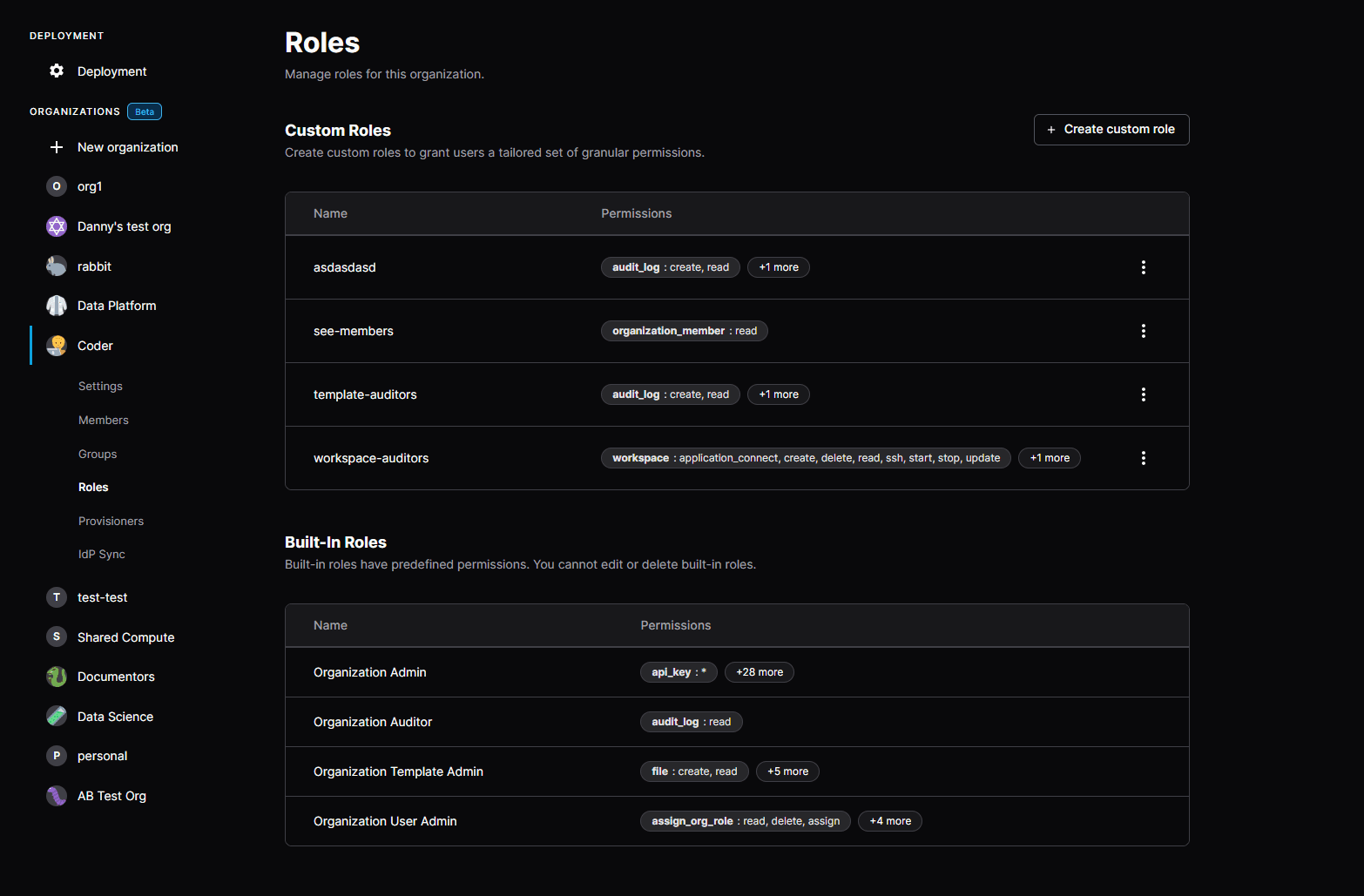
Starting in v2.16.0, Premium Coder deployments can configure custom roles on the Organization level.
You can create and assign custom roles in the dashboard under Organizations -> My Organization -> Roles.
Example roles
The Banking Compliance Auditor custom role cannot create workspaces, but can read template source code and view audit logs
The Organization Lead role can access user workspaces for troubleshooting purposes, but cannot edit templates
The Platform Member role cannot edit or create workspaces as they are created via a third-party system
A Health Check role can view deployment status but cannot create workspaces, manage templates, or view users
A CI role can update manage templates but cannot create workspaces or view users
Create custom roles
Selecting "Create custom role" opens a UI to select the desired permissions for a given persona.
From there, you can assign the custom role to any user in the organization under the Users settings in the dashboard.
Note that these permissions only apply to the scope of an organization, not across the deployment.
Security notes
A malicious Template Admin could write a template that executes commands on the host (or coder server container), which potentially escalates their privileges or shuts down the control plane.
To avoid this, run external provisioners.
In low-trust environments, we do not recommend giving users direct access to edit templates.
Instead, use CI/CD pipelines to update templates with proper security scans and code reviews in place.