Coder powers secure, scalable development across key industries — automotive, finance, government, and technology — enabling faster builds, tighter compliance, and seamless AI adoption in enterprise-grade cloud environments.
AI Gateway is part of AI Governance, which is included with a Premium license.
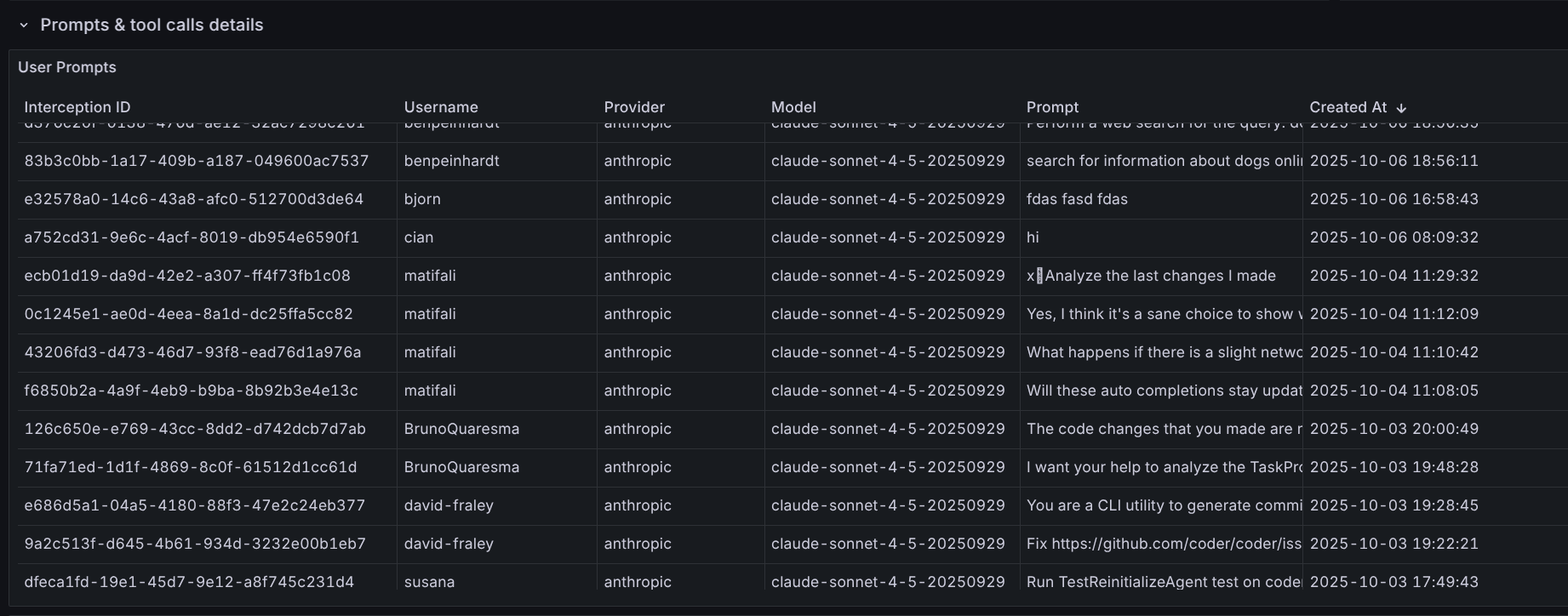
AI Gateway records the last user prompt, token usage, model reasoning, and every tool invocation for each intercepted request.
Each capture is tied to a single "interception" that maps back to the authenticated Coder identity, making it easy to attribute spend and behavior.
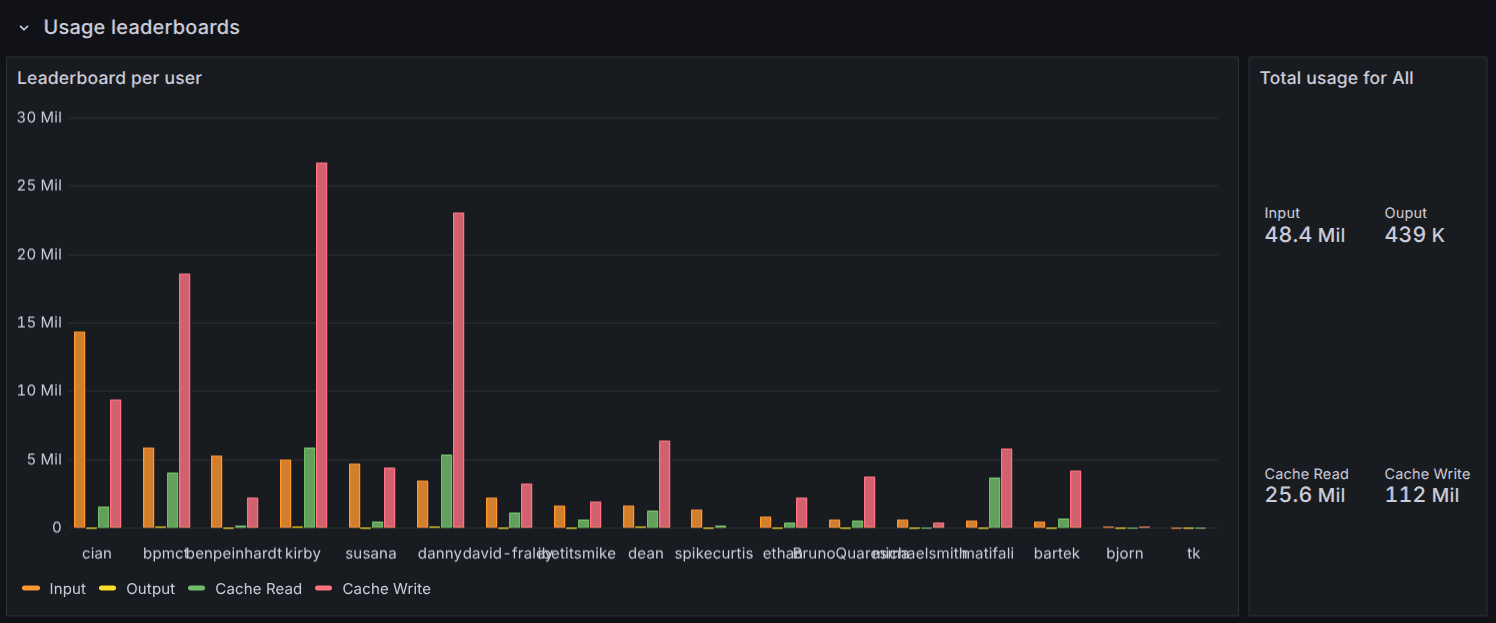
We provide an example Grafana dashboard that you can import as a starting point for your metrics.
Refer to the Grafana dashboard README.
These logs and metrics can be used to determine usage patterns, track costs, and evaluate tooling adoption.
Prometheus metrics
The embedded gateway and standalone gateway export the same AI Gateway request metrics.
Each process exports metrics for the traffic that it handles:
The Coder control plane (coderd) Prometheus listener exports metrics for the embedded gateway.
Each standalone gateway replica exports metrics from its own Prometheus listener.
Refer to provider configuration for the provider reload lifecycle these metrics describe.
The provider label is the provider instance name.
Some metrics use the explicit provider_name or provider_type labels for clarity.
Metric
Type
Labels
Purpose
coder_ai_gateway_interceptions_total
counter
client, initiator_id, method, model, provider, route, status
Intercepted requests.
coder_ai_gateway_interceptions_inflight
gauge
model, provider, route
Intercepted requests currently being processed.
coder_ai_gateway_interceptions_duration_seconds
histogram
model, provider
Total intercepted request duration, including upstream processing.
coder_ai_gateway_passthrough_total
counter
method, provider, route
Requests passed through to an upstream provider without interception.
Recorded token-usage records for which no price was found for either the requested or the provider-reported model. provider is the provider instance name, and provider_type is the configured type the price is keyed on, or unknown when the provider could not be resolved. model is the requested model, and provider_model is the model the provider reported, or empty when it didn't report one.
AI Gateway Proxy metrics
AI Gateway Proxy exports metrics from the coderd Prometheus listener.
A proxy_excluded status means another enabled provider with the same base URL hostname claimed the proxy route first.
The proxy classifier uses first-wins by database name sort order (ORDER BY name ASC), so the first provider in that order wins and subsequent providers with the same hostname are excluded from proxy routing.
They remain reachable via direct routing at /api/v2/ai-gateway/{name}/....
When alerting on coder_ai_gateway_proxy_provider_info, exclude proxy_excluded from the alert expression unless you want to be notified of intended duplicate-hostname configurations: status!~"enabled|proxy_excluded".
Metric
Type
Labels
Purpose
coder_ai_gateway_proxy_connect_sessions_total
counter
type
CONNECT sessions established, classified as mitm or tunneled.
coder_ai_gateway_proxy_mitm_requests_total
counter
provider
MITM requests handled by AI Gateway Proxy.
coder_ai_gateway_proxy_inflight_mitm_requests
gauge
provider
MITM requests currently being processed.
coder_ai_gateway_proxy_mitm_responses_total
counter
code, provider
MITM responses by HTTP status code.
coder_ai_gateway_proxy_provider_info
gauge
provider_name, provider_type, status
Routing status of each configured provider. Value is always 1; status is enabled, disabled, error, or proxy_excluded.
Unix timestamp of the last successful rebuild of the proxy routing snapshot.
Refer to the Prometheus reference for these metrics alongside the other metrics that Coder components export.
Metric name migration
Important
The embedded gateway metric prefix changed from coder_aibridged_* to coder_ai_gateway_*, and the proxy prefix changed from coder_aibridgeproxyd_* to coder_ai_gateway_proxy_*.
The embedded gateway and AI Gateway Proxy emit the legacy names with identical values during the v2.35 and v2.36 deprecation window, and the legacy names are planned for removal in v2.37.
The cost control metrics were added after the rename and have no legacy alias.
The standalone gateway emits only the current coder_ai_gateway_* names.
Migrate dashboards and alerts to the new names.
Do not relabel new names back to old names while both are emitted because this creates duplicate legacy series in the same scrape.
After the legacy names are removed, use metric_relabel_configs only if you need a temporary compatibility bridge:
metric_relabel_configs:
  # Proxy rule must come first; the gateway regex below also matches proxy metrics.
  - source_labels: [__name__]
    regex: 'coder_ai_gateway_proxy_(.*)'
    target_label: __name__
    replacement: 'coder_aibridgeproxyd_${1}'
  - source_labels: [__name__]
    regex: 'coder_ai_gateway_(.*)'
    target_label: __name__
    replacement: 'coder_aibridged_${1}'
Suggested alerts
Alert on any provider entering a non-enabled status:
sum by (instance, provider_name, status) (
  coder_ai_gateway_provider_info{status!="enabled"}
) > 0
Alert when the provider reload loop is firing but failing to refresh the pool for longer than a few minutes:
Use the coder_ai_gateway_proxy_* metrics when you alert on AI Gateway Proxy.
Standalone gateway monitoring
Metrics listener
Enable the standalone metrics listener with CODER_PROMETHEUS_ENABLE=true or --prometheus-enable, and set its bind address with CODER_PROMETHEUS_ADDRESS or --prometheus-address.
The command default is 127.0.0.1:2112.
The listener is unauthenticated, so expose it only to your monitoring network.
In addition to the common coder_ai_gateway_* metrics, the standalone listener exports standard unprefixed go_*, process_*, and promhttp_* metrics for the standalone process and its metrics handler.
Kubernetes discovery
The AI Gateway Helm chart enables metrics and binds the listener to 0.0.0.0:2112 by default.
The chart exposes a named metrics container port, but it does not include this port in the data-plane Service or create monitoring discovery resources.
For Prometheus pod-based discovery, add scrape annotations to each gateway pod:
You can also configure a PodMonitor to select the chart's app.kubernetes.io/name and app.kubernetes.io/instance pod labels, or add dedicated selector labels with coder.podLabels.
Manage the PodMonitor separately or include it in the Helm release with extraTemplates.
To use a ServiceMonitor, create a separate Service that exposes the metrics container port because the chart's data-plane Service exposes only the HTTP traffic port.
Refer to the Helm chart metrics configuration for the available chart settings.
Health and readiness
A standalone AI gateway exposes health endpoints on its data-plane listener:
Endpoint
Success condition
/healthz
The HTTP listener is serving.
/readyz
The control connection to coderd is active and the initial provider configuration fetch has completed.
/readyz returns HTTP 503 until the initial provider configuration fetch completes and whenever the control connection to coderd is unavailable.
The initial fetch can return an empty provider set.
A 200 OK response from /healthz only means the HTTP listener is accepting connections.
It returns 200 OK even when the control connection is down.
Both endpoints are unauthenticated, bypass the concurrency, rate limiting, and BYOK middleware, and do not create trace spans.
The standalone Helm chart enables a /healthz liveness probe and a /readyz readiness probe by default.
The startup probe is disabled by default.
Logs
Standalone operational logs
Standalone replicas use the standard Coder logging options.
Configure them on every replica or through coder.env in the AI Gateway Helm chart.
Refer to the coder ai-gateway start logging options for configuration details.
Structured interception logs
AI Gateway can emit a structured log for every interception record to an external SIEM or observability platform.
CODER_AI_GATEWAY_STRUCTURED_LOGGING enables the records, and CODER_AI_GATEWAY_STRUCTURED_LOGGING_SOURCE selects which process emits them.
Under the default source, coderd, standalone replicas send interception records to coderd, which writes the structured logs to the coderd log output.
Set the source to gateway or both on every process to have the gateway emit its own records, and ship the gateway's logs as well as coderd's.
Refer to structured logging for configuration and record types, and choose which process emits the records for the trade-offs between the sources.
Export data
AI Gateway interception data can be exported for external analysis, compliance reporting, or integration with log aggregation systems.
REST API
You can retrieve AI Gateway sessions via the Coder API, with filtering and pagination support.
curl -X GET "https://coder.example.com/api/v2/ai-gateway/sessions" \
  -H "Coder-Session-Token: $CODER_SESSION_TOKEN"
Available query filters:
client - Filter by client name.
Possible values are listed below.
initiator - Filter by user ID or username
provider - Filter by AI provider (for example, openai, anthropic)
model - Filter by model name
started_after - Filter sessions after a timestamp
started_before - Filter sessions before a timestamp
Possible client values
[!NOTE]
Client classification is done on best effort basis using the User-Agent header; not all clients send these headers in an easily-identifiable manner.
AI Gateway data is retained for 60 days by default.
Configure the retention period to balance storage costs with your organization's compliance and analysis needs.
For configuration options and details, refer to Data Retention in the AI Gateway setup guide.
Tracing
AI Gateway supports tracing through OpenTelemetry for request processing, upstream API calls, and MCP server interactions.
Embedded gateway spans are emitted by the coderd process.
Standalone spans are emitted independently by every replica with the service name coder-ai-gateway.
Enable tracing
AI Gateway exports spans over OTLP/gRPC when you set CODER_TRACE_ENABLE, honoring OTEL_EXPORTER_OTLP_TRACES_ENDPOINT.
The exporter always dials without TLS, so an https:// endpoint is still contacted over plaintext gRPC.
CODER_TRACE_HONEYCOMB_API_KEY adds a Honeycomb exporter and works with or without CODER_TRACE_ENABLE.
Set only the Honeycomb key to export to Honeycomb alone, or set both to export to Honeycomb and an OTLP collector.
The embedded and standalone gateways support the same tracing configuration options, but each standalone replica must be configured separately.
Refer to the coder server tracing options for the embedded gateway and the coder ai-gateway start tracing options for standalone replicas.
Configure tracing on every standalone process or through coder.env in the AI Gateway Helm chart.
The following minimal configuration enables tracing and exports spans over OTLP/gRPC:
In both deployment modes, each request to the gateway's LLM API endpoint creates an HTTP request span, including requests that are passed through or rejected instead of intercepted.
Traced operations
AI Gateway creates spans for the following operations:
Span name
Description
CachedBridgePool.Acquire
Acquiring a request bridge instance from the pool
Intercept
Top-level span for processing an intercepted request
Intercept.CreateInterceptor
Creating the request interceptor
Intercept.ProcessRequest
Processing the request through the bridge
Intercept.ProcessRequest.Upstream
Forwarding the request to the upstream AI provider
Intercept.ProcessRequest.ToolCall
Executing a tool call requested by the AI model
Intercept.RecordInterception
Creating the interception record
Intercept.RecordPromptUsage
Recording prompt and message data
Intercept.RecordTokenUsage
Recording token consumption
Intercept.RecordToolUsage
Recording tool and function calls
Intercept.RecordModelThought
Recording model reasoning
Intercept.RecordInterceptionEnded
Recording the interception as completed
Passthrough
Forwarding a non-intercepted provider request
ServerProxyManager.Init
Initializing MCP server proxy connections
StreamableHTTPServerProxy.Init
Setting up HTTP-based MCP server proxies
StreamableHTTPServerProxy.Init.fetchTools
Fetching available tools from MCP servers
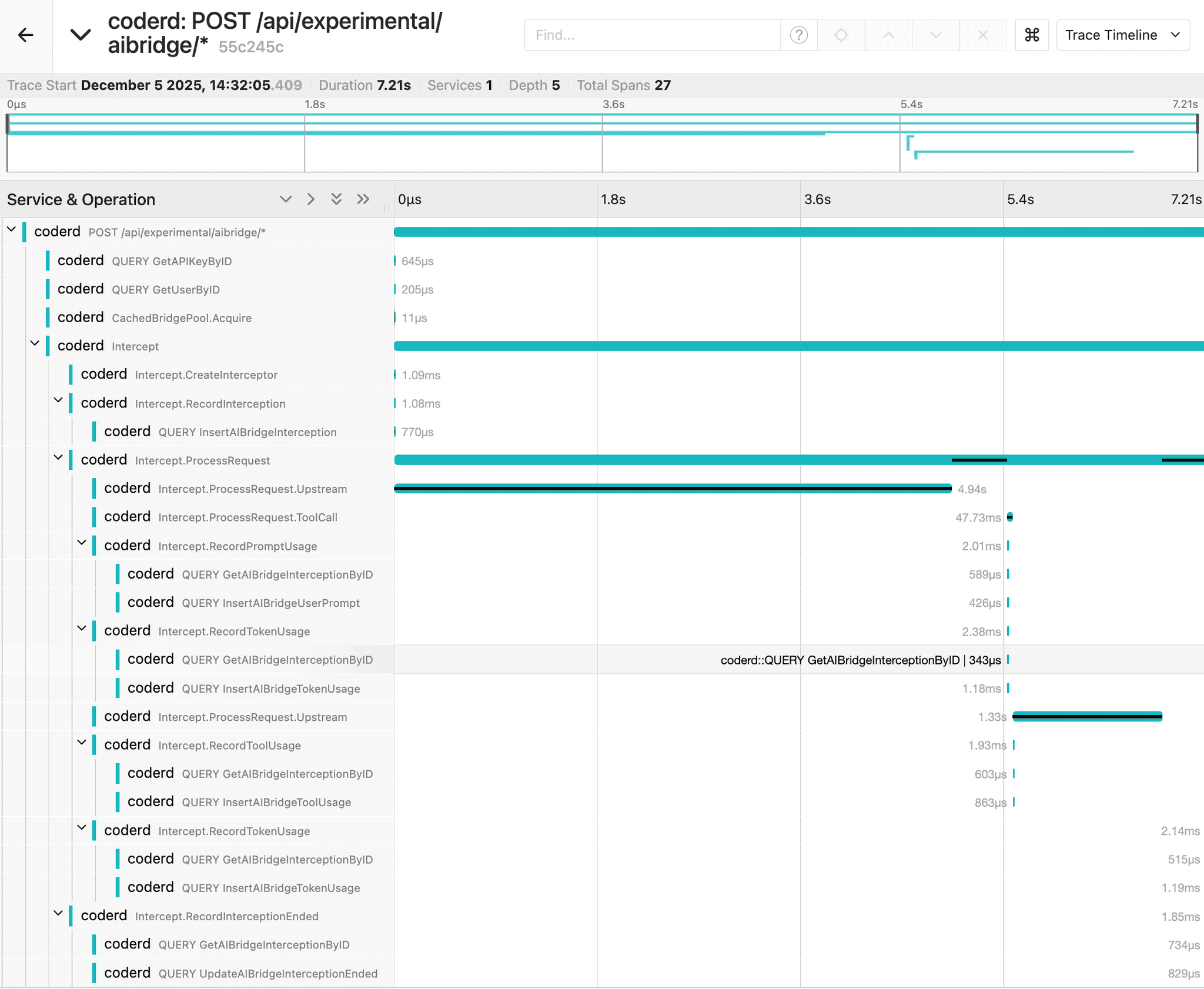
Example trace of an interception using a Jaeger backend:
Capture logs in traces
Note
Enabling log capture may generate a large volume of trace events.
Set CODER_TRACE_LOGS=true to include log messages as trace events:
Log capture only applies to recording spans, so it requires tracing to be enabled through CODER_TRACE_ENABLE or a backend-specific exporter such as CODER_TRACE_HONEYCOMB_API_KEY.
Leave CODER_TRACE_LOGS unset to trace without capturing logs.
For standalone replicas, set both options on every process that should capture logs.