Coder powers secure, scalable development across key industries — automotive, finance, government, and technology — enabling faster builds, tighter compliance, and seamless AI adoption in enterprise-grade cloud environments.
AI Gateway is part of AI Governance, which is included with a Premium license.
AI Gateway groups intercepted requests into sessions and threads to show the causal relationships between human prompts and agent actions.
This structure gives auditors clear provenance over who initiated what, and why.
Concepts
Term
Definition
Interception
A single intercepted request/response pair between client and provider.
Thread
A multi-part interaction starting with a human prompt that triggers one or more tool calls, forming an agentic loop.
Agentic loop
A sequence of tool invocations the agent performs to satisfy a request. The model ends its turn with a tool call, the client invokes it, sends the result back, and the cycle repeats until the model has enough information to formulate a response.
Session
A set of threads grouped by a client-provided session key. Claude Code and Codex provide session IDs automatically; other clients may not.
Human vs. Agent attribution
AI Gateway distinguishes between human-initiated and agent-initiated requests using the role property:
A message with role="user" indicates a human-initiated action (that is, prompt).
A message with role="assistant" indicates a message generated by a model.
A message with role="system" indicates the system prompt for the client.
The user role is currently overloaded by clients like Claude Code and Codex; they inject system instructions within role="user" blocks when using agents.
AI Gateway applies a heuristic of storing only the last prompt from a block of role="user" messages.
Note
AI Gateway cannot declare with certainty whether a request was human- or agent-initiated.
LLM reasoning capture
AI Gateway captures model reasoning and thinking content when available.
Both Anthropic (extended thinking) and OpenAI (reasoning summaries) support this feature.
Reasoning data gives auditors insight into why a tool was called, not just what was called.
Navigate the UI
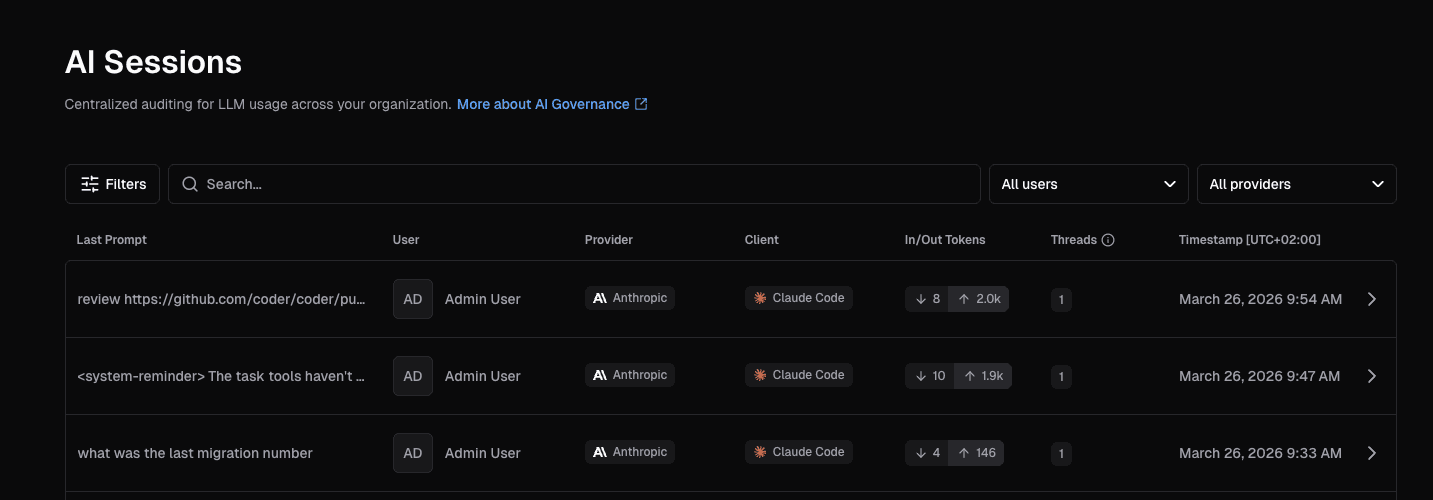
Sessions list
The sessions page (http://<deployment-url>/ai-gateway/sessions) lists sessions in reverse-chronological order.
By default it shows sessions with activity in the last 24 hours.
Use the time range filter in the filter bar to widen or narrow the window, for example to see older sessions.
Each row shows the last prompt, initiator, provider, client, token usage, network requests, thread count, and timestamp.
The Network column reports the total and blocked Agent Firewall requests for the session.
It shows No activity when the session made no requests, and Disabled when the session did not pass through Agent Firewall, so no network requests were monitored.
Select one to view its full details.
Session detail
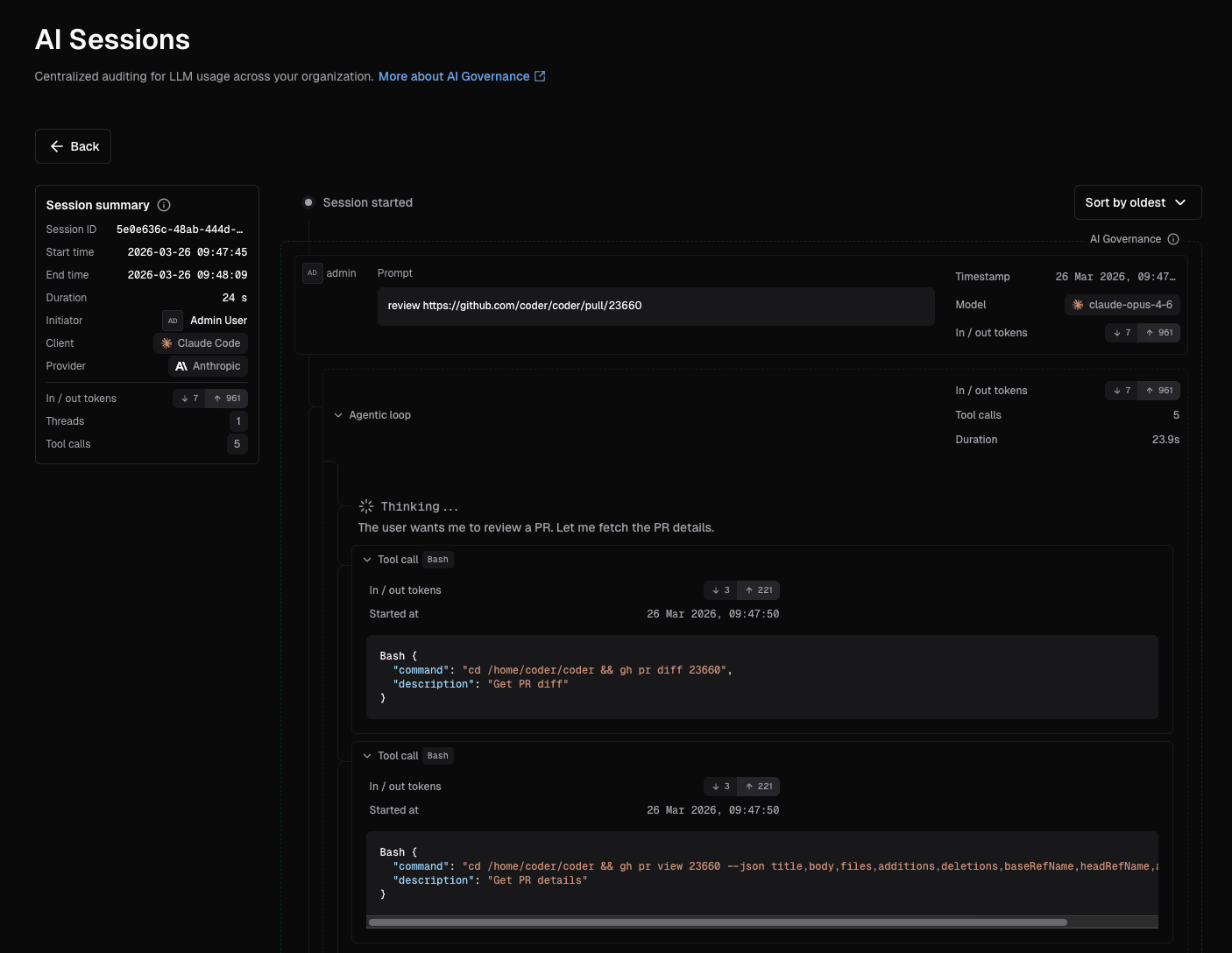
Open a session to see a chronological causal chain of events.
A search input next to the Back button filters the events by prompt text, tool names, tool inputs, and network call destinations.
While a query is active, the timeline shows only matching events and a count below the input reports how many events match.
Matches render in bold in prompts, tool names, and network call destinations, and a matching prompt expands to show the match.
A "No events match your search in the loaded events." message appears when nothing in the loaded events matches.
Within a thread, the prompt shows the total token usage and cost of the thread, including all its agentic actions.
Token usage is broken down into input, output, cache read, and cache write tokens.
A warning next to the model means either that the model was unpriced, or that Coder used the price of the model the provider reports serving instead of the requested model.
To see which model was used for pricing, hover over the model.
The agentic loop shows its duration and number of tool calls, and each step shows tool call details (including arguments and MCP server URLs).
The Session summary card beside the timeline shows the session's total token usage, with the same breakdown, and its total cost.
A warning next to a cost means some usage was unpriced, so the actual cost may be higher.
To learn how Coder prices usage and how to add missing prices, refer to How spend is calculated.
The card also reports the session's Agent Firewall activity:
Network requests is the total number of requests the session made.
It shows Disabled when the session did not pass through Agent Firewall, so monitoring was not active, and No activity when the session made no requests.
Blocked network requests is the subset of those requests that the allow-list denied.
This row appears only when the session made at least one request, and is highlighted when any were blocked.
Top domains names the destination host the session contacted most, and appears whenever at least one domain was recorded.
When the session contacted more than one distinct domain, a +N more count follows.
Conduct a forensic audit
When investigating an incident (policy violation, destructive action, and so on):
Identify the session.
Filter by user, time range, or client to find the relevant session.
Locate the thread.
Each thread in a session shows the (likely) human prompt that initiated the chain of actions.
Trace the causal chain.
Expand the thread to see every step in the agentic loop, including each tool call and its arguments.
Review model reasoning.
If extended thinking was enabled, check the model's reasoning at each step to understand why specific tools were called.
Assess attribution.
The session identifies the human who initiated the action.
Subsequent interceptions represent agent-driven actions that stem from that original prompt.
What we store
AI Gateway captures the following data from each request/response:
Last user prompt
Token usage
Tool calls (requests only, not responses)
Responses may be very large, and generally have lower audit value than requests
In future, we will support storing these results
Model thinking/reasoning
Model-produced inference text is discarded, as generated text alone cannot affect external systems.
The retention philosophy prioritizes:
Human prompts capture intent and detect policy violations or exfiltration attempts.
Tool calls record how agents interact with external systems, which is critical for understanding how incidents occurred.
For example, an agent might delete and recreate a database because it lacks permissions to satisfy a human request to query a table.
Model reasoning preserves thinking content that explains why specific tools were invoked, distinguishing between human instruction and model misunderstanding as the root cause.
See data retention to configure how long session data is kept.