Coder powers secure, scalable development across key industries — automotive, finance, government, and technology — enabling faster builds, tighter compliance, and seamless AI adoption in enterprise-grade cloud environments.
The id in the template's coder_external_auth data source must match the
CODER_EXTERNAL_AUTH_X_ID in the Coder deployment configuration.
If you want the template to clone a specific git repo:
# Require external authentication to use this template
data "coder_external_auth" "github" {
    id = "primary-github"
}

resource "coder_agent" "dev" {
    # ...
    dir = "~/coder"
    startup_script =<<EOF

    # Clone repo from GitHub
    if [ ! -d "coder" ]
    then
        git clone https://github.com/coder/coder
    fi

    EOF
}
Note
The dir attribute can be set in multiple ways, for example:
~/coder
/home/coder/coder
coder (relative to the home directory)
If you want the template to support any repository via
parameters
# Require external authentication to use this template
data "coder_external_auth" "github" {
    id = "primary-github"
}

# Prompt the user for the git repo URL
data "coder_parameter" "git_repo" {
    name          = "git_repo"
    display_name  = "Git repository"
    default       = "https://github.com/coder/coder"
}

locals {
    folder_name = try(element(split("/", data.coder_parameter.git_repo.value), length(split("/", data.coder_parameter.git_repo.value)) - 1), "")
}

resource "coder_agent" "dev" {
    # ...
    dir = "~/${local.folder_name}"
    startup_script =<<EOF

    # Clone repo from GitHub
    if [ ! -d "${local.folder_name}" ]
    then
        git clone ${data.coder_parameter.git_repo.value}
    fi

    EOF
}
3. Embed the "Open in Coder" button with Markdown
[](https://YOUR_ACCESS_URL/templates/YOUR_TEMPLATE/workspace)
Be sure to replace YOUR_ACCESS_URL with your Coder access url (e.g.
https://coder.example.com) and YOUR_TEMPLATE with the name of your template.
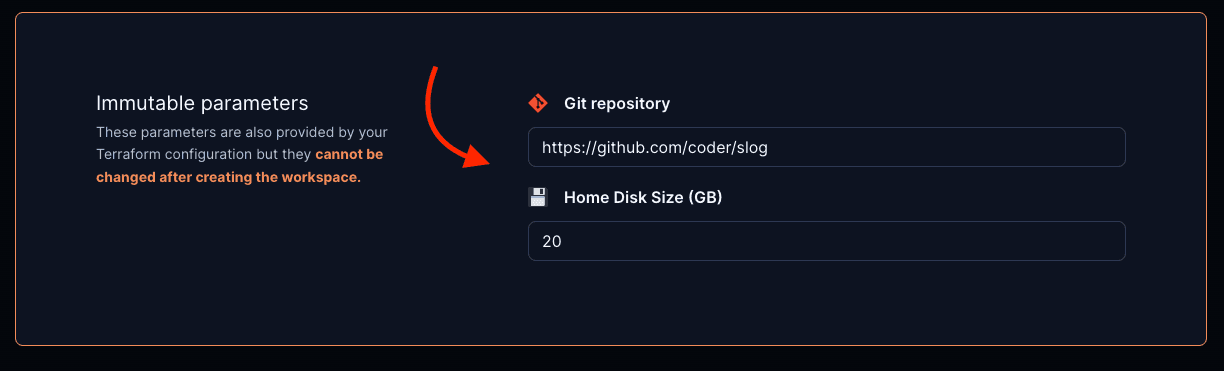
4. Optional: pre-fill parameter values in the "Create Workspace" page
This can be used to pre-fill the git repo URL, disk size, image, etc.
[](https://YOUR_ACCESS_URL/templates/YOUR_TEMPLATE/workspace?param.git_repo=https://github.com/coder/slog¶m.home_disk_size%20%28GB%29=20)
5. Optional: disable specific parameter fields by including their names as
specified in your template in the disable_params search params list
[](https://YOUR_ACCESS_URL/templates/YOUR_TEMPLATE/workspace?disable_params=first_parameter,second_parameter)
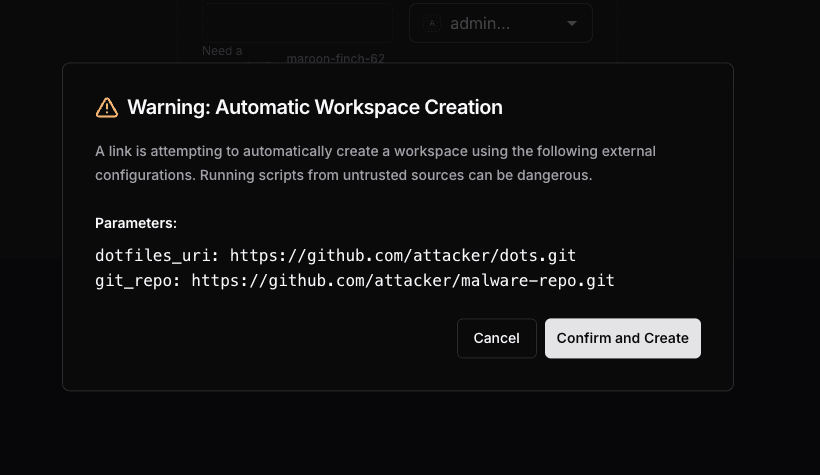
Security: consent dialog for automatic creation
When using mode=auto with prefilled param.* values, Coder displays a
security consent dialog before creating the workspace. This protects users
from malicious links that could provision workspaces with untrusted
configurations, such as dotfiles or startup scripts from unknown sources.
The dialog shows:
A warning that a workspace is about to be created automatically from a link
All prefilled param.* values from the URL
Confirm and Create and Cancel buttons
The workspace is only created if the user explicitly clicks Confirm and
Create. Clicking Cancel falls back to the standard creation form where
all parameters can be reviewed manually.
Example: Kubernetes
For a full example of the Open in Coder flow in Kubernetes, check out
this example template.